3
EN
REMOTE CONTROL
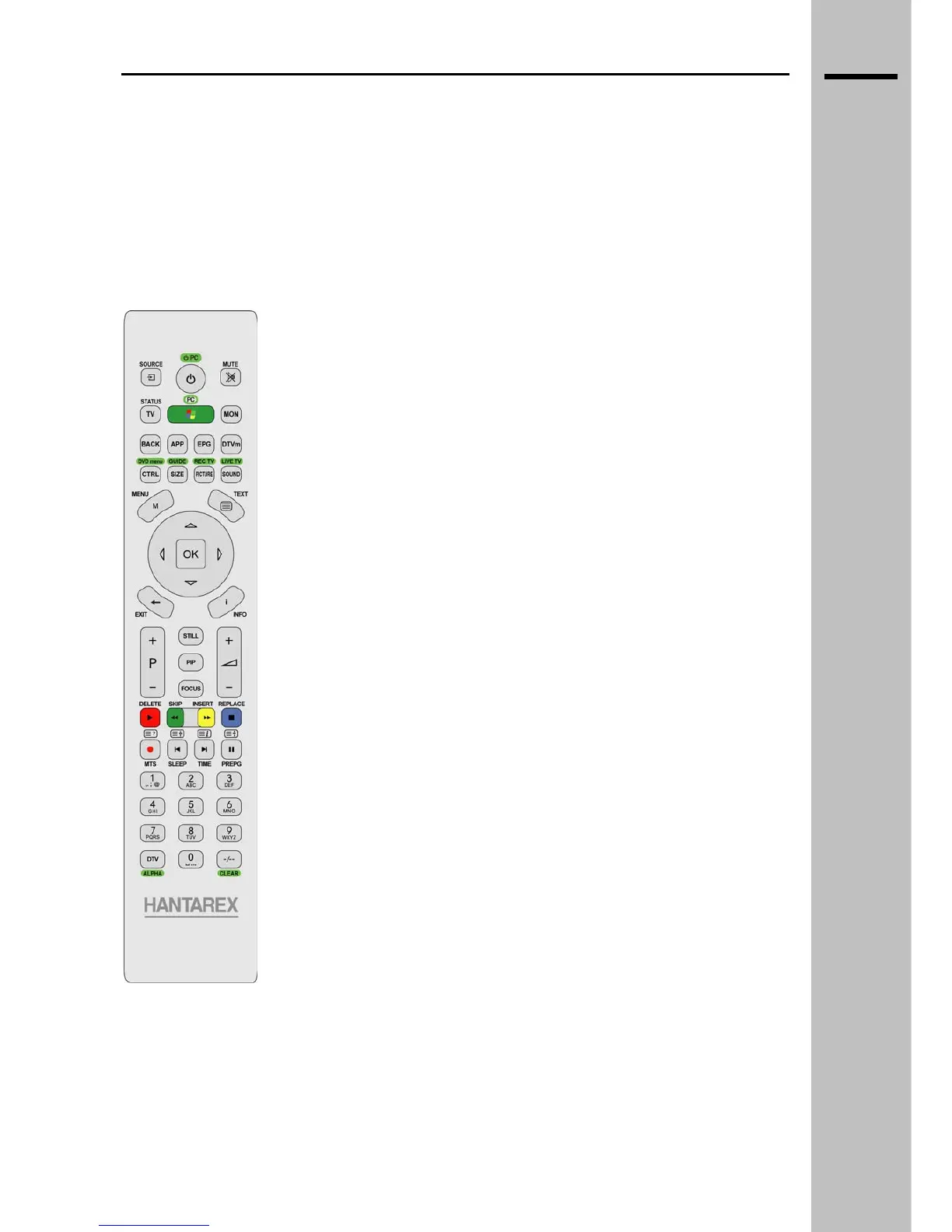
Remote Control
The single Hantarex remote control allows you to control all the functions of both the Flat TV and the
WMC. To go from one mode to another, press either the TV button or the “PC/Green Button”
Remote control in TV mode
POWER Turn on/off the TV
SOURCE Input selection menu
MUTE Turn off the volume completely
TV Activate TV mode
PC / GREEN BUTTON Activate WMC mode
MON Not active
BACK Not active
APP Not active
EPG Not active
DTVm Not active
CTRL / DVD menu Video – brightness, contrast, saturation,
sharpness adjustment
Graphics - brightness, contrast
adjustment
SIZE / GUIDE Image format
PICTURE / REC TV Image type selection
SOUND / LIVE TV Sound mode
MENU Access menu
TEXT Teletext (ON/MIX/OFF)
EXIT Menu or submenu exit
INFO Signal source information
▲, ▼, ►, ◄ Navigation arrows
OK Confirm key
STILL Freeze frame
PIP Picture in Picture mode
FOCUS PIP mode: select focus and audio
principal or secondary
P + Select the next program
P - Select the previous program
VOL + Increase the volume
VOL - Decrease the volume
RED / DELETE / PLAY Teletext RED
GREEN / SKIP / REW Teletext GREEN
YELLOW / INSERT / FWD Teletext YELLOW
BLUE / REPLACE / STOP Teletext BLUE
TXT ? / MTS / REC Teletext info / Audio channel selection
TXT stop / SLEEP / REPLAY Teletext stop / Sleep time selection
TXT i / TIME / SKIP Teletext index / Display the time
TXT zoom / PREPG / PAUSE Teletext zoom / Last channel selected /
0..9 Numeric keys
DTV / ALPHA Not active
-/-- / CLEAR Activate two digit channel selection
___________________________________________________________________________
WMC MANUAL rev 1.0


 To Next Page