3.1
EN
REMOTE CONTROL
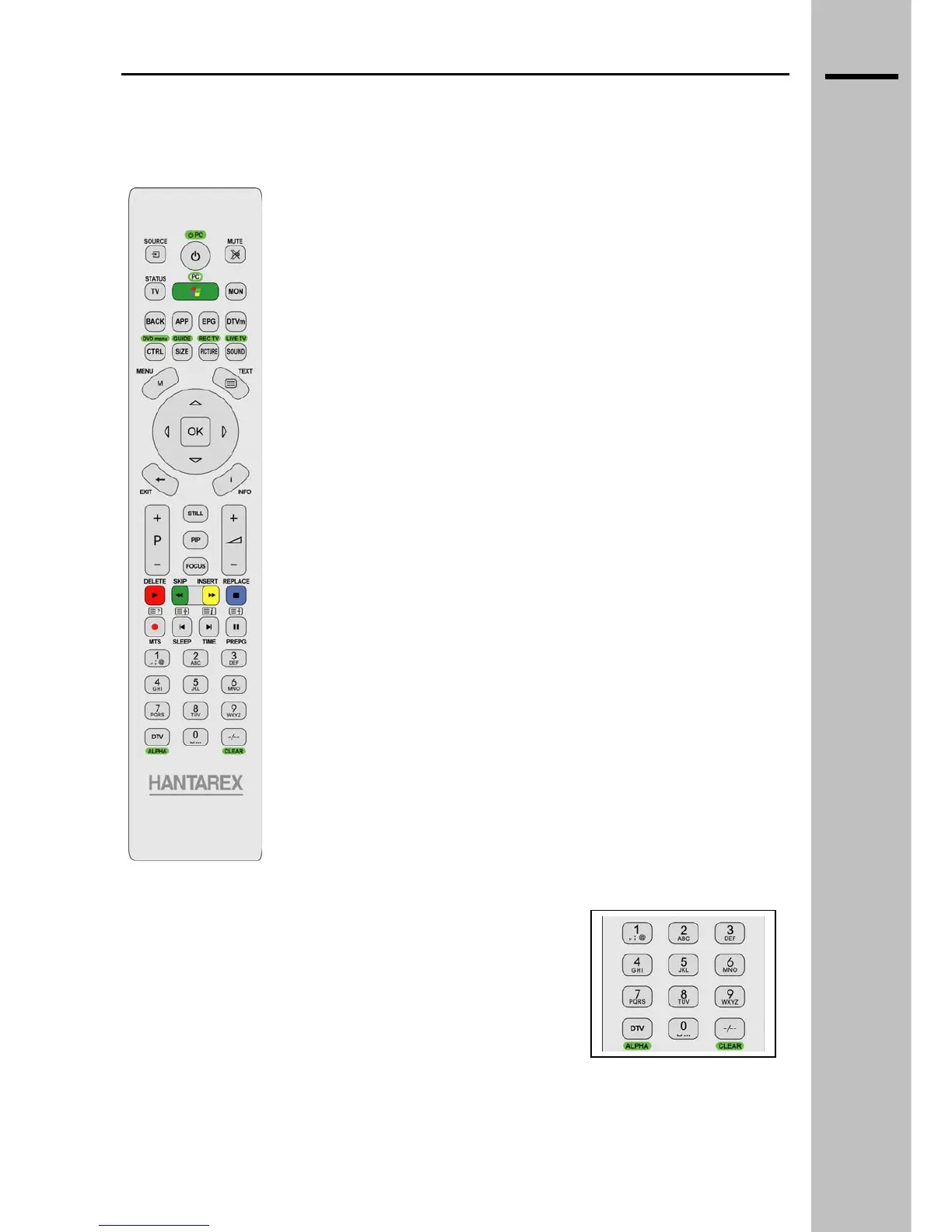
Remote control in WMC mode
POWER Turn off PC
SOURCE Not active
MUTE Turn off the volume completely
TV Activate TV mode
PC / GREEN BUTTON Return to the WMC main menu
MON Not active
BACK Return to the previous screen
APP Not active
EPG Not active
DTVm Not active
CTRL / DVD menu Start DVD recording menu
SIZE / GUIDE Open the TV Guide
PICTURE / REC TV View the recorded TV list
SOUND / LIVE TV View TV WMC full screen
MENU Not active
TEXT View Teletext WMC
EXIT Return to the previous screen
INFO View details about the media selected
▲, ▼, ►, ◄ Navigation arrows
OK Confirm button
STILL Not active
PIP Not active
FOCUS Not active
P + Select the next program
P - Select the previous program
VOL + Increase the volume
VOL - Decrease the volume
RED / DELETE / PLAY Run the selected media
GREEN / SKIP / REW Rapid rewind
YELLOW / INSERT / FWD Fast Forward
BLUE / REPLACE / STOP Stop the running media
TXT ? / MTS / REC Record a selected TV program on the
HD
TXT stop / SLEEP / REPLAY Go back one track
TXT i / TIME / SKIP Skip forward to the next track
TXT zoom / PREPG / PAUSE Pause the current playback
0..9 Numeric keys
DTV / ALPHA Activate the alphanumeric keyboard
-/-- / CLEAR CLEAR
Use the numeric keypad to select a TV channel.
To input a text in an application that requires it, press the ALPHA key
to go to the alphanumeric mode. Then, multi-tap the keys like with a
cellular telephone, push once for the first letter of a key, twice for the
second letter, etc. If you do not press a key for a few seconds, the
keypad will automatically return to the numeric mode.
___________________________________________________________________________
WMC MANUAL rev 1.0


 To Next Page