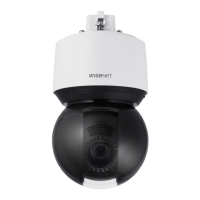
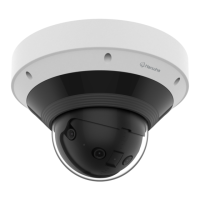
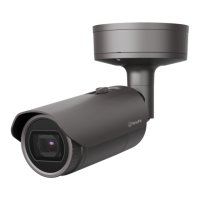
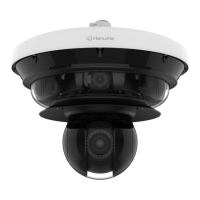
This document serves as the user manual for various models of Hanwha Vision Network Cameras, including QND-7012R/7022R/7032R/7082R, QNV-6014R/7012R/7022R/7032R/6084R/7082R, and QNO-6014R/7012R/7022R/7032R/6084R/7082R. It provides essential information for safe installation, operation, and maintenance of these devices.
Function Description
The Hanwha Vision Network Cameras are designed for surveillance and monitoring applications. They capture video and can be connected to a local area network (LAN) or the internet for remote access and management. Specific models offer different form factors (dome or bullet) and features such as IR LED for night vision, microphone for audio capture, and alarm input/output ports for integration with external sensors and warning devices. The cameras are equipped with a Micro SD card slot for local storage and support Power over Ethernet (PoE) for simplified installation.
Important Technical Specifications
General:
- Power Supply: 12Vdc or PoE (48V)
- PoE Support: IEEE 802.3af compliant
- Network Connection: Ethernet (RJ45), 10/100BASE-T, Category 5e cable recommended for up to 100m transmission distance.
- Micro SD Card: Recommended capacity 16GB ~ 128GB (MLC type required), SanDisk, Transcend, high endurance.
- NAS: Recommended capacity 200GB or higher, QNAP NAS, Synology NAS.
- Operating Temperature: The manual does not specify an operating temperature range, but it mentions that the product should not be installed in areas exposed to heavy cold.
- Waterproof Rating: IP66 compliant for specific models (QNO-6014R/7012R/7022R/7032R/6084R/7082R, QNV-6014R/7012R/7022R/7032R/6084R/7082R). External cable connections are not waterproofed and require additional sealing.
Power Consumption (Model Dependent):
- QNV-7082R, QNO-7082R: 12Vdc, 0.8A or PoE(48V), 0.24A
- QND-7082R: 12Vdc, 0.64A or PoE(48V), 0.18A
- QNV-7012R/7022R/7032R, QNO-7012R/7022R/7032R: 12Vdc, 0.76A or PoE(48V), 0.23A
- QND-7012R/7022R/7032R: 12Vdc, 0.6A or PoE(48V), 0.17A
- QNV-6084R, QNO-6084R: 12Vdc, 0.75A or PoE(48V), 0.23A
- QNV-6014R, QNO-6014R: 12Vdc, 0.71A or PoE(48V), 0.21A
Audio:
- Audio Codec: G.711 PCM (64kbps / 8kHz), G.726 ADPCM (16Kbps, 24Kbps, 32Kbps, 40Kbps / 8kHz)
- Full Duplex Audio: Supported
- Audio Input (QND-7012R/7022R/7032R/7082R): Built-in microphone
- Audio Input (QNO-6014R/7012R/7022R/7032R/6084R/7082R, QNV-6014R/7012R/7022R/7032R/6084R/7082R): Selectable (microphone/Line-in), 2.5VDC (4mA) supported voltage, 2K Ohm input impedance.
PC Specifications (Recommended for Web Viewer):
- CPU: Intel(R) Core(TM) i7 3.4 GHz or higher
- RAM: 8GB or higher
- Browser: Chrome (recommended), Safari, Firefox, MS Edge (chromium based)
- OS: Windows, Mac, Linux, Android, iOS, Chrome
Usage Features
Installation and Connection:
- Mounting: Cameras can be mounted on ceilings or walls. Templates are provided for drilling holes.
- Cable Connections: Detailed instructions are provided for connecting LAN, power, audio, and alarm cables, including waterproofing procedures for outdoor installations.
- RJ45 Waterproof Cable: Specific instructions for assembling a waterproof RJ45 connector for LAN cables in humid environments.
- Micro SD Card Insertion/Removal: Instructions for safely inserting and removing the Micro SD card, emphasizing the need to power off the camera and disable recording via the web viewer before removal to prevent data loss.
- Powering: Supports both DC 12V and PoE. If both are connected, DC 12V takes precedence.
- Alarm I/O Port: Connects to external alarm input sensors (day/night sensors) and alarm output signals (flashing lights, sirens).
- Audio Input: Connects to a microphone or LINE OUT port for audio monitoring. QND models have a built-in microphone.
Camera Adjustment:
- Monitoring Direction: Adjustable Pan (350 degrees), Tilt (67 degrees), and Lens Rotation (355 degrees) for dome models.
- Zoom/Focus Control: Buttons for zoom in/out (Tele/Wide) and focusing (Near/Far), with an automatic focus control button for QNO-6084R/7082R and QNV-6084R/7082R models.
Network Connection and Setup:
- Local Area Network (LAN): Connect directly to a local PC or via a switch.
- DHCP-Based DSL/Cable Modem: Connect directly to a modem, configure DDNS settings, and set IP type to DHCP.
- Device Manager: A software tool for searching cameras, configuring IP addresses (static or dynamic), and managing network settings.
- Port Range Forwarding (Port Mapping): Instructions for configuring port forwarding on a broadband router to allow remote access to the camera via the internet.
- Remote Access: Connect to the camera from a shared local PC or a remote PC via the internet using the camera's IP address or DDNS URL.
- Bonjour/UPnP: Supports Bonjour and UPnP protocols for easy camera discovery on the network.
Web Viewer:
- Access: Access the camera's web viewer via an internet browser using its IP address or DDNS URL.
- Login: Initial login requires setting a new password. The default administrator ID is "admin".
- Settings: Configure basic camera information, video, audio, network, event, analysis, and system settings.
Maintenance Features
General Maintenance:
- Cleaning: Clean contaminated surfaces with a soft, dry, or damp cloth. Avoid detergents, alcohol, solvents, or oil-based products.
- Firmware Updates: Not explicitly detailed in the provided excerpts, but typically managed through the web viewer or Device Manager.
- Password Management: Users are advised to change their password every three months for security and to protect personal information. The initial administrator password must be set upon first login.
- Reset Button: Restores all camera settings to factory default. Press and hold for 5 seconds to reboot. Note that resetting enables DHCP, requiring Device Manager to reconfigure network settings if no DHCP server is present.
Troubleshooting:
- Microphone Sound Volume: If periodic changes occur with Windows 10 Chrome/Firefox, ensure the correct microphone driver (High Definition Audio device) is installed.
- No Video (Safari HTTPS): If video fails to display, check "Always trust when connecting to the designated webviewer IP" in the authentication certificate.
- Camera Access Issues: Verify network settings, cable connections, DHCP functionality, and port forwarding if using a broadband router.
- Viewer Disconnection: Check network connections and camera configurations. Note that connections may be lost if more than 3 profiles are used simultaneously.
- Camera Not Detected: Turn off PC firewall settings and re-search.
- Image Overlap: Ensure multiple cameras are not set to a single multicast address.
- No Image: Verify multicast settings and router support if using multicast transmission.
- No Voice Recording: Ensure "Audio In" checkbox is enabled in -
- Motion Detection/Alarm Output Issues: Verify <Data & Time> settings, status, option in , and alarm output port settings.
- Micro SD Card Recording Issues: Check card for defects, ensure power is disconnected during replacement, verify correct insertion direction, and format the card via - - menu.
- NAS Recording Issues: Confirm registered information, valid IP address, ID/password, folder access, unchecked SMB/CIFS items, matching IP address format, and use of recommended NAS equipment.

 Need help?
 General

 To Next Page