3
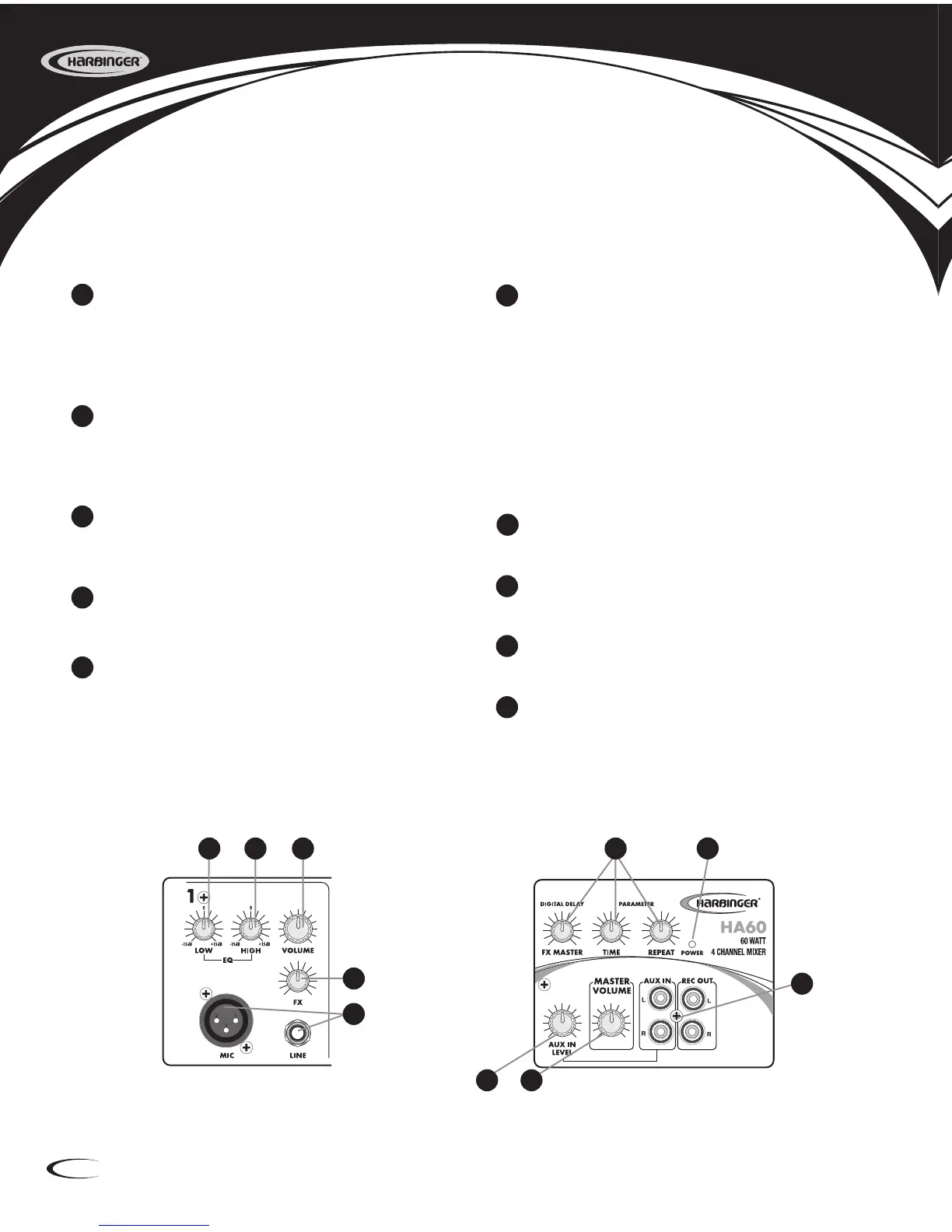
1 LOW EQ
This shelving control gives 15dB of boost or cut
at 80Hz. Add warmth to vocals or extra punch to
guitars, drums and synths by turning to the right. Turn
to the left to reduce stage rumble, hum or to improve a
muddy sound.
2 HIGH EQ
This shelving control gives 15dB of boost or cut at 12KHz.
Turn to the right to boost high frequencies, adding crispness to
percussion from drum machines, cymbals and synths. Turn to
the left to cut these frequencies, reducing sibilance or hiss.
3 VOLUME
This level control determines the proportion of the channel
signal in the mix, and provides a clear visual indication of
channel level.
4 FX
This knob sets the amount of signal level that will be sent to the
built-in digital delay effect.
MIC & LINE INPUT
This MIC input accepts male XLR while the LINE
input accepts a 1/4’’ type phone plug. Please use a low
impedance microphone and a properly wired cable for
best results. You can only use one of the two connectors at
the same time.
The signal from the input channels, processed by the built-in
digital delay will feed to the master output. There are three
knobs here to control the effect of digital delay.
FX MASTER: This knob adjusts the mix level of the
effect sound.
TIME: This knob adjusts the internal time of the delays;
turn to the right to increase the interval time between
two delays.
REPEAT: To increase the rate of the delays, turn
this knob to the right. You will hear the signal repeat
at a faster rate.
POWER INDICATOR
When the power switch at the rear panel is turned on, this
indicator will illuminate so the user may be aware of it.
AUX IN CONTROL
This knob adjusts the level of signal from the AUX Inputs to
the Master Volume.
MASTER VOLUME
This adjusts the nal level of the Output Volume. Turn
Master Volume down before turning unit on or off.
AUX IN & REC OUT
The AUX IN Phono Jacks allow MP3/CD players to be
connected to the amplier. The RECORD OUTPUT RCA Phono
Jacks, provide signal output to audio equipment. The
nominal output level and impedance are -10dBV/600ohms.
Input Channels Master Section
1
2
3
4
5
6
7
8
9
10
1
2 3
4
5
6
7
8 9
10





 To Next Page