TM
POWERED SUBWOOFER
V2218S
5
V2218S Owner's Manual
QUICK START GUIDE
SETTING UP/HELPFUL TIPS
• Position the VâRi speaker in the desired location, and ensure the
speaker is stable.
• Make sure the Power Switch is OFF.
• Make certain Level knob is turned down.
MAKING THE CONNECTIONS
• Plug connections to INPUT 1 and 2 from OUTPUTS of signal
source.
POWERING UP
• Turn on the power to any devices plugged into Input 1 or Input 2.
• Power ON the speaker.
• Slowly turn the Level knob to 12 o’clock.
• Slowly turn up the source volume to the desired level.
SIG/CLIP LIGHT
• The SIG/CLIP LED will light up BLUE when the speaker is receiving
a signal. If it is distorting, the LED will turn RED and the MASTER
VOLUME should be turned down.
LINKING MULTIPLE SUBWOOFERS
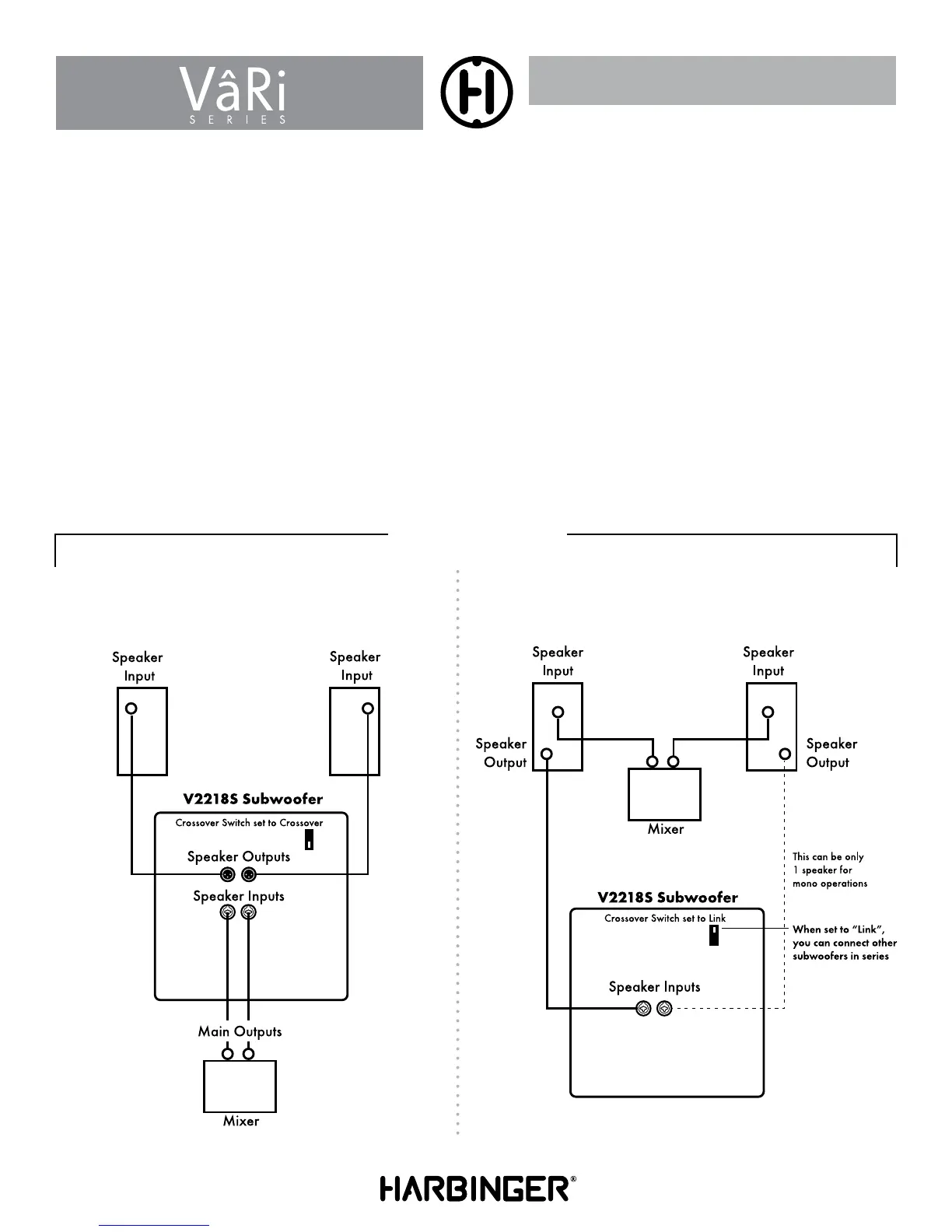
• If linking multiple subwoofers, plug the Line OUTPUT connection
of speaker 1 to the INPUT connection of speaker 2, and continue
the daisy chain to the next speaker.
• Turn the Power ON in the order of the audio signal to prevent
unwanted “pops”. First ON / Last OFF.
Typical Mono Sub system using
the internal crossover
Full Range speakers
with Sub
HOOK UP DIAGRAMS



 To Next Page