V2300 SERIES OWNER’S MANUAL
4
SMART STEREO™ WITH V2312/V2315
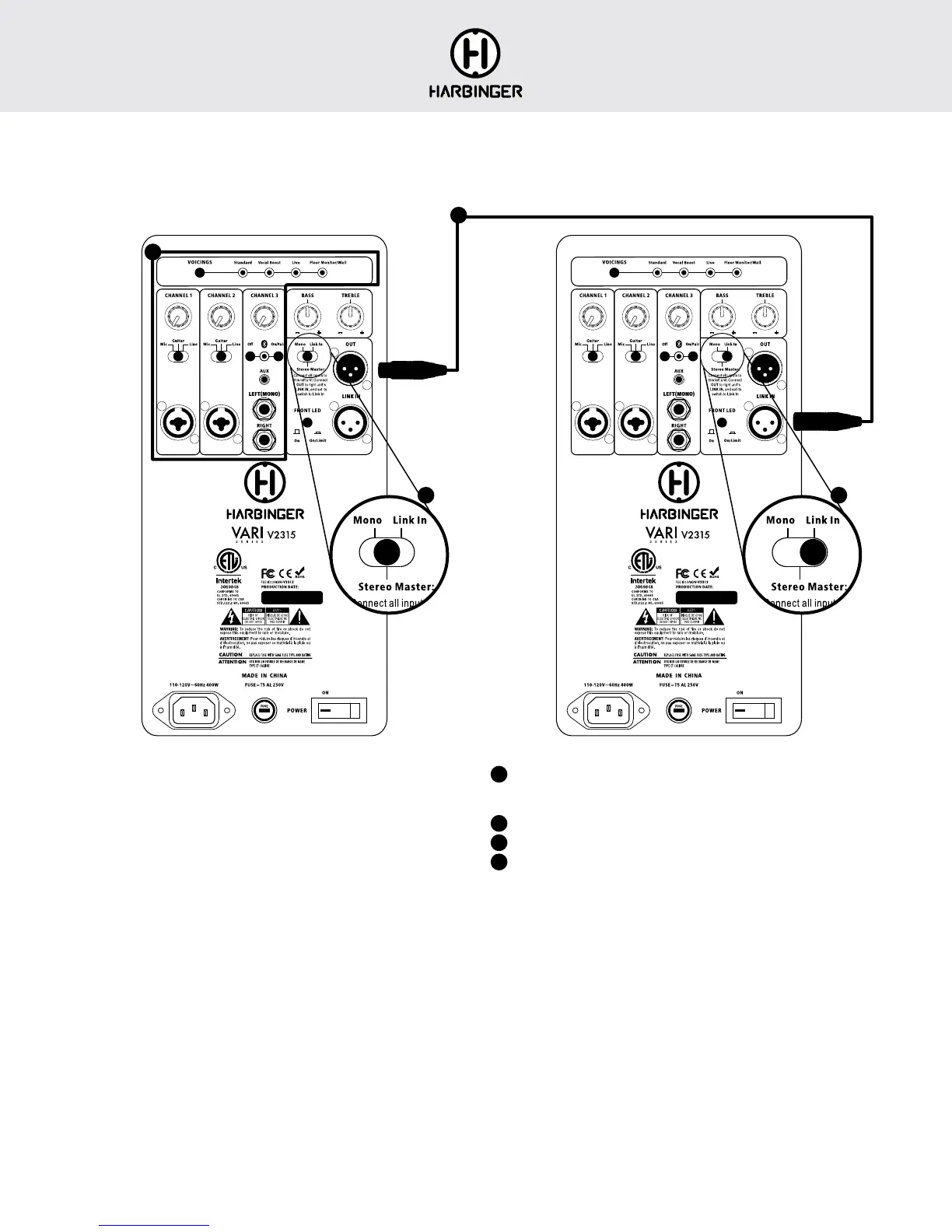
A pair of VARI 2312 or 2315 speakers can operate together as a Smart
Stereo™ system, giving you control of the sound and volume of both
speakers from the first master speaker, and optimally distributing all audio
inputs to both speakers for rich stereo sound.
Channel 1 and 2 inputs are routed mono to both VARI’s, while all Channel 3
inputs are routed in split stereo to the VARI’s.
1
Connect all inputs and make all sound settings on the first (left) unit only.
The second (right) unit’s inputs and controls are all disabled when it is
set to Link In.
2
Set the switch on first unit to Stereo Master.
3
Set the switch on second unit to Link In.
4
Connect an XLR (microphone) cable from the first unit’s OUT jack to the
second unit’s LINK IN.
1
2 3
4
BLUETOOTH
®
TROUBLESHOOTING
These steps should resolve any Bluetooth trouble you may encounter:
• Power off the V2312 or V2315 and leave it off
• On your Apple iOS device
1. Open Settings app, select Bluetooth
2. If V2312 or V2315 is listed under MY DEVICES, touch info button, tap
to Forget This Device
3. Turn off Bluetooth, wait 10 seconds, turn on Bluetooth
• On your Android device
1. Open Settings, select Bluetooth
2. If V2312 or V2315 is listed under Paired Devices, touch gear Icon, and
tap to Unpair
3. Turn off Bluetooth, wait 10 seconds, turn on Bluetooth
• Then power on your V2312 or V2315, and Bluetooth LED should flash
• You should now be able to connect to V2312 or V2315 via Bluetooth







 To Next Page