V3400 SERIES OWNER’S MANUAL
3
SETTING UP / HELPFUL TIPS
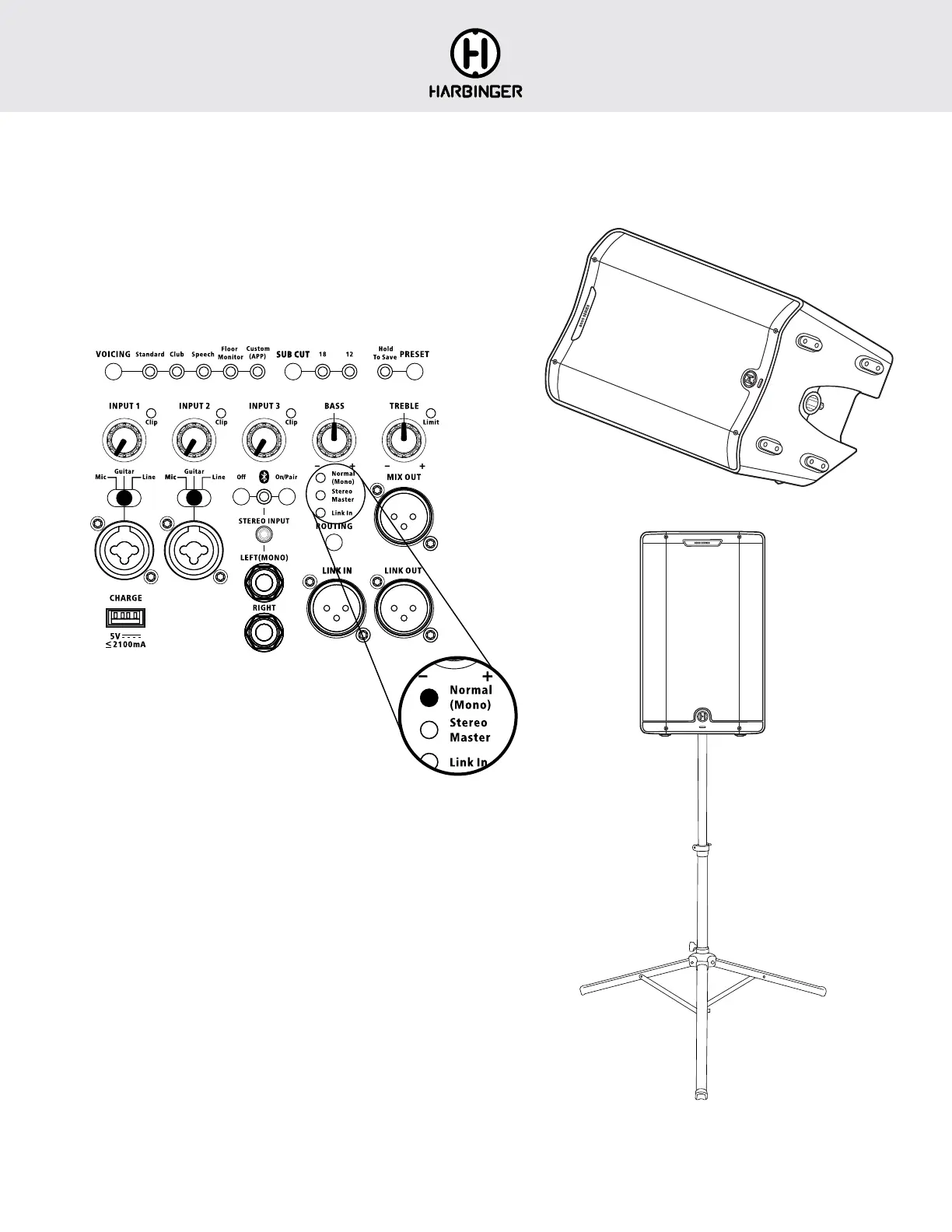
• Position the VARI speaker in the desired location, and ensure the speaker
is stable.
• Make sure the Power Switch is off.
• Turn Input 1, 2, and 3 knobs to minimum.
• Turn Bass and Treble to center/straight up.
MAKING THE CONNECTIONS
• Connect sources to Input 1, 2 and 3 input jacks as desired. (All these input
jacks can be used at once, along with Bluetooth audio input.)
CHECK VOICING
• Select the VOICING that best matches your use.
SUB CUT
• For use with a subwoofer (see following 2 pages).
CHECK ROUTING
• Set to Normal (Mono) for most uses.
• See following pages for other routing options.
CHECK INPUTS
• Check that Input 1 and Input 2 switches match sources:
Mic for microphones, Guitar for acoustic guitar or pedalboard output,
Line for mixers, keyboards and other electronics.
• If any Clip LED lights, turn down that input’s knob.
POWERING UP
• Power on any devices connected to input jacks.
• Turn up the output volume of all sources.
• Turn Input 1, 2 and 3 knobs to desired levels.
BLUETOOTH AUDIO INPUT
• From your Bluetooth audio source device, look for VARI V3412 or
VARI V3415 and select it.
• See next page for Bluetooth Troubleshooting in case of difficulty.
FRONT LED LIGHT
• Front LED will light white to show when speaker is powered on.
• When front LED lights red, limiter is being triggered, and Input 1, 2, and 3
knobs may need to be turned down.
VARI Series speakers can be used as Main Speakers
or Monitor Speakers.
QUICK START GUIDE: SINGLE V3412/V3415
Speaker stand not included
Main
Floor Monitor










 To Next Page