EasyManua.ls Logo

Harbor Breeze MERRIMACK II - User Manual

Harbor Breeze MERRIMACK II
22 pages
Print Icon
To Next Page IconTo Next Page
Loading...
1
XXXXXX
ITEM #1024423/1461048/2758997/5737472
MODEL #41125/42073/42241/43389
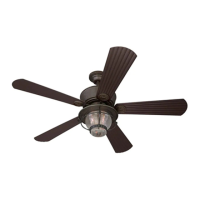
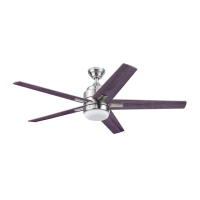
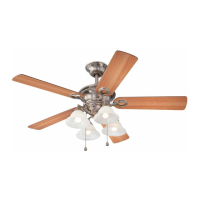
MERRIMACK II CEILING FAN
Español p. 23
H
a
r
b
o
r
B
r
e
e
z
e
H
a
r
b
o
r
B
r
e
e
z
e
LISTED FOR
DAMP LOCATION
HARBOR BREEZE and logo design are trademarks or
registered trademarks of LF, LLC. All rights reserved.
Purchase Date _________________________
Thank you for purchasing this HARBOR BREEZE product.
Questions, problems, or missing parts?
Before returning, contact us at:
888-251-1003, 8 a.m. - 8 p.m., EST, Monday - Sunday or at ascs@lowes.com.
ATTACH YOUR RECEIPT HERE

Questions and Answers

  • J
    Jessica WagnerJul 30, 2025
    Why is my Harbor Breeze MERRIMACK II wobbling excessively?
    • R
      Rebecca YoungJul 30, 2025
      Excessive wobbling in your Harbor Breeze Fan can stem from several causes. First, check and tighten all screws that hold the fan blades to the blade arms and the blade arms to the motor. If the issue persists, try switching one blade with a blade from the opposite side, or use a blade balancing kit. Also, turn off the power and ensure the mounting bracket is securely attached to the electrical outlet box and that the outlet box itself is secure. If the fan is too close to a vaulted ceiling, consider using a longer downrod or moving the fan. Finally, lift up the yoke cover and tighten the set screws on the yoke until secure.
  • D
    Dean AndersonAug 7, 2025
    How to fix a Harbor Breeze Fan that does not move?
    • D
      Donna GoodwinAug 7, 2025
      If your Harbor Breeze Fan isn't moving, first ensure the reverse switch is fully engaged by firmly pushing it completely to the left or right. Next, verify that the wall switch is turned on and that the power is on, or the fuse (breaker) hasn't blown. If these steps don't resolve the issue, turn off the power and check all wire connections at the ceiling outlet box for any faults.
  • E
    evelyn51Aug 13, 2025
    What to do if Harbor Breeze MERRIMACK II Fan lights are not working?
    • R
      Richard PetersAug 13, 2025
      If your Harbor Breeze Fan is operating correctly, but the lights aren't working, begin by re-installing the bulb(s). Then, ensure the 9-pin connectors in the light kit are connected properly. If the issue remains, turn off the power and check all wire connections at the ceiling outlet box.
  • M
    Mark McgeeAug 22, 2025
    What to do if my Harbor Breeze Fan is noisy?
    • D
      Donald RileyAug 22, 2025
      If your Harbor Breeze Fan is producing noise, start by checking and tightening all screws that hold the fan blades to the blade arms and the motor. Inspect the blades for cracks and replace any cracked blade. Avoid using a full range dimmer switch to control the fan speed, as it may not be compatible. Also, ensure the outlet box is securely attached to the building structure and that the mounting bracket is securely fastened to the outlet box with tight screws.

Summary

Package Contents

Hardware Contents

Safety Information

Preparation and Tools

Initial Installation

Power Disconnection and Safety

Turn off circuit breakers and wall switch before installation. DANGER: Failure to disconnect power can cause serious injury or death.

Mounting Method Selection

Determine mounting method: Standard (8ft+ ceilings), Angle (angled ceilings), or Closemount (under 8ft ceilings).

Clearance Requirements

Ensure blades are at least 30 inches from obstructions and 7 feet from the floor.

Mounting Bracket Installation

Loosen and detach mounting bracket, then secure it to the outlet box using proper hardware.

Motor Assembly Preparation

Remove preassembled motor screws and blocks from the underside of the motor assembly.

Standard or Angle Mounting Instructions

Downrod Pin and Set Screw Adjustment

Remove downrod pin and clip, then loosen set screws in the motor yoke.

Downrod and Wire Assembly

Insert downrod through canopy and yoke cover, feeding wires through the downrod.

Securing Downrod to Motor Yoke

Slide downrod into motor yoke, align holes, and secure with pin, clip, and set screws.

Lead Wire Management

Optional steps to cut and strip lead wires for simplified wiring, measuring 8 inches.

Mounting Bracket Connection

Align downrod ball end with mounting bracket tab. DANGER: Misalignment may cause wobble or fall.

Close Mount Installation

Canopy Cover Removal

Remove and discard the canopy cover. Downrod, canopy cover, and yoke cover are not used.

Attaching Canopy to Motor Assembly

Remove closemount screws, align canopy with motor, and re-install screws.

Temporary Hanging for Wiring

Hang the fan canopy on the mounting bracket hook to free hands for the wiring process.

Wiring Connections

Wire Connection Guidelines

Connect green to ground, white to neutral, black/blue to hot. CAUTION: Ensure proper grounding.

Securing Wire Connections

Wrap individual wire connectors with electrical tape and push wires into the outlet box.

Final Installation Steps

Securing the Canopy

Align canopy keyholes with mounting bracket screws and rotate clockwise to secure.

Blade Attachment to Blade Arms

Partially insert blade screws and washers through blades and into blade arms.

Blade Arm and Motor Assembly

Attach blade arms to the underside of the motor assembly using motor screws.

Light Pan Installation

Align light pan with fitter plate screws, turn clockwise, and tighten screws.

Light Kit Connections

Connect the 9-pin connector from the fitter plate to the light kit.

Attaching Light Kit

Align light kit key slots with light pan screws, turn clockwise, and secure with screws.

Bulb and Glass Globe Installation

Install bulbs, then lift and secure the glass globe with the finial cap and finial.

Light Frame Attachment

Align light frame grooves with light kit bumps and turn clockwise to lock into place.

Pull Chain Extensions and Power On

Attach pull chain extensions, then turn on the power supply to complete assembly.

Operating Instructions

Reverse Switch Operation

Adjust the reverse switch for downward (sun icon) or upward (snowflake icon) airflow.

Fan and Light Control

Use the fan pull chain for speed control (HIGH, MEDIUM, LOW, OFF) and light pull chain for ON/OFF.

Care and Maintenance

Troubleshooting Common Issues

Fan Does Not Move

Check reverse switch, wall switch, power, and wire connections if the fan fails to operate.

Excessive Wobbling

Address wobbling by tightening screws, balancing blades, or securing the mounting bracket.

Fan Noise and Stability

Fix fan noise by tightening blades, checking the wall control, or ensuring secure mounting.

Light Functionality Problems

Troubleshoot non-working lights by checking bulb installation and wire connections.

Limited Lifetime Warranty

Replacement Parts List

Harbor Breeze MERRIMACK II Specifications

General IconGeneral
TypeCeiling Fan
Blade Span52 inches
Motor TypeAC Motor
Number of Blades5
Control TypePull Chain
FinishBrushed nickel
Blade Pitch12 degrees
Number of Bulbs2
Speed Settings3
Mounting TypeDownrod
MaterialMetal
Reversible MotorYes
Indoor/Outdoor UseIndoor
Mounting OptionsDownrod mount

Related product manuals