16
HARDI NAVIGATOR
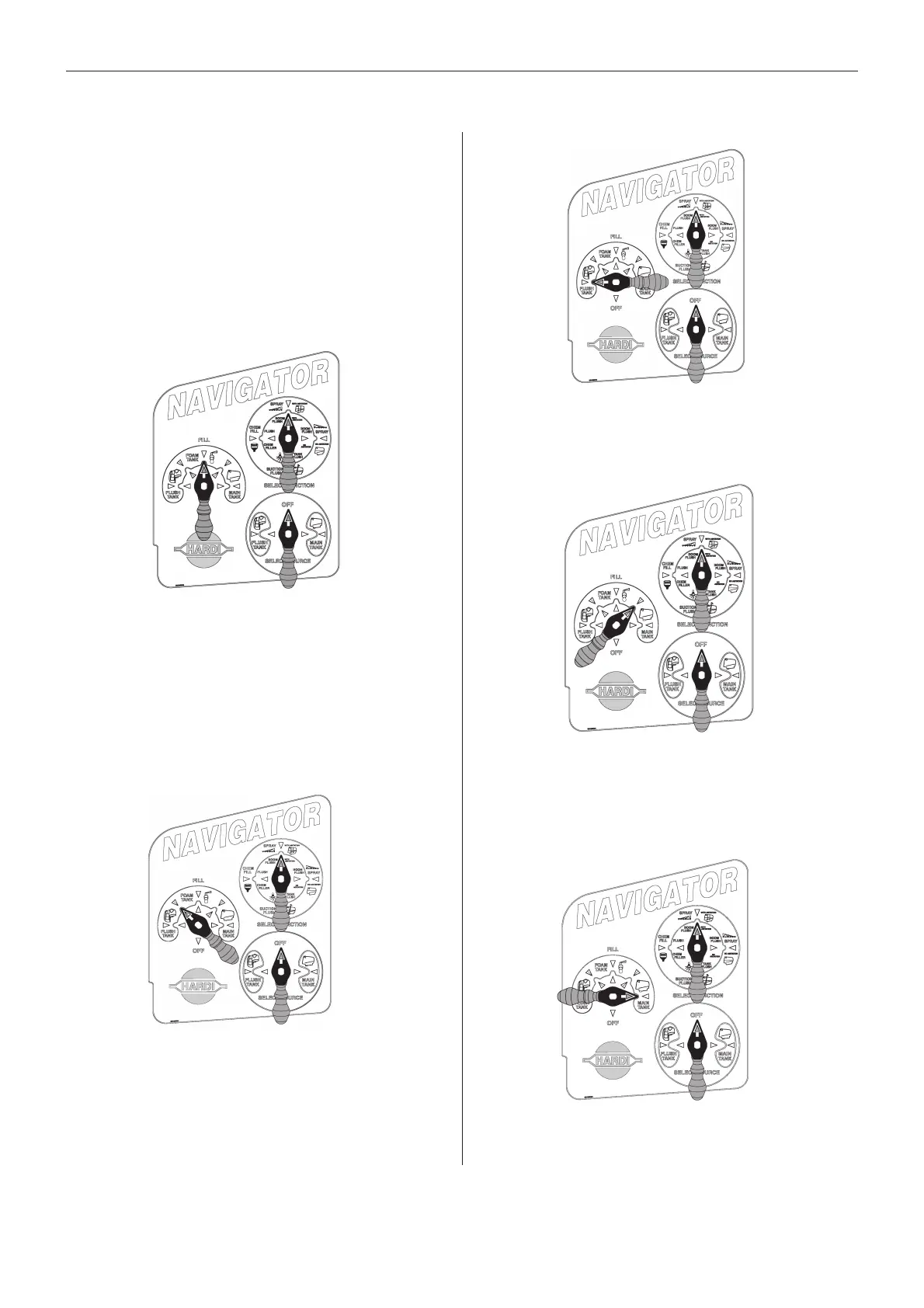
To FILL FOAM TANK:
To FILL FLUSH and FOAM TANKS at
the same time:
Fig 31
1 Turn the handle on the FILL valve to align with the
arrow indicating the Foam tank icon.
2 Remember to allow space for approximately 4-6
litres of foam concentrate.
3 After filling, turn FILL handle to OFF.
Fig 32
1 Turn the handle on the FILL valve to align with two-
tone arrow indicating simultaneous Foam / Flush fill.
2 Remember to allow space for approximately 4-6
litres of foam concentrate in the foam tank.
3 After filling, turn FILL handle to OFF.
FILLING TANKS USING SMART VALVES
HOW TO FILL EACH OF THE TANKS ON YOUR
SPRAYER WITH WATER:
1 Remove the camlock plug (A Fig 29) from the front
of the fill filter, and connect the filling hose from the
water supply.
2 Keep Select Source handle turned OFF.
Then:
To FILL MAIN TANK:
Fig 35
1 Turn FILL handle to align with the arrow indicating
the Main tank icon.
2 After filling, turn FILL handle to OFF.
To FILL FLUSH TANK:
To FILL FOAM and MAIN TANKS at
the same time:
Fig 33
1 Turn FILL handle to align with the arrow indicating
the Flush tank icon.
2 After filling, turn FILL handle to OFF.
Fig 34
1 Turn FILL handle to align with two-tone arrow indicat-
ing simultaneous Foam / Main fill.
2 NOTE: Allow space for approximately 4-6 litres of
foam concentrate in the foam tank.
3 After filling, turn FILL handle to OFF.
IMPORTANT:
TO AVOID BACKFLOW AFTER FILLING PROCESSES ARE COMPLETED, ALWAYS RETURN
FILL HANDLE TO OFF POSITION.
Always re-fit the camlock plug to the fill filter when filling is completed.



 To Next Page
 Loading...