
 Need help?
Do you have a question about the Harman Kardon SOUNDSTICKS and is the answer not in the manual?
Numbered list of 19 essential safety guidelines for operating the apparatus.
Highlights risks of electric shock and important operating/maintenance instructions.
Addresses no power to subwoofer or incorrect power adapter connection.
Instruction to plug the power adapter into the subwoofer unit.
Instruction to plug the power cord into a wall receptacle.
Steps to pair a Bluetooth device with Soundsticks Wireless.
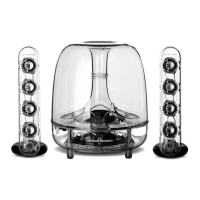
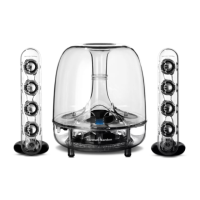
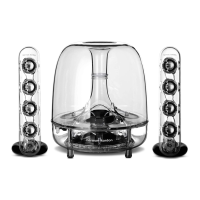
The Harman Kardon SoundSticks Wireless is a 2.1-channel speaker system designed to deliver high-quality audio for computers and other audio devices, with the added convenience of Bluetooth wireless connectivity. This system comprises a powerful subwoofer and two satellite speakers, all featuring a distinctive transparent design that allows users to see the internal components.
The primary function of the SoundSticks Wireless is to reproduce audio from various sources, enhancing the listening experience for music, movies, and games. The system operates as a traditional wired speaker setup when connected via a 3.5mm audio cable, and it also offers seamless wireless audio streaming through Bluetooth technology. The subwoofer handles low-frequency sounds, providing deep and resonant bass, while the two satellite speakers are responsible for mid-range and high-frequency audio, ensuring clear and detailed sound reproduction. The combination of these components creates a balanced and immersive soundstage.
The system is designed for easy integration into a desktop environment, with the satellite speakers typically placed on either side of a monitor or computer, and the subwoofer positioned as desired, often under a desk for optimal bass performance. The transparent aesthetic is a hallmark of the SoundSticks series, making it not just an audio device but also a visually striking addition to any workspace or entertainment area.
Setting up the SoundSticks Wireless is straightforward. Users begin by placing the individual satellite speakers next to their monitor or computer. The subwoofer can be placed in a convenient location, with placement under a desk often recommended for the best bass response. The satellite cables are then connected to the dual subwoofer cable, and the main input cable is connected from the subwoofer to the computer or other audio device's audio output jack. Finally, the power cord is plugged into the power adapter, and the adapter into a wall receptacle.
Once powered on by pushing the subwoofer volume knob/power ON/OFF button, an LED will illuminate, indicating the unit is active. The subwoofer volume knob allows users to balance the subwoofer's output with the volume of the satellite speakers, tailoring the bass level to their preference.
For wireless operation, the SoundSticks Wireless automatically enters pairing mode when turned on. Users can then put their Bluetooth-enabled device (such as a smartphone, tablet, or computer) into pairing mode and select "Soundsticks Wireless" from the list of available devices. If a passcode is required, "0000" is the default. A successful pairing is confirmed by the illumination of the Bluetooth LED on the SoundSticks Wireless.
The system features intuitive volume control located on one of the satellite speakers. Touching the "+" pad increases the volume, while touching the "-" pad decreases it. A unique feature allows users to mute the audio by simultaneously touching both the "+" and "-" pads. Touching either pad again will unmute the system. This dual functionality for wired and wireless audio sources means that audio from a paired Bluetooth device will mix with audio from a connected wired device. To listen to only one source, users must stop playback on the other device.
The SoundSticks Wireless is designed for continuous operation, but it is recommended to unplug the apparatus during lightning storms or when it will be unused for long periods to prevent potential damage. The power supply cord plug should always remain readily operable for complete disconnection from the AC mains.
Maintenance for the SoundSticks Wireless is minimal, focusing primarily on proper care and handling to ensure longevity and optimal performance. The apparatus should only be cleaned with a dry cloth; the use of liquids or harsh cleaning agents is not recommended. It is crucial to avoid exposing the system to dripping or splashing liquids, and no objects filled with liquids, such as vases, should be placed on the apparatus.
To ensure proper ventilation and prevent overheating, users should not block any ventilation openings. The system should also be kept away from heat sources like radiators, heat registers, stoves, or other heat-producing apparatus, including amplifiers.
The power cord should be protected from being walked on or pinched, especially at plugs, convenience receptacles, and the point where it exits the apparatus, to prevent damage that could lead to electrical hazards or system malfunction. Only attachments and accessories specified by the manufacturer should be used with the system.
In the event of any damage, such as a damaged power-supply cord or plug, liquid spills, objects falling into the apparatus, exposure to rain or moisture, or if the apparatus does not operate normally or has been dropped, all servicing should be referred to qualified service personnel. Users should not attempt to open the apparatus themselves, as there is a risk of electric shock, and doing so would void the warranty. The lightning flash symbol with an arrowhead within an equilateral triangle warns of uninsulated "dangerous voltage" inside the product, while the exclamation point within an equilateral triangle alerts users to important operating and maintenance instructions in the accompanying literature.
The product is intended to be supplied by a listed direct plug-in power unit marked "Class 2" with an output rated 16V DC minimum 1.5 A, emphasizing the importance of using the correct power supply to prevent damage and ensure safety.
 General
| Frequency Response | 44 Hz - 20 kHz |
|---|---|
| Type | 2.1 |
| Total Power Output | 40 Watts |
| Subwoofer | Yes |
| Connectivity | 3.5mm input |
| Volume Control | Yes |
| Weight (Satellites) | 0.7 kg each |






 To Next Page