EN
4
SYSTEM SETUP
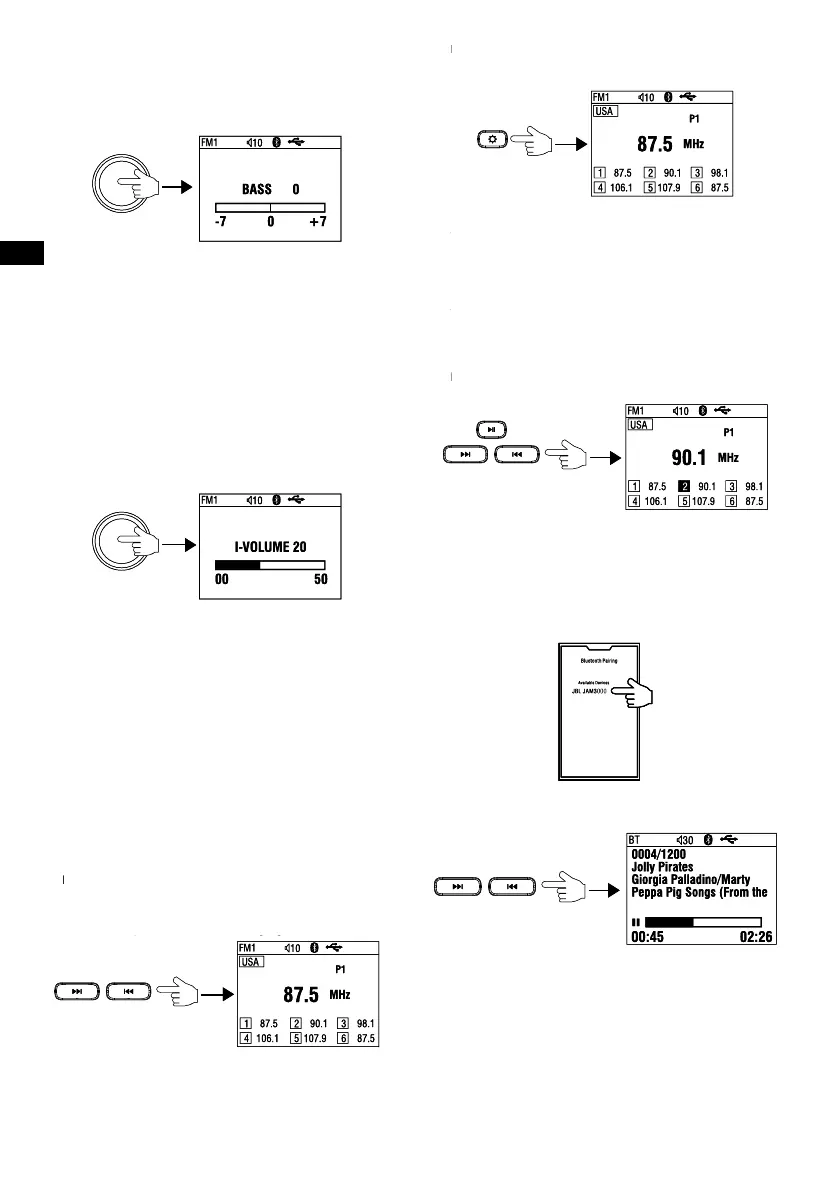
Press the SEL knob to enter 1
st
setting menu, then press it
repeatedly to display features in following sequence: VOLUME
BASS TREBLE BALANCE FADER EQ LOUD
SUBWOOFER VOLUME……
1st setting options:
Bass: -7dB – +7dB
Treble: -7dB – +7dB
Balance: Left 10 – Right 10 (default: 0)
Fader: Front 10 – Rear 10 (default: 0)
EQ: OFF, FLAT, CLASSIC, POP, ROCK
Loud: OFF/ON
Subwoofer: 0 ~ 20 (default at 12)
Note: with EQ activated, Bass and Treble will not be displayed
Press and hold SEL knob for over 2s to enter 2nd setting menu,
then press it repeatedly to display features in following sequence:
I-VOLUME BRIGHTNESS AREA BEEP ABOUT
RESET I-VOLUME……
2nd setting options:
I-Volume: 0 – 50 (default at 20)
BT Volume: 0 – 50 (default at 30)
Brightness: 0 – 10 (default at 5)
Area: USA, EUROPE, JAPAN, AUSTRALIA
Beep: ON/2ND/OFF
About: SW version display
Reset: YES/NO (With Reset displayed, turn VOL knob to highlight
at YES, then press and hold SEL knob for about 5s to reset the
system.)
FM/AM TUNER OPERATION
Tuning stations
- Repeat short press >>| or |<< button to tune the frequency
step by step.
- Long press >>| or |<< button for over 2s results in auto search
of the next or previous station of strong signal.
Auto Preset / Presets Scan
- In Radio mode, press Setup button (2) momently, it will scan
listening to each preset station for 6 seconds. At desired preset
station, press Return button to stop scanning.
- Long press it to auto store 6 stations in each band in sequence
by signal strength. After Auto Store is completed, it will auto
scan every preset for 6s in sequence.
Manual Preset / Presets Recall
- To manually store a preset, first manual tune to a station, press
and hold >|| button (6) to activate Manual Preset (Preset #1 is
now highlighted, then press >>| or |<< button (5/7) to select a
preset number, then preset and hold SEL knob (4) for over 2
seconds to store the frequency in that preset.
- To recall a preset station, press and hold >|| button (6) to
activate Manual Preset first, then press >>| or |<< button (5/7)
to select a preset number, press SEL knob (4) momently to
recall the station in that preset.
- Press Return button (3) or long press >|| button (6) to exit
Manual Preset status.
BLUETOOTH OPERATION
Pairing a Bluetooth device
1. Select Bluetooth as the source on the stereo.
2. Find and select “JBL JAM3000” in the list of available sources
in your phone’s Bluetooth pairing menu.
Selecting tracks
Press >>| or |<< button to select the next or previous track.
Pausing playback
While playing track, you can pause the track by press >|| button
(6), then press again to resume to playback status.
Connecting or disconnecting a device
In BT Music mode, press and hold SEL knob (4) for over 2s, it will
display the Device List and highlighted at current connected device.
To disconnect the device, press and hold the SEL knob within 5s
To connect or delete the device, press and hold SEL knob to
show the Device List first, then turn the knob to move highlight
to desired device, then press and hold the knob again to show
Connect or Delete, turn the knob and press it to confirm selection.
EN
4
SYSTEM SETUP
Press the SEL knob to enter 1
st
setting menu, then press it
repeatedly to display features in following sequence: VOLUME
BASS TREBLE BALANCE FADER EQ LOUD
SUBWOOFER VOLUME……
1st setting options:
Bass: -7dB – +7dB
Treble: -7dB – +7dB
Balance: Left 10 – Right 10 (default: 0)
Fader: Front 10 – Rear 10 (default: 0)
EQ: OFF, FLAT, CLASSIC, POP, ROCK
Loud: OFF/ON
Subwoofer: 0 ~ 20 (default at 12)
Note: with EQ activated, Bass and Treble will not be displayed
Press and hold SEL knob for over 2s to enter 2nd setting menu,
then press it repeatedly to display features in following sequence:
I-VOLUME BRIGHTNESS AREA BEEP ABOUT
RESET I-VOLUME……
2nd setting options:
I-Volume: 0 – 50 (default at 20)
BT Volume: 0 – 50 (default at 30)
Brightness: 0 – 10 (default at 5)
Area: USA, EUROPE, JAPAN, AUSTRALIA
Beep: ON/2ND/OFF
About: SW version display
Reset: YES/NO (With Reset displayed, turn VOL knob to highlight
at YES, then press and hold SEL knob for about 5s to reset the
system.)
FM/AM TUNER OPERATION
Tuning stations
- Repeat short press >>| or |<< button to tune the frequency
step by step.
- Long press >>| or |<< button for over 2s results in auto search
of the next or previous station of strong signal.
Auto Preset / Presets Scan
- In Radio mode, press Setup button (2) momently, it will scan
listening to each preset station for 6 seconds. At desired preset
station, press Return button to stop scanning.
- Long press it to auto store 6 stations in each band in sequence
by signal strength. After Auto Store is completed, it will auto
scan every preset for 6s in sequence.
Manual Preset / Presets Recall
- To manually store a preset, first manual tune to a station, press
and hold >|| button (6) to activate Manual Preset (Preset #1 is
now highlighted, then press >>| or |<< button (5/7) to select a
preset number, then preset and hold SEL knob (4) for over 2
seconds to store the frequency in that preset.
- To recall a preset station, press and hold >|| button (6) to
activate Manual Preset first, then press >>| or |<< button (5/7)
to select a preset number, press SEL knob (4) momently to
recall the station in that preset.
- Press Return button (3) or long press >|| button (6) to exit
Manual Preset status.
BLUETOOTH OPERATION
Pairing a Bluetooth device
1. Select Bluetooth as the source on the stereo.
2. Find and select “JBL JAM3000” in the list of available sources
in your phone’s Bluetooth pairing menu.
Selecting tracks
Press >>| or |<< button to select the next or previous track.
Pausing playback
While playing track, you can pause the track by press >|| button
(6), then press again to resume to playback status.
Connecting or disconnecting a device
In BT Music mode, press and hold SEL knob (4) for over 2s, it will
display the Device List and highlighted at current connected device.
To disconnect the device, press and hold the SEL knob within 5s
To connect or delete the device, press and hold SEL knob to
show the Device List first, then turn the knob to move highlight
to desired device, then press and hold the knob again to show
Connect or Delete, turn the knob and press it to confirm selection.
EN
4
SYSTEM SETUP
Press the SEL knob to enter 1
st
setting menu, then press it
repeatedly to display features in following sequence: VOLUME
BASS TREBLE BALANCE FADER EQ LOUD
SUBWOOFER VOLUME……
1st setting options:
Bass: -7dB – +7dB
Treble: -7dB – +7dB
Balance: Left 10 – Right 10 (default: 0)
Fader: Front 10 – Rear 10 (default: 0)
EQ: OFF, FLAT, CLASSIC, POP, ROCK
Loud: OFF/ON
Subwoofer: 0 ~ 20 (default at 12)
Note: with EQ activated, Bass and Treble will not be displayed
Press and hold SEL knob for over 2s to enter 2nd setting menu,
then press it repeatedly to display features in following sequence:
I-VOLUME BRIGHTNESS AREA BEEP ABOUT
RESET I-VOLUME……
2nd setting options:
I-Volume: 0 – 50 (default at 20)
BT Volume: 0 – 50 (default at 30)
Brightness: 0 – 10 (default at 5)
Area: USA, EUROPE, JAPAN, AUSTRALIA
Beep: ON/2ND/OFF
About: SW version display
Reset: YES/NO (With Reset displayed, turn VOL knob to highlight
at YES, then press and hold SEL knob for about 5s to reset the
system.)
FM/AM TUNER OPERATION
Tuning stations
- Repeat short press >>| or |<< button to tune the frequency
step by step.
- Long press >>| or |<< button for over 2s results in auto search
of the next or previous station of strong signal.
Auto Preset / Presets Scan
- In Radio mode, press Setup button (2) momently, it will scan
listening to each preset station for 6 seconds. At desired preset
station, press Return button to stop scanning.
- Long press it to auto store 6 stations in each band in sequence
by signal strength. After Auto Store is completed, it will auto
scan every preset for 6s in sequence.
Manual Preset / Presets Recall
- To manually store a preset, first manual tune to a station, press
and hold >|| button (6) to activate Manual Preset (Preset #1 is
now highlighted, then press >>| or |<< button (5/7) to select a
preset number, then preset and hold SEL knob (4) for over 2
seconds to store the frequency in that preset.
- To recall a preset station, press and hold >|| button (6) to
activate Manual Preset first, then press >>| or |<< button (5/7)
to select a preset number, press SEL knob (4) momently to
recall the station in that preset.
- Press Return button (3) or long press >|| button (6) to exit
Manual Preset status.
BLUETOOTH OPERATION
Pairing a Bluetooth device
1. Select Bluetooth as the source on the stereo.
2. Find and select “JBL JAM3000” in the list of available sources
in your phone’s Bluetooth pairing menu.
Selecting tracks
Press >>| or |<< button to select the next or previous track.
Pausing playback
While playing track, you can pause the track by press >|| button
(6), then press again to resume to playback status.
Connecting or disconnecting a device
In BT Music mode, press and hold SEL knob (4) for over 2s, it will
display the Device List and highlighted at current connected device.
To disconnect the device, press and hold the SEL knob within 5s
To connect or delete the device, press and hold SEL knob to
show the Device List first, then turn the knob to move highlight
to desired device, then press and hold the knob again to show
Connect or Delete, turn the knob and press it to confirm selection.
EN
4
SYSTEM SETUP
Press the SEL knob to enter 1
st
setting menu, then press it
repeatedly to display features in following sequence: VOLUME
BASS TREBLE BALANCE FADER EQ LOUD
SUBWOOFER VOLUME……
1st setting options:
Bass: -7dB – +7dB
Treble: -7dB – +7dB
Balance: Left 10 – Right 10 (default: 0)
Fader: Front 10 – Rear 10 (default: 0)
EQ: OFF, FLAT, CLASSIC, POP, ROCK
Loud: OFF/ON
Subwoofer: 0 ~ 20 (default at 12)
Note: with EQ activated, Bass and Treble will not be displayed
Press and hold SEL knob for over 2s to enter 2nd setting menu,
then press it repeatedly to display features in following sequence:
I-VOLUME BRIGHTNESS AREA BEEP ABOUT
RESET I-VOLUME……
2nd setting options:
I-Volume: 0 – 50 (default at 20)
BT Volume: 0 – 50 (default at 30)
Brightness: 0 – 10 (default at 5)
Area: USA, EUROPE, JAPAN, AUSTRALIA
Beep: ON/2ND/OFF
About: SW version display
Reset: YES/NO (With Reset displayed, turn VOL knob to highlight
at YES, then press and hold SEL knob for about 5s to reset the
system.)
FM/AM TUNER OPERATION
Tuning stations
- Repeat short press >>| or |<< button to tune the frequency
step by step.
- Long press >>| or |<< button for over 2s results in auto search
of the next or previous station of strong signal.
Auto Preset / Presets Scan
- In Radio mode, press Setup button (2) momently, it will scan
listening to each preset station for 6 seconds. At desired preset
station, press Return button to stop scanning.
- Long press it to auto store 6 stations in each band in sequence
by signal strength. After Auto Store is completed, it will auto
scan every preset for 6s in sequence.
Manual Preset / Presets Recall
- To manually store a preset, first manual tune to a station, press
and hold >|| button (6) to activate Manual Preset (Preset #1 is
now highlighted, then press >>| or |<< button (5/7) to select a
preset number, then preset and hold SEL knob (4) for over 2
seconds to store the frequency in that preset.
- To recall a preset station, press and hold >|| button (6) to
activate Manual Preset first, then press >>| or |<< button (5/7)
to select a preset number, press SEL knob (4) momently to
recall the station in that preset.
- Press Return button (3) or long press >|| button (6) to exit
Manual Preset status.
BLUETOOTH OPERATION
Pairing a Bluetooth device
1. Select Bluetooth as the source on the stereo.
2. Find and select “JBL JAM3000” in the list of available sources
in your phone’s Bluetooth pairing menu.
Selecting tracks
Press >>| or |<< button to select the next or previous track.
Pausing playback
While playing track, you can pause the track by press >|| button
(6), then press again to resume to playback status.
Connecting or disconnecting a device
In BT Music mode, press and hold SEL knob (4) for over 2s, it will
display the Device List and highlighted at current connected device.
To disconnect the device, press and hold the SEL knob within 5s
To connect or delete the device, press and hold SEL knob to
show the Device List first, then turn the knob to move highlight
to desired device, then press and hold the knob again to show
Connect or Delete, turn the knob and press it to confirm selection.
EN
4
SYSTEM SETUP
Press the SEL knob to enter 1
st
setting menu, then press it
repeatedly to display features in following sequence: VOLUME
BASS TREBLE BALANCE FADER EQ LOUD
SUBWOOFER VOLUME……
1st setting options:
Bass: -7dB – +7dB
Treble: -7dB – +7dB
Balance: Left 10 – Right 10 (default: 0)
Fader: Front 10 – Rear 10 (default: 0)
EQ: OFF, FLAT, CLASSIC, POP, ROCK
Loud: OFF/ON
Subwoofer: 0 ~ 20 (default at 12)
Note: with EQ activated, Bass and Treble will not be displayed
Press and hold SEL knob for over 2s to enter 2nd setting menu,
then press it repeatedly to display features in following sequence:
I-VOLUME BRIGHTNESS AREA BEEP ABOUT
RESET I-VOLUME……
2nd setting options:
I-Volume: 0 – 50 (default at 20)
BT Volume: 0 – 50 (default at 30)
Brightness: 0 – 10 (default at 5)
Area: USA, EUROPE, JAPAN, AUSTRALIA
Beep: ON/2ND/OFF
About: SW version display
Reset: YES/NO (With Reset displayed, turn VOL knob to highlight
at YES, then press and hold SEL knob for about 5s to reset the
system.)
FM/AM TUNER OPERATION
Tuning stations
- Repeat short press >>| or |<< button to tune the frequency
step by step.
- Long press >>| or |<< button for over 2s results in auto search
of the next or previous station of strong signal.
Auto Preset / Presets Scan
- In Radio mode, press Setup button (2) momently, it will scan
listening to each preset station for 6 seconds. At desired preset
station, press Return button to stop scanning.
- Long press it to auto store 6 stations in each band in sequence
by signal strength. After Auto Store is completed, it will auto
scan every preset for 6s in sequence.
Manual Preset / Presets Recall
- To manually store a preset, first manual tune to a station, press
and hold >|| button (6) to activate Manual Preset (Preset #1 is
now highlighted, then press >>| or |<< button (5/7) to select a
preset number, then preset and hold SEL knob (4) for over 2
seconds to store the frequency in that preset.
- To recall a preset station, press and hold >|| button (6) to
activate Manual Preset first, then press >>| or |<< button (5/7)
to select a preset number, press SEL knob (4) momently to
recall the station in that preset.
- Press Return button (3) or long press >|| button (6) to exit
Manual Preset status.
BLUETOOTH OPERATION
Pairing a Bluetooth device
1. Select Bluetooth as the source on the stereo.
2. Find and select “JBL JAM3000” in the list of available sources
in your phone’s Bluetooth pairing menu.
Selecting tracks
Press >>| or |<< button to select the next or previous track.
Pausing playback
While playing track, you can pause the track by press >|| button
(6), then press again to resume to playback status.
Connecting or disconnecting a device
In BT Music mode, press and hold SEL knob (4) for over 2s, it will
display the Device List and highlighted at current connected device.
To disconnect the device, press and hold the SEL knob within 5s
To connect or delete the device, press and hold SEL knob to
show the Device List first, then turn the knob to move highlight
to desired device, then press and hold the knob again to show
Connect or Delete, turn the knob and press it to confirm selection.
EN
4
SYSTEM SETUP
Press the SEL knob to enter 1
st
setting menu, then press it
repeatedly to display features in following sequence: VOLUME
BASS TREBLE BALANCE FADER EQ LOUD
SUBWOOFER VOLUME……
1st setting options:
Bass: -7dB – +7dB
Treble: -7dB – +7dB
Balance: Left 10 – Right 10 (default: 0)
Fader: Front 10 – Rear 10 (default: 0)
EQ: OFF, FLAT, CLASSIC, POP, ROCK
Loud: OFF/ON
Subwoofer: 0 ~ 20 (default at 12)
Note: with EQ activated, Bass and Treble will not be displayed
Press and hold SEL knob for over 2s to enter 2nd setting menu,
then press it repeatedly to display features in following sequence:
I-VOLUME BRIGHTNESS AREA BEEP ABOUT
RESET I-VOLUME……
2nd setting options:
I-Volume: 0 – 50 (default at 20)
BT Volume: 0 – 50 (default at 30)
Brightness: 0 – 10 (default at 5)
Area: USA, EUROPE, JAPAN, AUSTRALIA
Beep: ON/2ND/OFF
About: SW version display
Reset: YES/NO (With Reset displayed, turn VOL knob to highlight
at YES, then press and hold SEL knob for about 5s to reset the
system.)
FM/AM TUNER OPERATION
Tuning stations
- Repeat short press >>| or |<< button to tune the frequency
step by step.
- Long press >>| or |<< button for over 2s results in auto search
of the next or previous station of strong signal.
Auto Preset / Presets Scan
- In Radio mode, press Setup button (2) momently, it will scan
listening to each preset station for 6 seconds. At desired preset
station, press Return button to stop scanning.
- Long press it to auto store 6 stations in each band in sequence
by signal strength. After Auto Store is completed, it will auto
scan every preset for 6s in sequence.
Manual Preset / Presets Recall
- To manually store a preset, first manual tune to a station, press
and hold >|| button (6) to activate Manual Preset (Preset #1 is
now highlighted, then press >>| or |<< button (5/7) to select a
preset number, then preset and hold SEL knob (4) for over 2
seconds to store the frequency in that preset.
- To recall a preset station, press and hold >|| button (6) to
activate Manual Preset first, then press >>| or |<< button (5/7)
to select a preset number, press SEL knob (4) momently to
recall the station in that preset.
- Press Return button (3) or long press >|| button (6) to exit
Manual Preset status.
BLUETOOTH OPERATION
Pairing a Bluetooth device
1. Select Bluetooth as the source on the stereo.
2. Find and select “JBL JAM3000” in the list of available sources
in your phone’s Bluetooth pairing menu.
Selecting tracks
Press >>| or |<< button to select the next or previous track.
Pausing playback
While playing track, you can pause the track by press >|| button
(6), then press again to resume to playback status.
Connecting or disconnecting a device
In BT Music mode, press and hold SEL knob (4) for over 2s, it will
display the Device List and highlighted at current connected device.
To disconnect the device, press and hold the SEL knob within 5s
To connect or delete the device, press and hold SEL knob to
show the Device List first, then turn the knob to move highlight
to desired device, then press and hold the knob again to show
Connect or Delete, turn the knob and press it to confirm selection.
EN
4
SYSTEM SETUP
Press the SEL knob to enter 1
st
setting menu, then press it
repeatedly to display features in following sequence: VOLUME
BASS TREBLE BALANCE FADER EQ LOUD
SUBWOOFER VOLUME……
1st setting options:
Bass: -7dB – +7dB
Treble: -7dB – +7dB
Balance: Left 10 – Right 10 (default: 0)
Fader: Front 10 – Rear 10 (default: 0)
EQ: OFF, FLAT, CLASSIC, POP, ROCK
Loud: OFF/ON
Subwoofer: 0 ~ 20 (default at 12)
Note: with EQ activated, Bass and Treble will not be displayed
Press and hold SEL knob for over 2s to enter 2nd setting menu,
then press it repeatedly to display features in following sequence:
I-VOLUME BRIGHTNESS AREA BEEP ABOUT
RESET I-VOLUME……
2nd setting options:
I-Volume: 0 – 50 (default at 20)
BT Volume: 0 – 50 (default at 30)
Brightness: 0 – 10 (default at 5)
Area: USA, EUROPE, JAPAN, AUSTRALIA
Beep: ON/2ND/OFF
About: SW version display
Reset: YES/NO (With Reset displayed, turn VOL knob to highlight
at YES, then press and hold SEL knob for about 5s to reset the
system.)
FM/AM TUNER OPERATION
Tuning stations
- Repeat short press >>| or |<< button to tune the frequency
step by step.
- Long press >>| or |<< button for over 2s results in auto search
of the next or previous station of strong signal.
Auto Preset / Presets Scan
- In Radio mode, press Setup button (2) momently, it will scan
listening to each preset station for 6 seconds. At desired preset
station, press Return button to stop scanning.
- Long press it to auto store 6 stations in each band in sequence
by signal strength. After Auto Store is completed, it will auto
scan every preset for 6s in sequence.
Manual Preset / Presets Recall
- To manually store a preset, first manual tune to a station, press
and hold >|| button (6) to activate Manual Preset (Preset #1 is
now highlighted, then press >>| or |<< button (5/7) to select a
preset number, then preset and hold SEL knob (4) for over 2
seconds to store the frequency in that preset.
- To recall a preset station, press and hold >|| button (6) to
activate Manual Preset first, then press >>| or |<< button (5/7)
to select a preset number, press SEL knob (4) momently to
recall the station in that preset.
- Press Return button (3) or long press >|| button (6) to exit
Manual Preset status.
BLUETOOTH OPERATION
Pairing a Bluetooth device
1. Select Bluetooth as the source on the stereo.
2. Find and select “JBL JAM3000” in the list of available sources
in your phone’s Bluetooth pairing menu.
Selecting tracks
Press >>| or |<< button to select the next or previous track.
Pausing playback
While playing track, you can pause the track by press >|| button
(6), then press again to resume to playback status.
Connecting or disconnecting a device
In BT Music mode, press and hold SEL knob (4) for over 2s, it will
display the Device List and highlighted at current connected device.
To disconnect the device, press and hold the SEL knob within 5s
To connect or delete the device, press and hold SEL knob to
show the Device List first, then turn the knob to move highlight
to desired device, then press and hold the knob again to show
Connect or Delete, turn the knob and press it to confirm selection.
EN
4
SYSTEM SETUP
Press the SEL knob to enter 1
st
setting menu, then press it
repeatedly to display features in following sequence: VOLUME
BASS TREBLE BALANCE FADER EQ LOUD
SUBWOOFER VOLUME……
1st setting options:
Bass: -7dB – +7dB
Treble: -7dB – +7dB
Balance: Left 10 – Right 10 (default: 0)
Fader: Front 10 – Rear 10 (default: 0)
EQ: OFF, FLAT, CLASSIC, POP, ROCK
Loud: OFF/ON
Subwoofer: 0 ~ 20 (default at 12)
Note: with EQ activated, Bass and Treble will not be displayed
Press and hold SEL knob for over 2s to enter 2nd setting menu,
then press it repeatedly to display features in following sequence:
I-VOLUME BRIGHTNESS AREA BEEP ABOUT
RESET I-VOLUME……
2nd setting options:
I-Volume: 0 – 50 (default at 20)
BT Volume: 0 – 50 (default at 30)
Brightness: 0 – 10 (default at 5)
Area: USA, EUROPE, JAPAN, AUSTRALIA
Beep: ON/2ND/OFF
About: SW version display
Reset: YES/NO (With Reset displayed, turn VOL knob to highlight
at YES, then press and hold SEL knob for about 5s to reset the
system.)
FM/AM TUNER OPERATION
Tuning stations
- Repeat short press >>| or |<< button to tune the frequency
step by step.
- Long press >>| or |<< button for over 2s results in auto search
of the next or previous station of strong signal.
Auto Preset / Presets Scan
- In Radio mode, press Setup button (2) momently, it will scan
listening to each preset station for 6 seconds. At desired preset
station, press Return button to stop scanning.
- Long press it to auto store 6 stations in each band in sequence
by signal strength. After Auto Store is completed, it will auto
scan every preset for 6s in sequence.
Manual Preset / Presets Recall
- To manually store a preset, first manual tune to a station, press
and hold >|| button (6) to activate Manual Preset (Preset #1 is
now highlighted, then press >>| or |<< button (5/7) to select a
preset number, then preset and hold SEL knob (4) for over 2
seconds to store the frequency in that preset.
- To recall a preset station, press and hold >|| button (6) to
activate Manual Preset first, then press >>| or |<< button (5/7)
to select a preset number, press SEL knob (4) momently to
recall the station in that preset.
- Press Return button (3) or long press >|| button (6) to exit
Manual Preset status.
BLUETOOTH OPERATION
Pairing a Bluetooth device
1. Select Bluetooth as the source on the stereo.
2. Find and select “JBL JAM3000” in the list of available sources
in your phone’s Bluetooth pairing menu.
Selecting tracks
Press >>| or |<< button to select the next or previous track.
Pausing playback
While playing track, you can pause the track by press >|| button
(6), then press again to resume to playback status.
Connecting or disconnecting a device
In BT Music mode, press and hold SEL knob (4) for over 2s, it will
display the Device List and highlighted at current connected device.
To disconnect the device, press and hold the SEL knob within 5s
To connect or delete the device, press and hold SEL knob to
show the Device List first, then turn the knob to move highlight
to desired device, then press and hold the knob again to show
Connect or Delete, turn the knob and press it to confirm selection.
EN
4
SYSTEM SETUP
Press the SEL knob to enter 1
st
setting menu, then press it
repeatedly to display features in following sequence: VOLUME
BASS TREBLE BALANCE FADER EQ LOUD
SUBWOOFER VOLUME……
1st setting options:
Bass: -7dB – +7dB
Treble: -7dB – +7dB
Balance: Left 10 – Right 10 (default: 0)
Fader: Front 10 – Rear 10 (default: 0)
EQ: OFF, FLAT, CLASSIC, POP, ROCK
Loud: OFF/ON
Subwoofer: 0 ~ 20 (default at 12)
Note: with EQ activated, Bass and Treble will not be displayed
Press and hold SEL knob for over 2s to enter 2nd setting menu,
then press it repeatedly to display features in following sequence:
I-VOLUME BRIGHTNESS AREA BEEP ABOUT
RESET I-VOLUME……
2nd setting options:
I-Volume: 0 – 50 (default at 20)
BT Volume: 0 – 50 (default at 30)
Brightness: 0 – 10 (default at 5)
Area: USA, EUROPE, JAPAN, AUSTRALIA
Beep: ON/2ND/OFF
About: SW version display
Reset: YES/NO (With Reset displayed, turn VOL knob to highlight
at YES, then press and hold SEL knob for about 5s to reset the
system.)
FM/AM TUNER OPERATION
Tuning stations
- Repeat short press >>| or |<< button to tune the frequency
step by step.
- Long press >>| or |<< button for over 2s results in auto search
of the next or previous station of strong signal.
Auto Preset / Presets Scan
- In Radio mode, press Setup button (2) momently, it will scan
listening to each preset station for 6 seconds. At desired preset
station, press Return button to stop scanning.
- Long press it to auto store 6 stations in each band in sequence
by signal strength. After Auto Store is completed, it will auto
scan every preset for 6s in sequence.
Manual Preset / Presets Recall
- To manually store a preset, first manual tune to a station, press
and hold >|| button (6) to activate Manual Preset (Preset #1 is
now highlighted, then press >>| or |<< button (5/7) to select a
preset number, then preset and hold SEL knob (4) for over 2
seconds to store the frequency in that preset.
- To recall a preset station, press and hold >|| button (6) to
activate Manual Preset first, then press >>| or |<< button (5/7)
to select a preset number, press SEL knob (4) momently to
recall the station in that preset.
- Press Return button (3) or long press >|| button (6) to exit
Manual Preset status.
BLUETOOTH OPERATION
Pairing a Bluetooth device
1. Select Bluetooth as the source on the stereo.
2. Find and select “JBL JAM3000” in the list of available sources
in your phone’s Bluetooth pairing menu.
Selecting tracks
Press >>| or |<< button to select the next or previous track.
Pausing playback
While playing track, you can pause the track by press >|| button
(6), then press again to resume to playback status.
Connecting or disconnecting a device
In BT Music mode, press and hold SEL knob (4) for over 2s, it will
display the Device List and highlighted at current connected device.
To disconnect the device, press and hold the SEL knob within 5s
To connect or delete the device, press and hold SEL knob to
show the Device List first, then turn the knob to move highlight
to desired device, then press and hold the knob again to show
Connect or Delete, turn the knob and press it to confirm selection.
EN
4
SYSTEM SETUP
Press the SEL knob to enter 1
st
setting menu, then press it
repeatedly to display features in following sequence: VOLUME
BASS TREBLE BALANCE FADER EQ LOUD
SUBWOOFER VOLUME……
1st setting options:
Bass: -7dB – +7dB
Treble: -7dB – +7dB
Balance: Left 10 – Right 10 (default: 0)
Fader: Front 10 – Rear 10 (default: 0)
EQ: OFF, FLAT, CLASSIC, POP, ROCK
Loud: OFF/ON
Subwoofer: 0 ~ 20 (default at 12)
Note: with EQ activated, Bass and Treble will not be displayed
Press and hold SEL knob for over 2s to enter 2nd setting menu,
then press it repeatedly to display features in following sequence:
I-VOLUME BRIGHTNESS AREA BEEP ABOUT
RESET I-VOLUME……
2nd setting options:
I-Volume: 0 – 50 (default at 20)
BT Volume: 0 – 50 (default at 30)
Brightness: 0 – 10 (default at 5)
Area: USA, EUROPE, JAPAN, AUSTRALIA
Beep: ON/2ND/OFF
About: SW version display
Reset: YES/NO (With Reset displayed, turn VOL knob to highlight
at YES, then press and hold SEL knob for about 5s to reset the
system.)
FM/AM TUNER OPERATION
Tuning stations
- Repeat short press >>| or |<< button to tune the frequency
step by step.
- Long press >>| or |<< button for over 2s results in auto search
of the next or previous station of strong signal.
Auto Preset / Presets Scan
- In Radio mode, press Setup button (2) momently, it will scan
listening to each preset station for 6 seconds. At desired preset
station, press Return button to stop scanning.
- Long press it to auto store 6 stations in each band in sequence
by signal strength. After Auto Store is completed, it will auto
scan every preset for 6s in sequence.
Manual Preset / Presets Recall
- To manually store a preset, first manual tune to a station, press
and hold >|| button (6) to activate Manual Preset (Preset #1 is
now highlighted, then press >>| or |<< button (5/7) to select a
preset number, then preset and hold SEL knob (4) for over 2
seconds to store the frequency in that preset.
- To recall a preset station, press and hold >|| button (6) to
activate Manual Preset first, then press >>| or |<< button (5/7)
to select a preset number, press SEL knob (4) momently to
recall the station in that preset.
- Press Return button (3) or long press >|| button (6) to exit
Manual Preset status.
BLUETOOTH OPERATION
Pairing a Bluetooth device
1. Select Bluetooth as the source on the stereo.
2. Find and select “JBL JAM3000” in the list of available sources
in your phone’s Bluetooth pairing menu.
Selecting tracks
Press >>| or |<< button to select the next or previous track.
Pausing playback
While playing track, you can pause the track by press >|| button
(6), then press again to resume to playback status.
Connecting or disconnecting a device
In BT Music mode, press and hold SEL knob (4) for over 2s, it will
display the Device List and highlighted at current connected device.
To disconnect the device, press and hold the SEL knob within 5s
To connect or delete the device, press and hold SEL knob to
show the Device List first, then turn the knob to move highlight
to desired device, then press and hold the knob again to show
Connect or Delete, turn the knob and press it to confirm selection.
EN
4
SYSTEM SETUP
Press the SEL knob to enter 1
st
setting menu, then press it
repeatedly to display features in following sequence: VOLUME
BASS TREBLE BALANCE FADER EQ LOUD
SUBWOOFER VOLUME……
1st setting options:
Bass: -7dB – +7dB
Treble: -7dB – +7dB
Balance: Left 10 – Right 10 (default: 0)
Fader: Front 10 – Rear 10 (default: 0)
EQ: OFF, FLAT, CLASSIC, POP, ROCK
Loud: OFF/ON
Subwoofer: 0 ~ 20 (default at 12)
Note: with EQ activated, Bass and Treble will not be displayed
Press and hold SEL knob for over 2s to enter 2nd setting menu,
then press it repeatedly to display features in following sequence:
I-VOLUME BRIGHTNESS AREA BEEP ABOUT
RESET I-VOLUME……
2nd setting options:
I-Volume: 0 – 50 (default at 20)
BT Volume: 0 – 50 (default at 30)
Brightness: 0 – 10 (default at 5)
Area: USA, EUROPE, JAPAN, AUSTRALIA
Beep: ON/2ND/OFF
About: SW version display
Reset: YES/NO (With Reset displayed, turn VOL knob to highlight
at YES, then press and hold SEL knob for about 5s to reset the
system.)
FM/AM TUNER OPERATION
Tuning stations
- Repeat short press >>| or |<< button to tune the frequency
step by step.
- Long press >>| or |<< button for over 2s results in auto search
of the next or previous station of strong signal.
Auto Preset / Presets Scan
- In Radio mode, press Setup button (2) momently, it will scan
listening to each preset station for 6 seconds. At desired preset
station, press Return button to stop scanning.
- Long press it to auto store 6 stations in each band in sequence
by signal strength. After Auto Store is completed, it will auto
scan every preset for 6s in sequence.
Manual Preset / Presets Recall
- To manually store a preset, first manual tune to a station, press
and hold >|| button (6) to activate Manual Preset (Preset #1 is
now highlighted, then press >>| or |<< button (5/7) to select a
preset number, then preset and hold SEL knob (4) for over 2
seconds to store the frequency in that preset.
- To recall a preset station, press and hold >|| button (6) to
activate Manual Preset first, then press >>| or |<< button (5/7)
to select a preset number, press SEL knob (4) momently to
recall the station in that preset.
- Press Return button (3) or long press >|| button (6) to exit
Manual Preset status.
BLUETOOTH OPERATION
Pairing a Bluetooth device
1. Select Bluetooth as the source on the stereo.
2. Find and select “JBL JAM3000” in the list of available sources
in your phone’s Bluetooth pairing menu.
Selecting tracks
Press >>| or |<< button to select the next or previous track.
Pausing playback
While playing track, you can pause the track by press >|| button
(6), then press again to resume to playback status.
Connecting or disconnecting a device
In BT Music mode, press and hold SEL knob (4) for over 2s, it will
display the Device List and highlighted at current connected device.
To disconnect the device, press and hold the SEL knob within 5s
To connect or delete the device, press and hold SEL knob to
show the Device List first, then turn the knob to move highlight
to desired device, then press and hold the knob again to show
Connect or Delete, turn the knob and press it to confirm selection.
EN
4
SYSTEM SETUP
Press the SEL knob to enter 1
st
setting menu, then press it
repeatedly to display features in following sequence: VOLUME
BASS TREBLE BALANCE FADER EQ LOUD
SUBWOOFER VOLUME……
1st setting options:
Bass: -7dB – +7dB
Treble: -7dB – +7dB
Balance: Left 10 – Right 10 (default: 0)
Fader: Front 10 – Rear 10 (default: 0)
EQ: OFF, FLAT, CLASSIC, POP, ROCK
Loud: OFF/ON
Subwoofer: 0 ~ 20 (default at 12)
Note: with EQ activated, Bass and Treble will not be displayed
Press and hold SEL knob for over 2s to enter 2nd setting menu,
then press it repeatedly to display features in following sequence:
I-VOLUME BRIGHTNESS AREA BEEP ABOUT
RESET I-VOLUME……
2nd setting options:
I-Volume: 0 – 50 (default at 20)
BT Volume: 0 – 50 (default at 30)
Brightness: 0 – 10 (default at 5)
Area: USA, EUROPE, JAPAN, AUSTRALIA
Beep: ON/2ND/OFF
About: SW version display
Reset: YES/NO (With Reset displayed, turn VOL knob to highlight
at YES, then press and hold SEL knob for about 5s to reset the
system.)
FM/AM TUNER OPERATION
Tuning stations
- Repeat short press >>| or |<< button to tune the frequency
step by step.
- Long press >>| or |<< button for over 2s results in auto search
of the next or previous station of strong signal.
Auto Preset / Presets Scan
- In Radio mode, press Setup button (2) momently, it will scan
listening to each preset station for 6 seconds. At desired preset
station, press Return button to stop scanning.
- Long press it to auto store 6 stations in each band in sequence
by signal strength. After Auto Store is completed, it will auto
scan every preset for 6s in sequence.
Manual Preset / Presets Recall
- To manually store a preset, first manual tune to a station, press
and hold >|| button (6) to activate Manual Preset (Preset #1 is
now highlighted, then press >>| or |<< button (5/7) to select a
preset number, then preset and hold SEL knob (4) for over 2
seconds to store the frequency in that preset.
- To recall a preset station, press and hold >|| button (6) to
activate Manual Preset first, then press >>| or |<< button (5/7)
to select a preset number, press SEL knob (4) momently to
recall the station in that preset.
- Press Return button (3) or long press >|| button (6) to exit
Manual Preset status.
BLUETOOTH OPERATION
Pairing a Bluetooth device
1. Select Bluetooth as the source on the stereo.
2. Find and select “JBL JAM3000” in the list of available sources
in your phone’s Bluetooth pairing menu.
Selecting tracks
Press >>| or |<< button to select the next or previous track.
Pausing playback
While playing track, you can pause the track by press >|| button
(6), then press again to resume to playback status.
Connecting or disconnecting a device
In BT Music mode, press and hold SEL knob (4) for over 2s, it will
display the Device List and highlighted at current connected device.
To disconnect the device, press and hold the SEL knob within 5s
To connect or delete the device, press and hold SEL knob to
show the Device List first, then turn the knob to move highlight
to desired device, then press and hold the knob again to show
Connect or Delete, turn the knob and press it to confirm selection.
EN
4
SYSTEM SETUP
Press the SEL knob to enter 1
st
setting menu, then press it
repeatedly to display features in following sequence: VOLUME
BASS TREBLE BALANCE FADER EQ LOUD
SUBWOOFER VOLUME……
1st setting options:
Bass: -7dB – +7dB
Treble: -7dB – +7dB
Balance: Left 10 – Right 10 (default: 0)
Fader: Front 10 – Rear 10 (default: 0)
EQ: OFF, FLAT, CLASSIC, POP, ROCK
Loud: OFF/ON
Subwoofer: 0 ~ 20 (default at 12)
Note: with EQ activated, Bass and Treble will not be displayed
Press and hold SEL knob for over 2s to enter 2nd setting menu,
then press it repeatedly to display features in following sequence:
I-VOLUME BRIGHTNESS AREA BEEP ABOUT
RESET I-VOLUME……
2nd setting options:
I-Volume: 0 – 50 (default at 20)
BT Volume: 0 – 50 (default at 30)
Brightness: 0 – 10 (default at 5)
Area: USA, EUROPE, JAPAN, AUSTRALIA
Beep: ON/2ND/OFF
About: SW version display
Reset: YES/NO (With Reset displayed, turn VOL knob to highlight
at YES, then press and hold SEL knob for about 5s to reset the
system.)
FM/AM TUNER OPERATION
Tuning stations
- Repeat short press >>| or |<< button to tune the frequency
step by step.
- Long press >>| or |<< button for over 2s results in auto search
of the next or previous station of strong signal.
Auto Preset / Presets Scan
- In Radio mode, press Setup button (2) momently, it will scan
listening to each preset station for 6 seconds. At desired preset
station, press Return button to stop scanning.
- Long press it to auto store 6 stations in each band in sequence
by signal strength. After Auto Store is completed, it will auto
scan every preset for 6s in sequence.
Manual Preset / Presets Recall
- To manually store a preset, first manual tune to a station, press
and hold >|| button (6) to activate Manual Preset (Preset #1 is
now highlighted, then press >>| or |<< button (5/7) to select a
preset number, then preset and hold SEL knob (4) for over 2
seconds to store the frequency in that preset.
- To recall a preset station, press and hold >|| button (6) to
activate Manual Preset first, then press >>| or |<< button (5/7)
to select a preset number, press SEL knob (4) momently to
recall the station in that preset.
- Press Return button (3) or long press >|| button (6) to exit
Manual Preset status.
BLUETOOTH OPERATION
Pairing a Bluetooth device
1. Select Bluetooth as the source on the stereo.
2. Find and select “JBL JAM3000” in the list of available sources
in your phone’s Bluetooth pairing menu.
Selecting tracks
Press >>| or |<< button to select the next or previous track.
Pausing playback
While playing track, you can pause the track by press >|| button
(6), then press again to resume to playback status.
Connecting or disconnecting a device
In BT Music mode, press and hold SEL knob (4) for over 2s, it will
display the Device List and highlighted at current connected device.
To disconnect the device, press and hold the SEL knob within 5s
To connect or delete the device, press and hold SEL knob to
show the Device List first, then turn the knob to move highlight
to desired device, then press and hold the knob again to show
Connect or Delete, turn the knob and press it to confirm selection.
EN
4
SYSTEM SETUP
Press the SEL knob to enter 1
st
setting menu, then press it
repeatedly to display features in following sequence: VOLUME
BASS TREBLE BALANCE FADER EQ LOUD
SUBWOOFER VOLUME……
1st setting options:
Bass: -7dB – +7dB
Treble: -7dB – +7dB
Balance: Left 10 – Right 10 (default: 0)
Fader: Front 10 – Rear 10 (default: 0)
EQ: OFF, FLAT, CLASSIC, POP, ROCK
Loud: OFF/ON
Subwoofer: 0 ~ 20 (default at 12)
Note: with EQ activated, Bass and Treble will not be displayed
Press and hold SEL knob for over 2s to enter 2nd setting menu,
then press it repeatedly to display features in following sequence:
I-VOLUME BRIGHTNESS AREA BEEP ABOUT
RESET I-VOLUME……
2nd setting options:
I-Volume: 0 – 50 (default at 20)
BT Volume: 0 – 50 (default at 30)
Brightness: 0 – 10 (default at 5)
Area: USA, EUROPE, JAPAN, AUSTRALIA
Beep: ON/2ND/OFF
About: SW version display
Reset: YES/NO (With Reset displayed, turn VOL knob to highlight
at YES, then press and hold SEL knob for about 5s to reset the
system.)
FM/AM TUNER OPERATION
Tuning stations
- Repeat short press >>| or |<< button to tune the frequency
step by step.
- Long press >>| or |<< button for over 2s results in auto search
of the next or previous station of strong signal.
Auto Preset / Presets Scan
- In Radio mode, press Setup button (2) momently, it will scan
listening to each preset station for 6 seconds. At desired preset
station, press Return button to stop scanning.
- Long press it to auto store 6 stations in each band in sequence
by signal strength. After Auto Store is completed, it will auto
scan every preset for 6s in sequence.
Manual Preset / Presets Recall
- To manually store a preset, first manual tune to a station, press
and hold >|| button (6) to activate Manual Preset (Preset #1 is
now highlighted, then press >>| or |<< button (5/7) to select a
preset number, then preset and hold SEL knob (4) for over 2
seconds to store the frequency in that preset.
- To recall a preset station, press and hold >|| button (6) to
activate Manual Preset first, then press >>| or |<< button (5/7)
to select a preset number, press SEL knob (4) momently to
recall the station in that preset.
- Press Return button (3) or long press >|| button (6) to exit
Manual Preset status.
BLUETOOTH OPERATION
Pairing a Bluetooth device
1. Select Bluetooth as the source on the stereo.
2. Find and select “JBL JAM3000” in the list of available sources
in your phone’s Bluetooth pairing menu.
Selecting tracks
Press >>| or |<< button to select the next or previous track.
Pausing playback
While playing track, you can pause the track by press >|| button
(6), then press again to resume to playback status.
Connecting or disconnecting a device
In BT Music mode, press and hold SEL knob (4) for over 2s, it will
display the Device List and highlighted at current connected device.
To disconnect the device, press and hold the SEL knob within 5s
To connect or delete the device, press and hold SEL knob to
show the Device List first, then turn the knob to move highlight
to desired device, then press and hold the knob again to show
Connect or Delete, turn the knob and press it to confirm selection.
EN
4
SYSTEM SETUP
Press the SEL knob to enter 1
st
setting menu, then press it
repeatedly to display features in following sequence: VOLUME
BASS TREBLE BALANCE FADER EQ LOUD
SUBWOOFER VOLUME……
1st setting options:
Bass: -7dB – +7dB
Treble: -7dB – +7dB
Balance: Left 10 – Right 10 (default: 0)
Fader: Front 10 – Rear 10 (default: 0)
EQ: OFF, FLAT, CLASSIC, POP, ROCK
Loud: OFF/ON
Subwoofer: 0 ~ 20 (default at 12)
Note: with EQ activated, Bass and Treble will not be displayed
Press and hold SEL knob for over 2s to enter 2nd setting menu,
then press it repeatedly to display features in following sequence:
I-VOLUME BRIGHTNESS AREA BEEP ABOUT
RESET I-VOLUME……
2nd setting options:
I-Volume: 0 – 50 (default at 20)
BT Volume: 0 – 50 (default at 30)
Brightness: 0 – 10 (default at 5)
Area: USA, EUROPE, JAPAN, AUSTRALIA
Beep: ON/2ND/OFF
About: SW version display
Reset: YES/NO (With Reset displayed, turn VOL knob to highlight
at YES, then press and hold SEL knob for about 5s to reset the
system.)
FM/AM TUNER OPERATION
Tuning stations
- Repeat short press >>| or |<< button to tune the frequency
step by step.
- Long press >>| or |<< button for over 2s results in auto search
of the next or previous station of strong signal.
Auto Preset / Presets Scan
- In Radio mode, press Setup button (2) momently, it will scan
listening to each preset station for 6 seconds. At desired preset
station, press Return button to stop scanning.
- Long press it to auto store 6 stations in each band in sequence
by signal strength. After Auto Store is completed, it will auto
scan every preset for 6s in sequence.
Manual Preset / Presets Recall
- To manually store a preset, first manual tune to a station, press
and hold >|| button (6) to activate Manual Preset (Preset #1 is
now highlighted, then press >>| or |<< button (5/7) to select a
preset number, then preset and hold SEL knob (4) for over 2
seconds to store the frequency in that preset.
- To recall a preset station, press and hold >|| button (6) to
activate Manual Preset first, then press >>| or |<< button (5/7)
to select a preset number, press SEL knob (4) momently to
recall the station in that preset.
- Press Return button (3) or long press >|| button (6) to exit
Manual Preset status.
BLUETOOTH OPERATION
Pairing a Bluetooth device
1. Select Bluetooth as the source on the stereo.
2. Find and select “JBL JAM3000” in the list of available sources
in your phone’s Bluetooth pairing menu.
Selecting tracks
Press >>| or |<< button to select the next or previous track.
Pausing playback
While playing track, you can pause the track by press >|| button
(6), then press again to resume to playback status.
Connecting or disconnecting a device
In BT Music mode, press and hold SEL knob (4) for over 2s, it will
display the Device List and highlighted at current connected device.
To disconnect the device, press and hold the SEL knob within 5s
To connect or delete the device, press and hold SEL knob to
show the Device List first, then turn the knob to move highlight
to desired device, then press and hold the knob again to show
Connect or Delete, turn the knob and press it to confirm selection.
EN
4
SYSTEM SETUP
Press the SEL knob to enter 1
st
setting menu, then press it
repeatedly to display features in following sequence: VOLUME
BASS TREBLE BALANCE FADER EQ LOUD
SUBWOOFER VOLUME……
1st setting options:
Bass: -7dB – +7dB
Treble: -7dB – +7dB
Balance: Left 10 – Right 10 (default: 0)
Fader: Front 10 – Rear 10 (default: 0)
EQ: OFF, FLAT, CLASSIC, POP, ROCK
Loud: OFF/ON
Subwoofer: 0 ~ 20 (default at 12)
Note: with EQ activated, Bass and Treble will not be displayed
Press and hold SEL knob for over 2s to enter 2nd setting menu,
then press it repeatedly to display features in following sequence:
I-VOLUME BRIGHTNESS AREA BEEP ABOUT
RESET I-VOLUME……
2nd setting options:
I-Volume: 0 – 50 (default at 20)
BT Volume: 0 – 50 (default at 30)
Brightness: 0 – 10 (default at 5)
Area: USA, EUROPE, JAPAN, AUSTRALIA
Beep: ON/2ND/OFF
About: SW version display
Reset: YES/NO (With Reset displayed, turn VOL knob to highlight
at YES, then press and hold SEL knob for about 5s to reset the
system.)
FM/AM TUNER OPERATION
Tuning stations
- Repeat short press >>| or |<< button to tune the frequency
step by step.
- Long press >>| or |<< button for over 2s results in auto search
of the next or previous station of strong signal.
Auto Preset / Presets Scan
- In Radio mode, press Setup button (2) momently, it will scan
listening to each preset station for 6 seconds. At desired preset
station, press Return button to stop scanning.
- Long press it to auto store 6 stations in each band in sequence
by signal strength. After Auto Store is completed, it will auto
scan every preset for 6s in sequence.
Manual Preset / Presets Recall
- To manually store a preset, first manual tune to a station, press
and hold >|| button (6) to activate Manual Preset (Preset #1 is
now highlighted, then press >>| or |<< button (5/7) to select a
preset number, then preset and hold SEL knob (4) for over 2
seconds to store the frequency in that preset.
- To recall a preset station, press and hold >|| button (6) to
activate Manual Preset first, then press >>| or |<< button (5/7)
to select a preset number, press SEL knob (4) momently to
recall the station in that preset.
- Press Return button (3) or long press >|| button (6) to exit
Manual Preset status.
BLUETOOTH OPERATION
Pairing a Bluetooth device
1. Select Bluetooth as the source on the stereo.
2. Find and select “JBL JAM3000” in the list of available sources
in your phone’s Bluetooth pairing menu.
Selecting tracks
Press >>| or |<< button to select the next or previous track.
Pausing playback
While playing track, you can pause the track by press >|| button
(6), then press again to resume to playback status.
Connecting or disconnecting a device
In BT Music mode, press and hold SEL knob (4) for over 2s, it will
display the Device List and highlighted at current connected device.
To disconnect the device, press and hold the SEL knob within 5s
To connect or delete the device, press and hold SEL knob to
show the Device List first, then turn the knob to move highlight
to desired device, then press and hold the knob again to show
Connect or Delete, turn the knob and press it to confirm selection.
SYSTEM
SETUP
2nd setting options:
FM/AM TUNER OPERATION
I
I
BLUETOOTH OPERATION


 To Next Page
 Loading...