5
EN
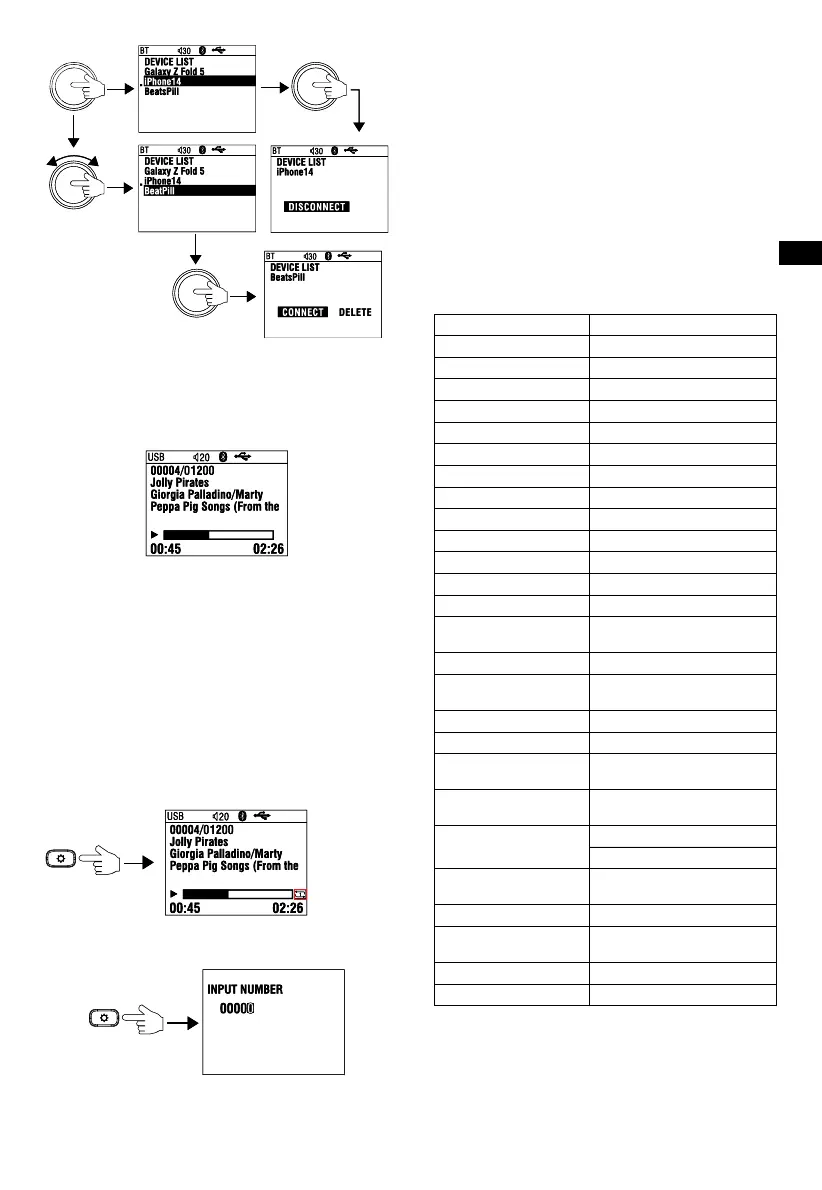
press and hold
turn
press and hold
USB OPERATION
Connecting a USB device
Plug a USB drive into the USB slot. It will auto begin to read the
tracks in the device.
Play Mode Select / File Search
1. While USB playing, press Setup button (2) repeatedly to
select between Repeat one, Repeat Folder, Random Folder,
Random all, Intro Scan.
Playback mode options:
Repeat:
1. ONE (one track)
2. FOLDER (all tracks in one folder)
Random:
1. ALL (all tracks on the USB device)
2. FOLDER (all tracks in one folder)
INTRO: Plays a brief sample of the beginning of each song
on the USB device
The small
icon shows
the playback
mode.
2. Long press it to enter Track Number search mode. Turn SEL
knob and press to set value of track number, then press and
hold SEL for 2s to confirm the selection.
press and hold
Navigating tracks
1. Press the PREVIOUS and NEXT buttons to restart the current
track, select a previous track, or jump to the next track.
2. Press and hold the PREVIOUS and NEXT buttons to rewind or
fast-forward a track.
Note: If the current playing track elapsed time is less than
5 seconds, then press Previous button to select previous track.
If the track elapsed time is over 5 seconds, then press Previous
the first time will result in back to the beginning of current track,
press it again within 5seconds to select previous track.
Pausing playback
1. Press the PLAY/PAUSE button to pause or resume playing
a track.
2. Press and hold the PLAY/PAUSE button to enter files folder
list. Turn SEL knob to find desired fold/file and press to
confirm selection.
SPECIFICATIONS
Tuner bands AM/FM
AM Band for USA 530 - 1710kHz (10kHz STEP)
AM Band for Europe 522 - 1620kHz (9kHz STEP)
AM Band for Japan 522 - 1629 KHZ (9kHz STEP)
AM Band for Australia 531 - 1602 kHz (9kHz STEP)
FM Band for USA 87.5 - 107.9MHz (0.2MHz STEP)
FM Band for Europe 87.50 - 108.00MHz (0.05MHz STEP)
FM Band for Japan 76.0 - 95.0 MHz (0.1MHz STEP)
FM Band for Australia 87.5 - 108.0 MHz (0.1MHz STEP)
Number of station presets 18
Bluetooth version 5.3
Bluetooth A2DP protocol 1.3.2
Bluetooth AVRCP 1.5
BT Max Power <10dBm
Bluetooth transmitter
frequency range
2400MHz - 2483.5MHz
Serial Port Profile (SPP) 1.2
Simple Secure Pairing
(SSP)
Yes
Number of paired phones 5
Bluetooth auto reconnect Yes (most recently paired phone)
Compatible media file
formats
WAV, MP3, M4A, WMA
Maximum number of files
on USB device
9999
RMS Power Output
(Watts x Channel) @ 4-ohm
Low distortion power 15W x 4
High distortion power 25W x 4
Frequency Response,
+/- 3dB
20Hz to 20kHz
Signal-to-Noise Ratio >75dB
THD+N @ 2.1Vrms
(RCA outputs)
1%
Operating voltage 9V – 16V
Quiescent current <80mA
Caution
1. The product is a built-in component. The terminal where
the product is installed should be used for the evaluation of
product structure, and no consideration should be given to
the temperature of the metallic casing. After the product is
installed, only the operation panel is exposed to users.
5
EN
press and hold
turn
press and hold
USB OPERATION
Connecting a USB device
Plug a USB drive into the USB slot. It will auto begin to read the
tracks in the device.
Play Mode Select / File Search
1. While USB playing, press Setup button (2) repeatedly to
select between Repeat one, Repeat Folder, Random Folder,
Random all, Intro Scan.
Playback mode options:
Repeat:
1. ONE (one track)
2. FOLDER (all tracks in one folder)
Random:
1. ALL (all tracks on the USB device)
2. FOLDER (all tracks in one folder)
INTRO: Plays a brief sample of the beginning of each song
on the USB device
The small
icon shows
the playback
mode.
2. Long press it to enter Track Number search mode. Turn SEL
knob and press to set value of track number, then press and
hold SEL for 2s to confirm the selection.
press and hold
Navigating tracks
1. Press the PREVIOUS and NEXT buttons to restart the current
track, select a previous track, or jump to the next track.
2. Press and hold the PREVIOUS and NEXT buttons to rewind or
fast-forward a track.
Note: If the current playing track elapsed time is less than
5 seconds, then press Previous button to select previous track.
If the track elapsed time is over 5 seconds, then press Previous
the first time will result in back to the beginning of current track,
press it again within 5seconds to select previous track.
Pausing playback
1. Press the PLAY/PAUSE button to pause or resume playing
a track.
2. Press and hold the PLAY/PAUSE button to enter files folder
list. Turn SEL knob to find desired fold/file and press to
confirm selection.
SPECIFICATIONS
Tuner bands AM/FM
AM Band for USA 530 - 1710kHz (10kHz STEP)
AM Band for Europe 522 - 1620kHz (9kHz STEP)
AM Band for Japan 522 - 1629 KHZ (9kHz STEP)
AM Band for Australia 531 - 1602 kHz (9kHz STEP)
FM Band for USA 87.5 - 107.9MHz (0.2MHz STEP)
FM Band for Europe 87.50 - 108.00MHz (0.05MHz STEP)
FM Band for Japan 76.0 - 95.0 MHz (0.1MHz STEP)
FM Band for Australia 87.5 - 108.0 MHz (0.1MHz STEP)
Number of station presets 18
Bluetooth version 5.3
Bluetooth A2DP protocol 1.3.2
Bluetooth AVRCP 1.5
BT Max Power <10dBm
Bluetooth transmitter
frequency range
2400MHz - 2483.5MHz
Serial Port Profile (SPP) 1.2
Simple Secure Pairing
(SSP)
Yes
Number of paired phones 5
Bluetooth auto reconnect Yes (most recently paired phone)
Compatible media file
formats
WAV, MP3, M4A, WMA
Maximum number of files
on USB device
9999
RMS Power Output
(Watts x Channel) @ 4-ohm
Low distortion power 15W x 4
High distortion power 25W x 4
Frequency Response,
+/- 3dB
20Hz to 20kHz
Signal-to-Noise Ratio >75dB
THD+N @ 2.1Vrms
(RCA outputs)
1%
Operating voltage 9V – 16V
Quiescent current <80mA
Caution
1. The product is a built-in component. The terminal where
the product is installed should be used for the evaluation of
product structure, and no consideration should be given to
the temperature of the metallic casing. After the product is
installed, only the operation panel is exposed to users.
5
EN
press and hold
turn
press and hold
USB OPERATION
Connecting a USB device
Plug a USB drive into the USB slot. It will auto begin to read the
tracks in the device.
Play Mode Select / File Search
1. While USB playing, press Setup button (2) repeatedly to
select between Repeat one, Repeat Folder, Random Folder,
Random all, Intro Scan.
Playback mode options:
Repeat:
1. ONE (one track)
2. FOLDER (all tracks in one folder)
Random:
1. ALL (all tracks on the USB device)
2. FOLDER (all tracks in one folder)
INTRO: Plays a brief sample of the beginning of each song
on the USB device
The small
icon shows
the playback
mode.
2. Long press it to enter Track Number search mode. Turn SEL
knob and press to set value of track number, then press and
hold SEL for 2s to confirm the selection.
press and hold
Navigating tracks
1. Press the PREVIOUS and NEXT buttons to restart the current
track, select a previous track, or jump to the next track.
2. Press and hold the PREVIOUS and NEXT buttons to rewind or
fast-forward a track.
Note: If the current playing track elapsed time is less than
5 seconds, then press Previous button to select previous track.
If the track elapsed time is over 5 seconds, then press Previous
the first time will result in back to the beginning of current track,
press it again within 5seconds to select previous track.
Pausing playback
1. Press the PLAY/PAUSE button to pause or resume playing
a track.
2. Press and hold the PLAY/PAUSE button to enter files folder
list. Turn SEL knob to find desired fold/file and press to
confirm selection.
SPECIFICATIONS
Tuner bands AM/FM
AM Band for USA 530 - 1710kHz (10kHz STEP)
AM Band for Europe 522 - 1620kHz (9kHz STEP)
AM Band for Japan 522 - 1629 KHZ (9kHz STEP)
AM Band for Australia 531 - 1602 kHz (9kHz STEP)
FM Band for USA 87.5 - 107.9MHz (0.2MHz STEP)
FM Band for Europe 87.50 - 108.00MHz (0.05MHz STEP)
FM Band for Japan 76.0 - 95.0 MHz (0.1MHz STEP)
FM Band for Australia 87.5 - 108.0 MHz (0.1MHz STEP)
Number of station presets 18
Bluetooth version 5.3
Bluetooth A2DP protocol 1.3.2
Bluetooth AVRCP 1.5
BT Max Power <10dBm
Bluetooth transmitter
frequency range
2400MHz - 2483.5MHz
Serial Port Profile (SPP) 1.2
Simple Secure Pairing
(SSP)
Yes
Number of paired phones 5
Bluetooth auto reconnect Yes (most recently paired phone)
Compatible media file
formats
WAV, MP3, M4A, WMA
Maximum number of files
on USB device
9999
RMS Power Output
(Watts x Channel) @ 4-ohm
Low distortion power 15W x 4
High distortion power 25W x 4
Frequency Response,
+/- 3dB
20Hz to 20kHz
Signal-to-Noise Ratio >75dB
THD+N @ 2.1Vrms
(RCA outputs)
1%
Operating voltage 9V – 16V
Quiescent current <80mA
Caution
1. The product is a built-in component. The terminal where
the product is installed should be used for the evaluation of
product structure, and no consideration should be given to
the temperature of the metallic casing. After the product is
installed, only the operation panel is exposed to users.
5
EN
press and hold
turn
press and hold
USB OPERATION
Connecting a USB device
Plug a USB drive into the USB slot. It will auto begin to read the
tracks in the device.
Play Mode Select / File Search
1. While USB playing, press Setup button (2) repeatedly to
select between Repeat one, Repeat Folder, Random Folder,
Random all, Intro Scan.
Playback mode options:
Repeat:
1. ONE (one track)
2. FOLDER (all tracks in one folder)
Random:
1. ALL (all tracks on the USB device)
2. FOLDER (all tracks in one folder)
INTRO: Plays a brief sample of the beginning of each song
on the USB device
The small
icon shows
the playback
mode.
2. Long press it to enter Track Number search mode. Turn SEL
knob and press to set value of track number, then press and
hold SEL for 2s to confirm the selection.
press and hold
Navigating tracks
1. Press the PREVIOUS and NEXT buttons to restart the current
track, select a previous track, or jump to the next track.
2. Press and hold the PREVIOUS and NEXT buttons to rewind or
fast-forward a track.
Note: If the current playing track elapsed time is less than
5 seconds, then press Previous button to select previous track.
If the track elapsed time is over 5 seconds, then press Previous
the first time will result in back to the beginning of current track,
press it again within 5seconds to select previous track.
Pausing playback
1. Press the PLAY/PAUSE button to pause or resume playing
a track.
2. Press and hold the PLAY/PAUSE button to enter files folder
list. Turn SEL knob to find desired fold/file and press to
confirm selection.
SPECIFICATIONS
Tuner bands AM/FM
AM Band for USA 530 - 1710kHz (10kHz STEP)
AM Band for Europe 522 - 1620kHz (9kHz STEP)
AM Band for Japan 522 - 1629 KHZ (9kHz STEP)
AM Band for Australia 531 - 1602 kHz (9kHz STEP)
FM Band for USA 87.5 - 107.9MHz (0.2MHz STEP)
FM Band for Europe 87.50 - 108.00MHz (0.05MHz STEP)
FM Band for Japan 76.0 - 95.0 MHz (0.1MHz STEP)
FM Band for Australia 87.5 - 108.0 MHz (0.1MHz STEP)
Number of station presets 18
Bluetooth version 5.3
Bluetooth A2DP protocol 1.3.2
Bluetooth AVRCP 1.5
BT Max Power <10dBm
Bluetooth transmitter
frequency range
2400MHz - 2483.5MHz
Serial Port Profile (SPP) 1.2
Simple Secure Pairing
(SSP)
Yes
Number of paired phones 5
Bluetooth auto reconnect Yes (most recently paired phone)
Compatible media file
formats
WAV, MP3, M4A, WMA
Maximum number of files
on USB device
9999
RMS Power Output
(Watts x Channel) @ 4-ohm
Low distortion power 15W x 4
High distortion power 25W x 4
Frequency Response,
+/- 3dB
20Hz to 20kHz
Signal-to-Noise Ratio >75dB
THD+N @ 2.1Vrms
(RCA outputs)
1%
Operating voltage 9V – 16V
Quiescent current <80mA
Caution
1. The product is a built-in component. The terminal where
the product is installed should be used for the evaluation of
product structure, and no consideration should be given to
the temperature of the metallic casing. After the product is
installed, only the operation panel is exposed to users.
5
EN
press and hold
turn
press and hold
USB OPERATION
Connecting a USB device
Plug a USB drive into the USB slot. It will auto begin to read the
tracks in the device.
Play Mode Select / File Search
1. While USB playing, press Setup button (2) repeatedly to
select between Repeat one, Repeat Folder, Random Folder,
Random all, Intro Scan.
Playback mode options:
Repeat:
1. ONE (one track)
2. FOLDER (all tracks in one folder)
Random:
1. ALL (all tracks on the USB device)
2. FOLDER (all tracks in one folder)
INTRO: Plays a brief sample of the beginning of each song
on the USB device
The small
icon shows
the playback
mode.
2. Long press it to enter Track Number search mode. Turn SEL
knob and press to set value of track number, then press and
hold SEL for 2s to confirm the selection.
press and hold
Navigating tracks
1. Press the PREVIOUS and NEXT buttons to restart the current
track, select a previous track, or jump to the next track.
2. Press and hold the PREVIOUS and NEXT buttons to rewind or
fast-forward a track.
Note: If the current playing track elapsed time is less than
5 seconds, then press Previous button to select previous track.
If the track elapsed time is over 5 seconds, then press Previous
the first time will result in back to the beginning of current track,
press it again within 5seconds to select previous track.
Pausing playback
1. Press the PLAY/PAUSE button to pause or resume playing
a track.
2. Press and hold the PLAY/PAUSE button to enter files folder
list. Turn SEL knob to find desired fold/file and press to
confirm selection.
SPECIFICATIONS
Tuner bands AM/FM
AM Band for USA 530 - 1710kHz (10kHz STEP)
AM Band for Europe 522 - 1620kHz (9kHz STEP)
AM Band for Japan 522 - 1629 KHZ (9kHz STEP)
AM Band for Australia 531 - 1602 kHz (9kHz STEP)
FM Band for USA 87.5 - 107.9MHz (0.2MHz STEP)
FM Band for Europe 87.50 - 108.00MHz (0.05MHz STEP)
FM Band for Japan 76.0 - 95.0 MHz (0.1MHz STEP)
FM Band for Australia 87.5 - 108.0 MHz (0.1MHz STEP)
Number of station presets 18
Bluetooth version 5.3
Bluetooth A2DP protocol 1.3.2
Bluetooth AVRCP 1.5
BT Max Power <10dBm
Bluetooth transmitter
frequency range
2400MHz - 2483.5MHz
Serial Port Profile (SPP) 1.2
Simple Secure Pairing
(SSP)
Yes
Number of paired phones 5
Bluetooth auto reconnect Yes (most recently paired phone)
Compatible media file
formats
WAV, MP3, M4A, WMA
Maximum number of files
on USB device
9999
RMS Power Output
(Watts x Channel) @ 4-ohm
Low distortion power 15W x 4
High distortion power 25W x 4
Frequency Response,
+/- 3dB
20Hz to 20kHz
Signal-to-Noise Ratio >75dB
THD+N @ 2.1Vrms
(RCA outputs)
1%
Operating voltage 9V – 16V
Quiescent current <80mA
Caution
1. The product is a built-in component. The terminal where
the product is installed should be used for the evaluation of
product structure, and no consideration should be given to
the temperature of the metallic casing. After the product is
installed, only the operation panel is exposed to users.
5
EN
press and hold
turn
press and hold
USB OPERATION
Connecting a USB device
Plug a USB drive into the USB slot. It will auto begin to read the
tracks in the device.
Play Mode Select / File Search
1. While USB playing, press Setup button (2) repeatedly to
select between Repeat one, Repeat Folder, Random Folder,
Random all, Intro Scan.
Playback mode options:
Repeat:
1. ONE (one track)
2. FOLDER (all tracks in one folder)
Random:
1. ALL (all tracks on the USB device)
2. FOLDER (all tracks in one folder)
INTRO: Plays a brief sample of the beginning of each song
on the USB device
The small
icon shows
the playback
mode.
2. Long press it to enter Track Number search mode. Turn SEL
knob and press to set value of track number, then press and
hold SEL for 2s to confirm the selection.
press and hold
Navigating tracks
1. Press the PREVIOUS and NEXT buttons to restart the current
track, select a previous track, or jump to the next track.
2. Press and hold the PREVIOUS and NEXT buttons to rewind or
fast-forward a track.
Note: If the current playing track elapsed time is less than
5 seconds, then press Previous button to select previous track.
If the track elapsed time is over 5 seconds, then press Previous
the first time will result in back to the beginning of current track,
press it again within 5seconds to select previous track.
Pausing playback
1. Press the PLAY/PAUSE button to pause or resume playing
a track.
2. Press and hold the PLAY/PAUSE button to enter files folder
list. Turn SEL knob to find desired fold/file and press to
confirm selection.
SPECIFICATIONS
Tuner bands AM/FM
AM Band for USA 530 - 1710kHz (10kHz STEP)
AM Band for Europe 522 - 1620kHz (9kHz STEP)
AM Band for Japan 522 - 1629 KHZ (9kHz STEP)
AM Band for Australia 531 - 1602 kHz (9kHz STEP)
FM Band for USA 87.5 - 107.9MHz (0.2MHz STEP)
FM Band for Europe 87.50 - 108.00MHz (0.05MHz STEP)
FM Band for Japan 76.0 - 95.0 MHz (0.1MHz STEP)
FM Band for Australia 87.5 - 108.0 MHz (0.1MHz STEP)
Number of station presets 18
Bluetooth version 5.3
Bluetooth A2DP protocol 1.3.2
Bluetooth AVRCP 1.5
BT Max Power <10dBm
Bluetooth transmitter
frequency range
2400MHz - 2483.5MHz
Serial Port Profile (SPP) 1.2
Simple Secure Pairing
(SSP)
Yes
Number of paired phones 5
Bluetooth auto reconnect Yes (most recently paired phone)
Compatible media file
formats
WAV, MP3, M4A, WMA
Maximum number of files
on USB device
9999
RMS Power Output
(Watts x Channel) @ 4-ohm
Low distortion power 15W x 4
High distortion power 25W x 4
Frequency Response,
+/- 3dB
20Hz to 20kHz
Signal-to-Noise Ratio >75dB
THD+N @ 2.1Vrms
(RCA outputs)
1%
Operating voltage 9V – 16V
Quiescent current <80mA
Caution
1. The product is a built-in component. The terminal where
the product is installed should be used for the evaluation of
product structure, and no consideration should be given to
the temperature of the metallic casing. After the product is
installed, only the operation panel is exposed to users.
USB OPERATION
SPECIFICATIONS
EN
I


 To Next Page
 Loading...