Need help?
Do you have a question about the Harman JBL VM300 and is the answer not in the manual?
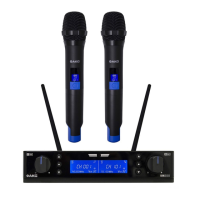
Details the front panel interface of the SR300 receiver, including volume, scan, sync, IR sensor, LCD, and module buttons.
Describes the rear panel connections of the SR300 receiver, including antennas, power, and audio outputs.
Explains the front interface of the HT300 handheld transmitter, covering pickup, LCD, and on/off button.
Details the rear interface of the HT300 handheld transmitter, including grip, battery compartment, and antenna.
Procedure for setting frequency, RF output, auto attenuation, and display mode for each channel on the SR300.
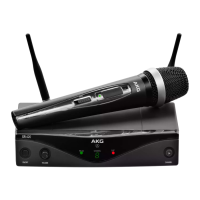
The JBL VM300 Wireless Microphone System is a sophisticated audio solution designed for both professional and entertainment sound applications, offering ultra-clarity and reliable performance. The system comprises an SR300 receiver and two HT300 hand-held transmitters, each equipped with features to ensure optimal functionality and ease of use.
The core function of the VM300 system is to provide high-quality wireless audio transmission. The SR300 receiver acts as the central hub, managing audio signals from the two HT300 transmitters. It features two channels (Ch-A and Ch-B) to accommodate both microphones simultaneously. The system operates within a specific frequency band, utilizing PLL synthesized control for stable frequency preparation and transmission. The HT300 hand-held transmitters are designed for vocal or instrument sound pick-up, converting acoustic energy into electrical signals for wireless transmission to the receiver.
The VM300 system is packed with user-friendly features that enhance its usability and performance:
Preset Frequency/Channel Module: The SR300 receiver allows users to select preset frequency/channel modules for both Ch-A and Ch-B. This simplifies setup, enabling quick configuration for different environments or applications. Once a selection is made, the system automatically stores it.
Auto Scan: This feature on the SR300 receiver enables an automatic search for available frequencies. When activated, the system scans and displays the optimal frequency/channel, simplifying the process of finding a clear signal and avoiding interference. This is particularly useful in dynamic environments where available frequencies may change.
SHAKE TO SYNC: A unique synchronization method, SHAKE TO SYNC, allows for quick and intuitive pairing between the HT300 transmitters and the SR300 receiver. By gently shaking both the receiver and transmitters simultaneously, the system automatically synchronizes their frequencies. This method is effective within a 10-meter range, provided there are no significant obstructions or interference.
Synchronization through IR: As an alternative to SHAKE TO SYNC, the system also supports synchronization via infrared (IR). Users can activate the Auto Sync function on the SR300, then place the HT300 transmitter near the receiver's IR sensor. The system will then automatically synchronize the frequency/channel, which is displayed flashing on the LCD during the process.
Auto Mute: Both HT300 transmitters feature an auto mute function. This can be activated or deactivated by a long press of the On/Off button, providing convenience and preventing unwanted audio transmission when the microphone is not in use.
Auto Sleep and Auto Wakeup: These intelligent power management features help conserve battery life and ensure the system is ready when needed. While the manual does not detail the exact triggers, these functions typically put the transmitters into a low-power state after a period of inactivity and reactivate them upon motion or sound detection.
Channel Settings Configuration: The SR300 receiver offers comprehensive channel settings. Users can adjust the channel frequency (SET FRQ), RF output of the HT300 (SET RF – high or low), and auto attenuation of the output gain (SET AUD) for each channel. The display mode (SET DIS) can also be configured to show either the channel number or the frequency. These settings are accessed and adjusted using the Volume knobs, which also serve as selection and confirmation buttons.
Volume Control: Each channel on the SR300 receiver has an independent volume knob, allowing precise adjustment of the audio output.
LCD Displays: Both the SR300 receiver and HT300 transmitters are equipped with LCD screens. The receiver's LCD shows the status of both Ch-A and Ch-B, including audio signal level, RF signal level, frequency/channel, and mute status. The transmitter's LCD displays battery level, frequency/channel, and mute status, providing essential information at a glance.
Lock/Unlock Function: The SR300 receiver can be locked or unlocked by a long press of both Volume knobs. When locked, the LCD displays "LOC ON," preventing accidental changes to settings. When unlocked, it displays "UNLOC."
Audio Outputs: The SR300 receiver provides versatile audio output options. It includes two 3-pin balanced XLR connectors for professional-grade audio devices (Balance Out A/B) and a 6.35 mm unbalanced TS connector (Mix Out) for connecting to downstream audio devices like audio processors.
The VM300 system is designed for durability and ease of maintenance:
Battery Compartment: The HT300 transmitters feature a grip/battery compartment that can be twisted off for easy installation or replacement of AA batteries. This design ensures quick and convenient power management.
Antenna Connections: The SR300 receiver has two dedicated connections for UHF antennas, which are provided with the system. It is crucial not to block the antenna areas on both the receiver and transmitters to ensure optimal wireless transmission.
Power Input: The SR300 receiver uses a 12 VDC, 1.25A power adapter, which is supplied with the system. This standardized power input simplifies replacement if needed.
Cleaning: The manual specifies that the apparatus should only be cleaned with a dry cloth, advising against the use of liquids to prevent damage.
Serviceability: In case of damage or malfunction, all servicing is to be referred to qualified service personnel. The manual explicitly states "NO USER SERVICEABLE PARTS INSIDE" and warns against removing the cover to reduce the risk of electronic shock.
The JBL VM300 system is a comprehensive and user-friendly wireless microphone solution, integrating advanced features for seamless operation and high-fidelity audio capture in various demanding environments.
 General
| Polar Pattern | Cardioid |
|---|---|
| Color | Black |
| THD | <0.5% |
| Microphone Battery | 2 x AA |
| Connector | XLR |


 To Next Page