EasyManua.ls Logo

Harvia XENIO CX45J - User Manual

Harvia XENIO CX45J
16 pages
Print Icon
To Next Page IconTo Next Page
Loading...
04052022/Y05-0917
HARVIA XENIO CX45J
Control unit
Question and Answer IconNeed help?

Do you have a question about the Harvia XENIO CX45J and is the answer not in the manual?

Overview

The HARVIA XENIO CX45J is a control unit designed for managing the functions of an electric sauna heater. It is intended for use by sauna owners, those responsible for sauna maintenance, and electricians for installation. The control unit is not to be used for any other purpose.

Function Description

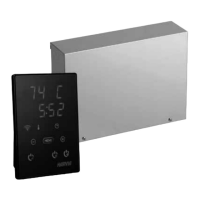
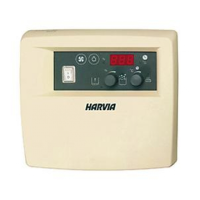
The HARVIA XENIO control unit is used to control an electric sauna heater with an output range of 2.3–18 kW. The system comprises a control panel, a power unit, and a temperature sensor. The control unit regulates the sauna room temperature based on information from the sensor. The temperature sensor and the overheat protector are located in the temperature sensor box. The temperature is sensed by an NTC thermistor, and the overheat protector can be reset. The control unit can be equipped with a safety switch to preset the start of the heater.

The control unit operates in standby mode when connected to the power supply and the main switch is on, indicated by the I/O button's background light on the control panel. To start the heater, the heater I/O button on the control panel is pressed. The display shows the set temperature and the set on-time for five seconds. Once the desired temperature is reached, the heating elements automatically turn off and on in periods to maintain the temperature. The sauna typically warms up within an hour if the heater efficiency is suitable and the sauna is well-built. The heater turns off when the I/O button is pressed, the on-time runs out, or an error occurs. It is crucial to ensure the control unit cuts off power to the heater after the on-time has elapsed, dehumidification has ended, or the heater has been manually switched off.

The control unit also supports accessories such as lighting and ventilation, which can be started and shut down independently. Lighting (max 100 W) can be controlled from the control panel. If a fan is installed, it can also be connected to and controlled from the control panel. A safety switch, such as the Harvia SFE, can be integrated to prevent the heater from operating if objects are placed on it, reducing fire hazards.

Important Technical Specifications

Control Panel:

  • Temperature adjustment range: 40–110 °C
  • Pre-setting time adjustment range: 0–12 h
  • Control of lighting and fan: Max 100 W
  • Dimensions: 85 mm x 24 mm x 110 mm
  • Length of data cable: 5 m (10 m extension cables available, max. total length 30 m)

Power Unit:

  • Supply voltage and max. loads:
    • 200 V 1-Phase: Max load 9 kW
    • 200 V 1-Phase (two separated circuits): Max load 18 kW
    • 200 V 3-Phase: Max load 15.5 kW
    • Max load can be increased up to 36 kW with a power extension unit LTY45J.
  • Lighting control: Max power: 100 W, 200 V 1N~
  • Fan control: Max power: 100 W, 200 V 1N~
  • Dimensions: 364 mm x 73 mm x 267 mm
  • Terminal for a safety switch

Sensors:

  • Temperature sensor: Equipped with a resettable overheat protector and a temperature-sensing NTC thermistor (22 kΩ/T=25 °C)
  • Weight: 176 g with leads (ca 4 m)
  • Dimensions: 51 mm x 73 mm x 27 mm

Power Extension Unit LTY45J (optional):

  • Increases maximum load of control unit to 18 kW.
  • Controlled using terminals A1, A2, A3, and A4.

Usage Features

Changing Settings: Settings such as temperature, remaining on-time, pre-setting time, remote use, pause time, maximum on-time, sensor reading adjustment, memory for power failures, and sauna dehumidifying interval can be adjusted via the control panel.

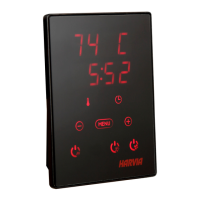
  • Basic Mode (Heater On): The top row of the display shows the sauna room temperature, and the bottom row shows the remaining on-time. Indicator lights glow.
  • Sauna Room Temperature: Adjustable from 40–110 °C using the – and + buttons.
  • Remaining On-time: Adjustable using the – and + buttons.
  • Pre-setting Time (Timed Switch-on): Adjustable in 10-minute steps. The heater will start after the preset time.
  • Remote Use: Options include "OFF" (remote control disabled), "SAFE" (safety switch). Pause time must be enabled for remote starts via automated schedules.
  • Maximum On-time: Adjustable from 1–12 hours (factory setting is 6 hours).
  • Sensor Reading Adjustment: Correctable by +/- 10 units, affecting the measuring curve.
  • Memory for Power Failures: Can be turned ON or OFF. If ON, the system restarts after a power break. If OFF, the system shuts down and requires manual restart.
  • Sauna Dehumidifying Interval: Can be turned ON or OFF. The interval starts when devices are switched off or on-time runs out. During this 45-minute interval, the heater is on, sauna temperature is set at 40 °C, and the fan (if connected) is on. It helps maintain sauna condition.

Control Panel Lock: The control panel can be locked in standby mode by pressing and holding the heater and light buttons for three seconds. "-CL-" is shown on the display. This prevents remote starts.

Remote Control: The control unit can remotely control the heater if equipped with a secure switch (safety switch). If the safety switch circuit is closed, the heater can be turned on remotely. If open, "SAFE" is displayed, and the heater will not start.

  • Pause Time: Prevents remote turn-on if less than 6 hours have passed since the last heater use. "rESt" is displayed during this period.
  • Memory for Power Failures: Resumes operation if the remote switch remains ON.
  • Preset Time: Cannot be controlled remotely during preset delay time.
  • Dehumidifying: If enabled and the heater is turned off remotely, dehumidifying starts and cannot be stopped remotely.

Power Saving Mode: Activated if no buttons are pressed for 30 minutes. Only the heater button (and "rc on" if remote use is active) remains lit.

Maintenance Features

Troubleshooting: The control panel displays error messages (E numbers) for various issues.

  • E1 (Temperature sensor measuring circuit broken): Check red and yellow wires to the temperature sensor and their connections.
  • E2 (Temperature sensor's measuring circuit short-circuited): Check red and yellow wires to the temperature sensor and their connections.
  • E3 (Overheat protector's measuring circuit broken): Press the overheat protector's reset button. Check red and yellow wires to the temperature sensor and their connections.
  • E9 (Connection failure in the system): Switch the power off from the main switch, check the data cable, sensor cable, and their connections. Switch the power on.

Power Unit Fuse Faults: Blown fuses should be replaced with new ones of the same value.

  • If fuse F2 for the electronic card has blown, there is likely a fault in the power unit, requiring service.
  • If fuses F1 or F3 (for lighting or fan) have blown, check the wiring and functioning of lighting and fan.

Resetting the Overheat Protector: The sensor box WX232 contains a temperature sensor and an overheat protector. If the temperature in the sauna environment rises too high, the overheat protector cuts off the heater power. Resetting the overheat protector is shown in figure 10. The reason for the cutoff must be determined before the button is pressed.

Spare Parts: Harvia recommends using only manufacturer's spare parts. Key spare parts include:

  • Control panel (WX387)
  • Temperature sensor (WX232)
  • Data cable 5 m (WX311)
  • Data cable extension 10 m (optional) (WX313)
  • Circuit board (WX361J)

Harvia XENIO CX45J Specifications

General IconGeneral
BrandHarvia
ModelXENIO CX45J
CategoryControl Unit
LanguageEnglish

Related product manuals