CAUTION: TO AVOID BATTERY LEAKAGE
1. Be sure to insert the batteries correctly and always follow the toy and
battery manufacturers’ instructions;
2. Do not mix old batteries and new batteries or alkaline, standard (carbon-
zinc) or rechargeable (nickel-cadmium) batteries;
3. Always remove weak or dead batteries from the product.
IMPORTANT: BATTERY INFORMATION
Please retain this information for future reference.
Batteries should be replaced by an adult.
CAUTION:
1. Always follow the instructions carefully. Use only batteries specified and be sure to insert
item correctly by matching the + and – polarity markings.
2. Do not mix old batteries and new batteries or standard (carbon-zinc) with alkaline batteries.
3. Remove exhausted or dead batteries from the product.
4. Remove batteries if product is not to be played with for a long time.
5. Do not short-circuit the supply terminals.
6. Should this product cause, or be affected by, local electrical interference, move it away
from other electrical equipment. Reset (switching off and back on again or removing and re-
inserting batteries) if necessary.
7. RECHARGEABLE BATTERIES: Do not mix these with any other types of batteries. Always
remove from the product before recharging. Recharge batteries under adult supervision.
DO NOT RECHARGE OTHER TYPES OF BATTERIES.
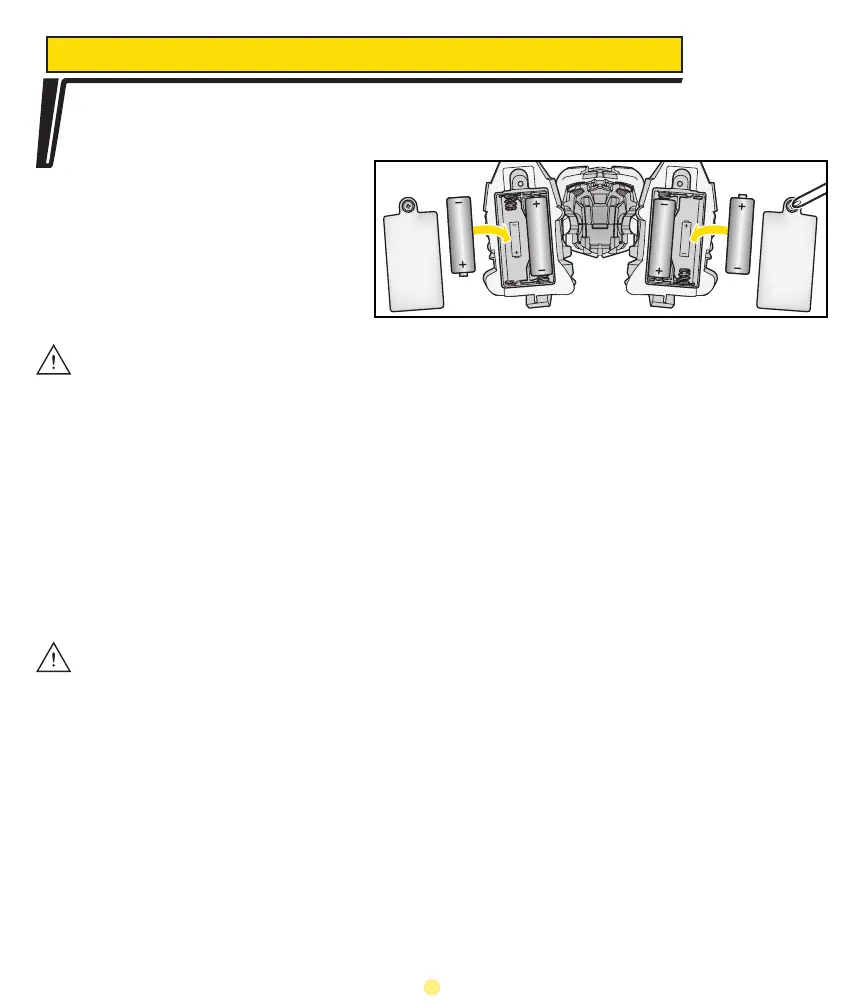
To begin playing with your musical companion, you must first install the batteries.
Using a Phillips/cross head screwdriver (not included), loosen screw in battery
compartment cover (screw stays
attached to cover) on bottom
of each foot of the toy. Into
each foot, insert 2 x 1.5V “AA”
alkaline batteries in the battery
compartment. Replace cover and
tighten screw.
TO INSERT BATTERIES
2








 To Next Page