
 To Next Page
H
Heidi SimpsonJul 30, 2025
What to do if my Hasbro TRANSFORMERS BEATMIX BUMBLEBEE is freezing up?
- JJustin JohnsonJul 30, 2025
If your Hasbro Toy is freezing up, use a ballpoint pen tip to press the Reset Button, and then turn the toy on.

What to do if my Hasbro TRANSFORMERS BEATMIX BUMBLEBEE is freezing up?
If your Hasbro Toy is freezing up, use a ballpoint pen tip to press the Reset Button, and then turn the toy on.
Why are the sounds faint on my Hasbro TRANSFORMERS BEATMIX BUMBLEBEE Toy?
If the sounds from your Hasbro Toy are faint or weak, or the movements are slow, and the toy is acting erratically, make sure the volume levels of the toy and your musical device are turned up. Also, the batteries may need changing; see battery instructions for complete details on how to change batteries.
What to do if my Hasbro TRANSFORMERS BEATMIX BUMBLEBEE is not working after changing batteries?
If your Hasbro Toy is not doing anything after you've changed the batteries, ensure that you have installed the batteries correctly. You can also try pressing the toy’s Reset button, and then turn the toy on.
Why I cannot fit a cord into the Input Port of Hasbro Toy?
If you cannot fit a cord into the Input Port of your Hasbro Toy, it's because the toy only accepts 3.5 mm stereo output audio cords.
Why can’t I hear anything when I connect headphones to my Hasbro TRANSFORMERS BEATMIX BUMBLEBEE Toy?
The Input port on your Hasbro Toy is for input only; it doesn’t function as an output port, so you won't hear anything through headphones connected to it.
Details required batteries, type, and tools for installation.
Instructions for inserting AA batteries into the toy's feet using a screwdriver.
Guidelines for safe battery usage, mixing, and handling to prevent leakage.
Instructions for recording 5-second audio clips using the chest button.
Lists common problems like faint sounds, slow movements, and erratic behavior with solutions.
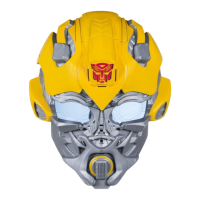
This document is a user's guide for the BEATMIX BUMBLEBEE, a musical, mixable, beat-machine companion. It is designed for ages 8 and up. The product number is 77148.
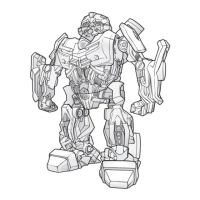
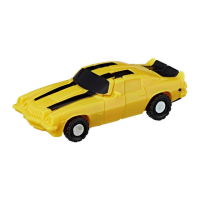
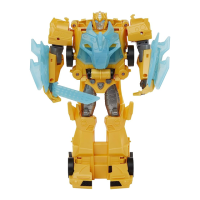
The BEATMIX BUMBLEBEE is an electronic toy that acts as a musical companion. It features poseable arms, a speaker, 8 LED lights, a sound sensor, moving doors, beat buttons, a volume control, an ON/OFF button, a reset button, an audio input jack, and a scratch wheel. The toy is capable of playing music, recording beats and sound clips, and reacting to music with grooving motions and flashing LEDs. It does not convert into a vehicle.
*   Loosen the screw on the battery compartment cover on the bottom of each foot using a Phillips/cross head screwdriver.
*   Insert 2 x 1.5V "AA" alkaline batteries into each foot, ensuring correct polarity (+ and -).
*   Replace the cover and tighten the screw.
*   **To Turn ON:** Press the button on the toy's back. An introduction song and LED animation will play, indicating the toy is "awake." The button on the back will light up and stay lit.
*   **To Turn OFF:** Press and hold the button on the toy's back for three seconds. A sound effect and LED animation will play, indicating the toy is shutting down.
*   **Volume Control:** Use the left ankle wheel to control the volume of beats and clip playback.
*   **Connecting a Musical Device:** Use the enclosed cable to connect a musical device (CD player, stereo, portable music player, computer, video game system, etc. – not included) to the Audio Input Jack on the back of the toy's right leg. Adjust the volume on your musical device.
*   **Sound Sensor:** If no musical device is connected, the toy's sound sensor will detect and react to loud music in the room.
*   **Reactions to Music:** The toy acts as a speaker and performs grooving motions. Its LEDs will flash to the music. Playing music for more than two minutes will activate all special lights and movements.
*   **Energy Levels:** The more music and interaction the toy receives, the more energized it becomes, leading to more movement and "talking" with recorded music.
*   **Manual Recording:**
    *   Ensure music or beats are playing through the toy.
    *   Press the Record Button (Transformer™ logo on the chest) to activate the recorder for 5 seconds.
    *   During recording, the Record Button will turn green. It will turn back to red when recording is complete.
    *   The toy will stop recording automatically after 5 seconds.
*   **Random Recording:** The toy will randomly record music and beats (in 3-second clips) when music is playing.
*   **Playback:** To manually play back recorded samples, press the Record Button when it is flashing orange.
*   **Activating Beats:** Press any of the following spots to activate a beat: Right Chest Plate, Left Chest Plate, Right Ankle, Right Foot, Left Foot.
*   **Arm Sound Effects:** The toy's arms have four positions, each with a different sound effect.
*   **Loop Mode:** To hear sound effects in a continuous "loop mode," press and hold the toy's left foot button for about three seconds. The toy's eyes will flash, and the headlights will flash green to confirm "loop mode." Then press a button for a sound effect.
*   **Stopping Beats/Effects:** Press the same spot again to stop any beat or effect.
*   **Single Play Mode:** To return to "single play mode," push and hold the left foot button again for two seconds. The headlights will flash red to confirm.
*   Higher interaction leads to higher energy levels.
*   High energy levels result in a "happy" animation.
*   Low energy levels result in an "unhappy" animation.
*   To preserve battery life, turn the toy OFF if not planning to interact with it for a while.
*   Batteries should be replaced by an adult.
*   Always follow instructions for correct battery insertion, matching polarity (+ and -).
*   Do not mix old and new batteries, or alkaline, standard (carbon-zinc), or rechargeable (nickel-cadmium) batteries.
*   Remove weak or dead batteries promptly.
*   Remove batteries if the product will not be used for a long time.
*   Do not short-circuit the supply terminals.
*   **Rechargeable Batteries:** Do not mix with other types. Remove from the product before recharging. Recharge under adult supervision. Do not recharge other types of batteries.
*   **Faint/Weak Sounds or Slow Movements:** Check volume levels of the toy and musical device. Batteries may need changing.
*   **Erratic Behavior:** Batteries may need changing.
*   **Toy Not Responding After Battery Change:** Ensure batteries are installed correctly. Try pressing the Reset button and turning the toy on.
*   **Cord Not Fitting Input Port:** Ensure it's a 3.5 mm stereo output audio cord.
*   **No Sound with Headphones:** The input port is for input only, not output.
*   **Toy Freezing Up:** Press the Reset Button (using a ballpoint pen tip) and turn the toy on.
*   Do not use excessive force to pull or twist movable parts, especially the arms.
*   The toy may react to other sounds/noises besides music.
*   Avoid placing the toy near fragile objects or fluid containers, as it moves and could spill things.
*   Do not expose the product to moisture.
*   Avoid high/low temperatures, dusty/humid areas, or direct sunlight.
This device complies with Part 15 of the FCC Rules. Operation is subject to two conditions: (1) it may not cause harmful interference, and (2) it must accept any interference received. The equipment has been tested and found to comply with Class B digital device limits. If interference occurs, reorient/relocate the receiving antenna, increase separation between equipment and receiver, or consult a dealer/experienced radio/TV technician.

 General