77
H4D
Introductory overview
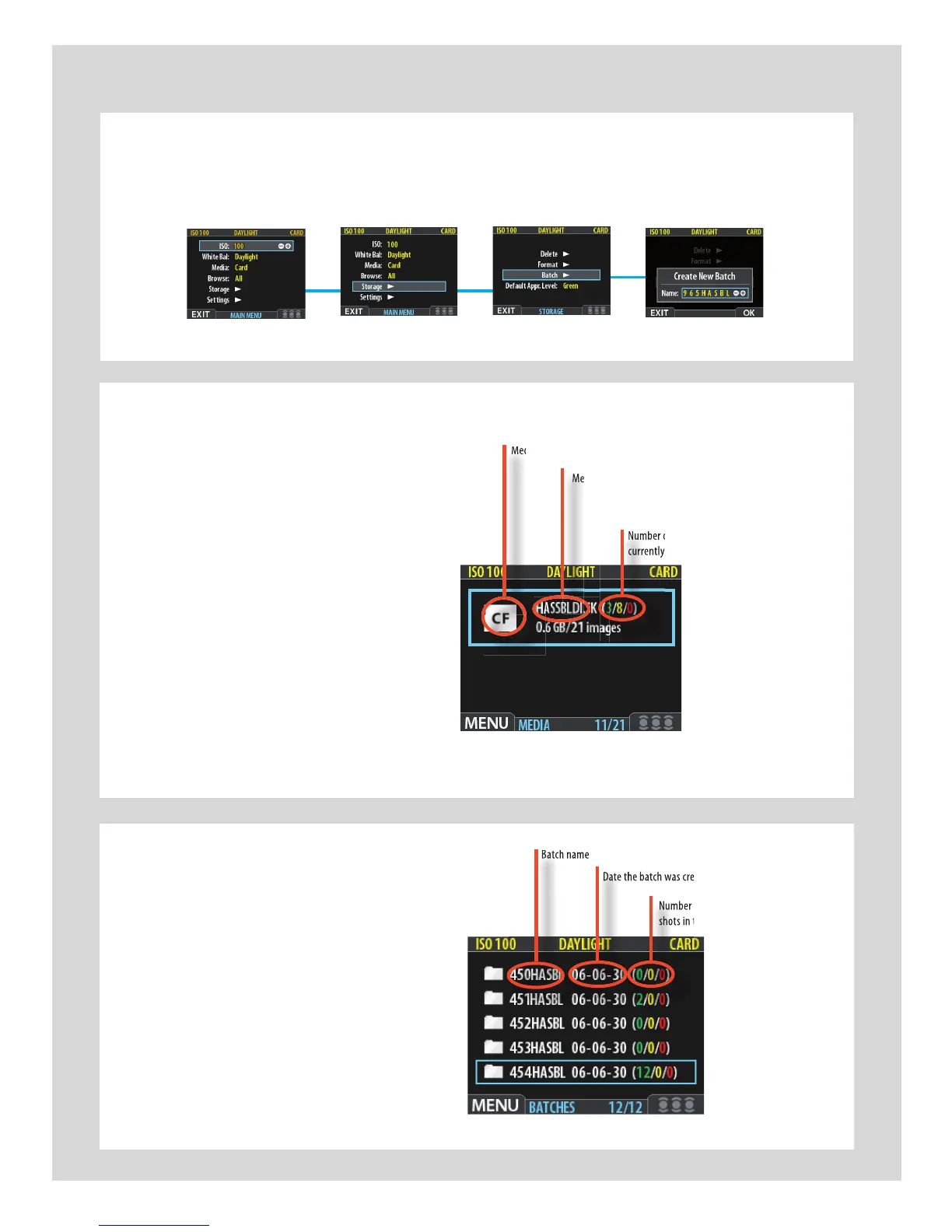
Medium-typeicon(CompactFlash)
Mediumname
Numberofgreen,yellowandredshots
currentlystoredonthemedium
The
MEDIA
screen.
In this example a CF card and a FireWire
disk are illustrated and therefore con-
nected.
The blue frame around the CF card
symbol tells you that captured images
will be saved to the CF card and not
the FireWire disk. This is the
Current
Medium
Numberofgreen,yellowandredshots
currentlystoredonthemedium
Medium-typeicon(CompactFlash)
Batchname
Datethebatchwascreated
Numberofgreen,yellowandred
shotsinthebatch(IAAclassication)
The
BATCH
screen.
The blue frame around a folder tells
you that it is the
Current Batch
.
Datethebatchwascreated
Numberofgreen,yellowandred
shotsinthebatch(IAAclassication)











 To Next Page