Figure 11
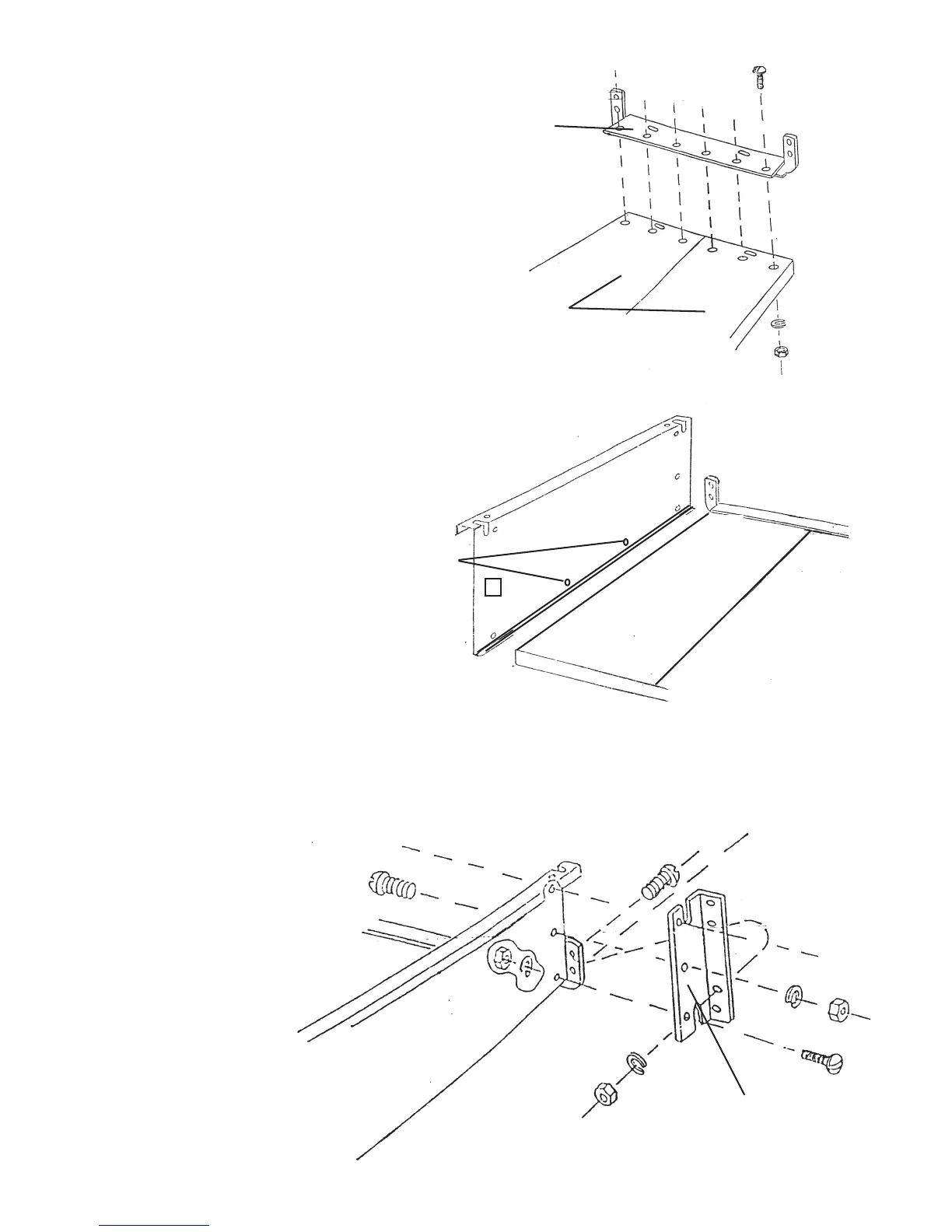
Step 11: See Figure 11 for bolt positions. Bolt Rear
Cross Brace (#12) to Bottom Panels (#1) using 6 Bolts
(#21), 6 Washers (#23) and 6 Nuts (#24).
Figure 12
Rear Cross Brace (#12)
Bottom Panel (#1)
Step 12: Install the right Side Panel (#14)
to the Bottom Panel (#1) as shown in Figure
12. Use 2 Bolts (#21), 2 Washers (#23), and
2 Nuts (#24) to attach the Side Panel.
See Step 13 below for instructions on
installing 2 other bolts into side panel.
Bolt Locations
Rear Corner Brace (#15)
#38897 Page 7
Step 13: Secure each Side Panel (#14) by
bolting a Rear Corner Brace (#15) to the
outside of the Side Panel. Use 5 Bolts (#21),
5 Washers (#23) and 5 Nuts (#24) to secure
each Side Panel. Figure 13 shows Rear
Corner Brace being assembled to
left Side Panel. Follow same
procedure to assemble Rear Corner
Brace to right Side Panel.
Figure 13
REV 02/07


 To Next Page