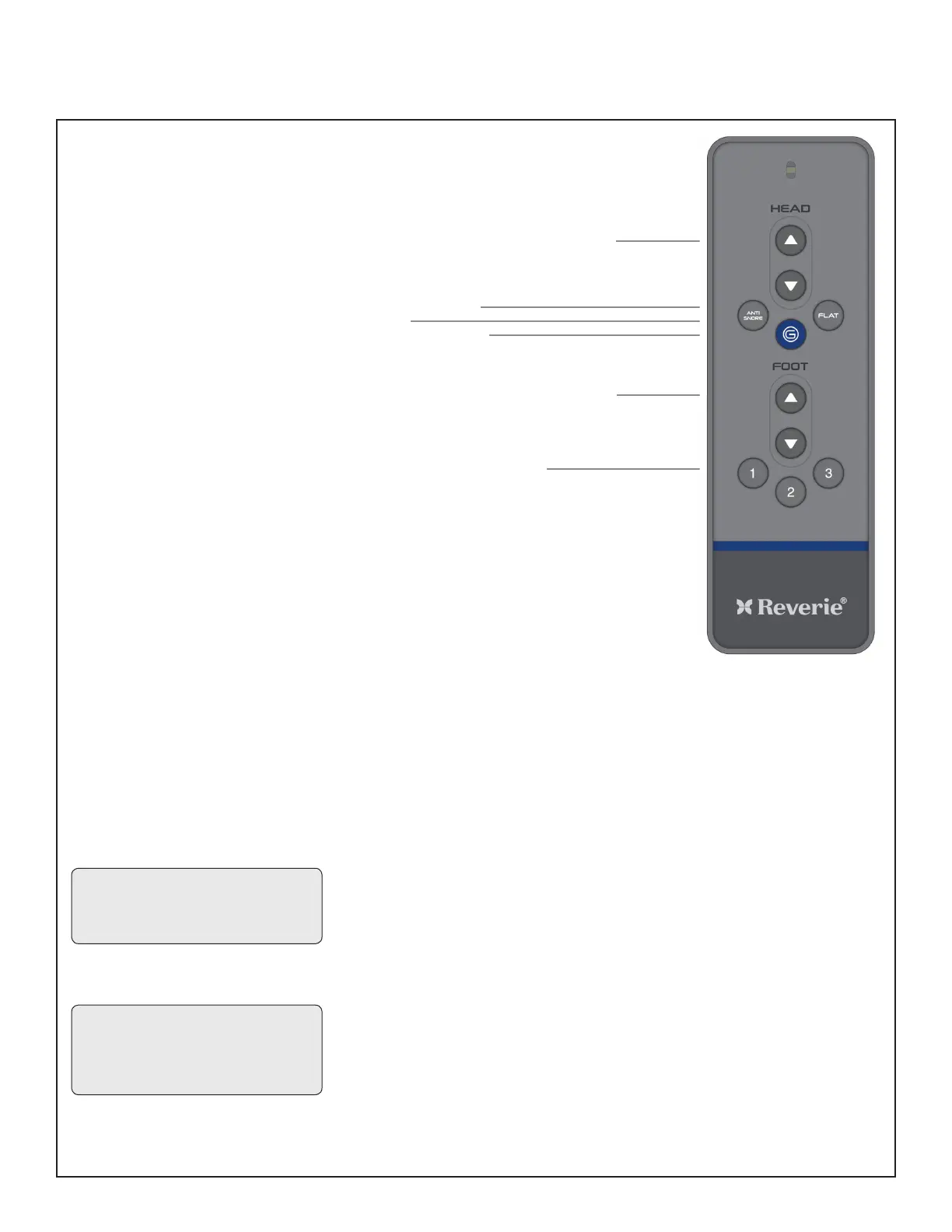
HEAD AND FOOT
ADJUSTMENTS (A,E)
Adjusts the head and foot sections
to the desired positions.
ANTI SNORE (B)
Raises the HEAD slightly for easier
breathing.
FLAT (C)
Returns both head and foot to the
at position.
ZERO GRAVITY (D)
Allows your legs to be lifted to a
position slightly above the chest,
which enables blood ow to easily
circulate back to the heart, thus
reducing stress and fatigue.
MEMORY POSITION PRESETS
(F)
You can store 2 personalized
memory positions. Press and hold
the Memory button for 5 seconds
until the LED light ashes 3 times to
store the setting. To recall a Memory
Position, press the corresponding
button.
NOTE: Any control button on the
remote will interrupt and stop the
FLAT, ZERO-G, Anti-Snore and
Memory Position presets.
NOTE: Do not hold the memory
position for more than 5 seconds
or the setting will overwrite.
Remote Control Operation Guide
A. RAISE & LOWER HEAD SECTION
B. ANTI - SNORE
C. FLAT
D. ZERO GRAVITY
E. RAISE & LOWER FOOT SECTION
F
.
MEMOR
Y POSITION 1-3
REMOTE LOCKOUT FEATURE
(A,C)
We created the remote lockout feature
to help owners prevent unintended use
of the base.
Activating Remote Lockout
At the same time, press and hold
the HEAD UP and FLAT buttons for
3 seconds. The LED will ash twice
to indicate activation. Pressing any
buttons on the remote while in lockout
mode will result in no movement from
the power base.
Deactivating Remote Lockout
Repeat the same process, press and
hold the HEAD UP and FLAT buttons
at the same time for 3 seconds.
The LED will ash twice to indicate
deactivation. The remote and power
base will work normally.


 To Next Page