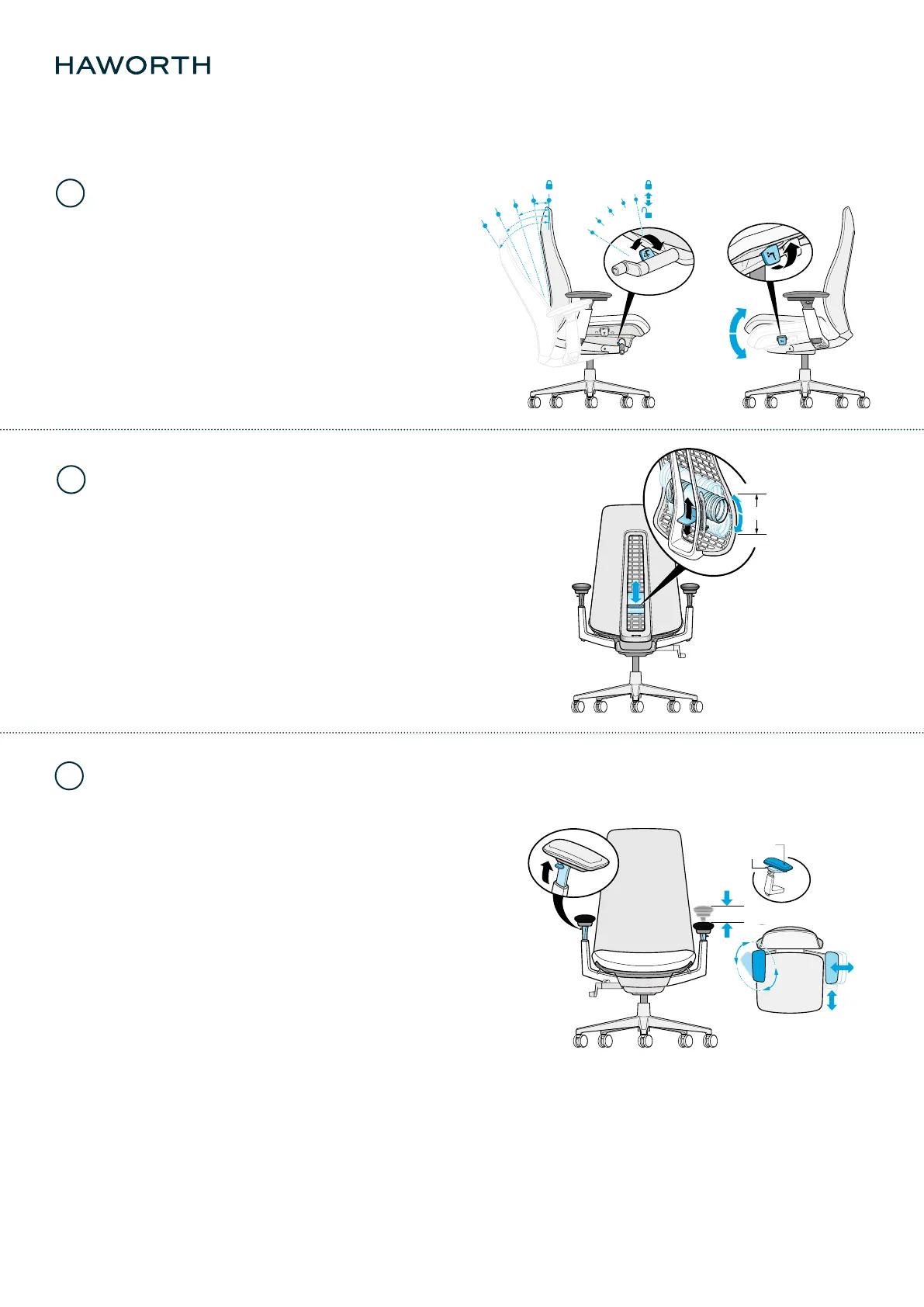
Back Stop and Forward Tilt (optional)
Back Support/Lumbar Adjustment
(optional)
Back stop allows users to lock the back of chair at upright
position for task application. In total 4 additional back stop
positions are available. (1) Recline to the desired stopping
position and (2) push down on the lever to activate the back stop.
(3) Pull up on the lever to release the back stop. Rotate the lever
forward to engage; rotate backward to disengage.
Forward Tilt enables you to vary your posture throughout
the day by changing the curve of your spine. (1)Push
down on the lever. (2)Recline just until you hear a click,
then lean forward. (3) Pull up on lever and lean back to
release forward tilt.
Lumbar adjustment provides additional support in the lower
back. It maintains the natural curvature of the spine at the lower
back and allows users to choose the support that feels right for
them. The integrated passive pelvic support rotates the pelvis
forward to maintain the natural spine shape.
(1) Pull up on the handle to raise the lumbar pad; push down to
lower it.
Fern
User Guide
5
6
7
2 | 2Haworth EMEA
5 x
Arms adjustments (optional)
Height adjustment accommodates users with varying elbow rest
heights so that users avoid lifting their shoulders or leaning side-
ways to get arm support.
(1) Armcaps height adjustment raises and lowers the arms to
keep the users shoulder in a neutral posture. To change the height
of the armrest, pull up on the lever and slide the armrest up or
down.
(2) Armcapst side-to-side adjustment accommodates users with
various shoulder width. Grasp the armrest cap and slide it
side-to-side as needed.
(3) Armcaps front-to-back adjustment allows users to get closer
to their work surface while maintaining eective use of the
backrest. Grasp the armrest cap and slide it forward or backward
as needed.
(4) Armcaps pivot allows the user to have proper support of the
forearm when mousing or keying. To change the angle of the
armrest, grasp the armrest cap and rotate the front of the
armcaps toward or away from the body.
100
125 mm
4-D Arms:
Elements pivot



 To Previous Page