4.2.8 The fault interface
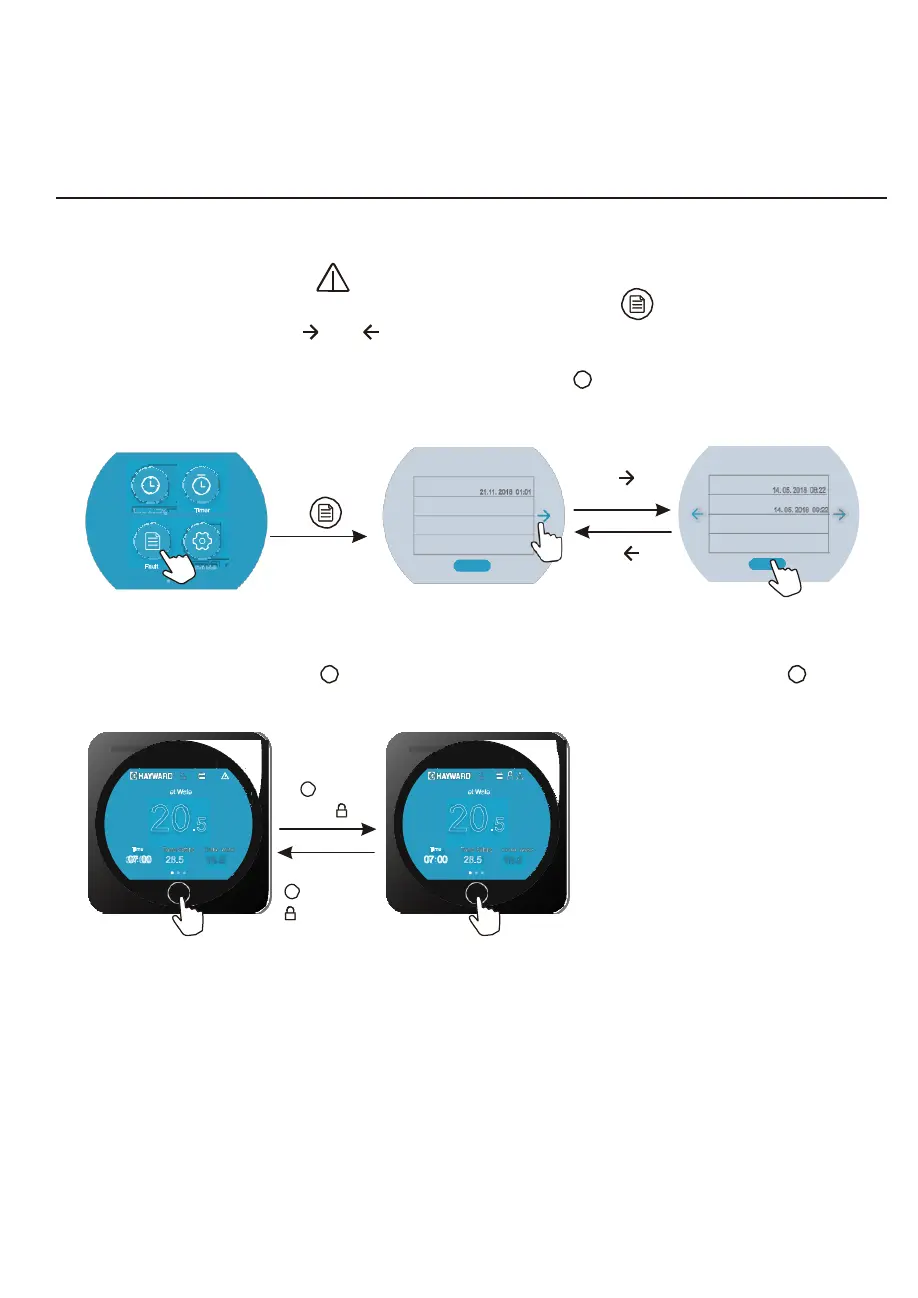
When fault occus, the fault icon “ ” will display in the main interface.
To check the fault record list, slide to the Third function interface, click “ ” to enter into the Fault
history record interface, click “ ”or “ ” to page up or down, the fault interface will record the
time, code, name of the fault.
Click “Del” to clean the fault records and press the BACK button “ ” to return back to the Third
function interface.
Parameter
click “ ”
Fault
E08 Communication fault
21.11. 2018 01:01
P09 Antifreeze Temp. Sensor Fault
19. 11. 2018 05:20
P09 Antifreeze Temp. Sensor Fault
19. 11. 2018 06:20
P09 Antifreeze Temp. Sensor Fault
19. 11. 2018 07:20
1/10
Del
click “ ”
to page up
click “ ”to
page back
Fault
P07 Suction Temp. Sensor Fault
14. 05. 2018 08:22
P02 Outlet Temp. Sensor Fault
14. 05. 2018 09:22
2/10
Del
4.2.8 Keyboard locking
In the Main interface, press the “ ” button over 5 seconds, the screen is locked, press the “ ”
button over 5 seconds again to unlock the screen.
Inl
I
e
nl
t
et
W
wa
a
te
te
r
r
20
.5
press button
“ ” 5s, it
shows “ ”
Inl
I
e
nl
t
et
W
wa
a
te
te
r
r
20
℃
.5
Time
Te
H
m
ea
p
tin
S
g
et
S
tin
et
g O
O
u
u
t
t
l
l
e
e
t
t
Water
Time
Te
H
m
ea
p
tin
S
g
et
S
tin
et
g O
O
u
u
t
t
l
l
e
e
t
t
Water
07 00
28.5 18.5
℃
press button
“ ” 5s,the icon
“ ” disppears
07 00
28.5
℃
18.5
14



 To Next Page