10
1 2
3
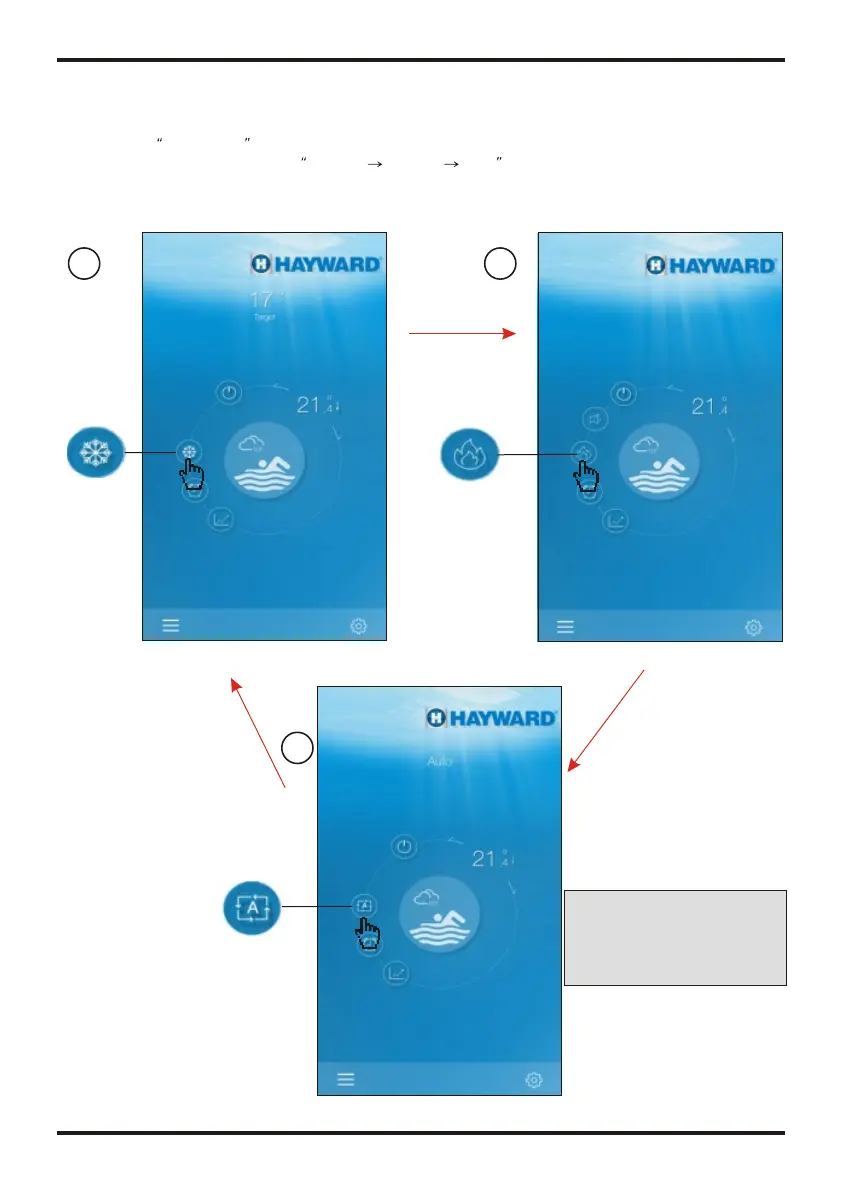
4.2.2 Modes shifting
Cick the Mode shift icon to shift running mode of equipment.
The sequence of shifting is Cooling Heating Auto and that cycle repeats.
Shift to Heating
mode
Shift to Cooling mode
Shift to Auto mode
Interface of cooling mode
Interface of heating mode
11
21
4.2.3 Setting the temperature
Complete the setting of target temp.
Hold the cursor slide to change
the temperature
1
2
Click characters
to set timer
4.2.4 Timer setting
(1) Click Timer icon to enter the timer setting interface.
(2) Click "<" to return to previous interface.
(3) 2 independent groups of timer are provided for setting.
Interface of Auto mode
Note:
when the unit is designed
for single automatic mode or
single the mode can not be
switched.
OPERATION AND USE
OPERATION AND USE


 To Next Page