CONTENT
1 The brief introduction of Wi-Fi module
Description of the magic controlling
3 The using of Wi-Fi module
3.1 Wi-fi module work
3.2 Download the APP
3.3 Register
3.4 Configuration
4.1 The meaning of main icon
1.1 Spare parts of Wi-Fi module
1.2
2 The installation of Wi-Fi module
2.1 Opening the heat pump
2.2 Connection
2.3 Reinstall
4 Operation and use of APP
4.2 Main Function
4.3 Other Function
5 FAQ
1
1
1
2
2
2
3
3
3
4
5
6
8
8
9
14
15
1.2 Description of the magic controlling
1
2
LED light( on = green )
Network configuration button
1.Keeping-on blue light indicates power is on;
2.Flashing blue light indicates Air link connection
configuration;
3.Keeping-on green light indicates the unit is
connected to the Cloud or the phone;
4.Flashing green light indicates the unit is
connected to the router;
5.Keeping-on red light indicates no Internet
connection;
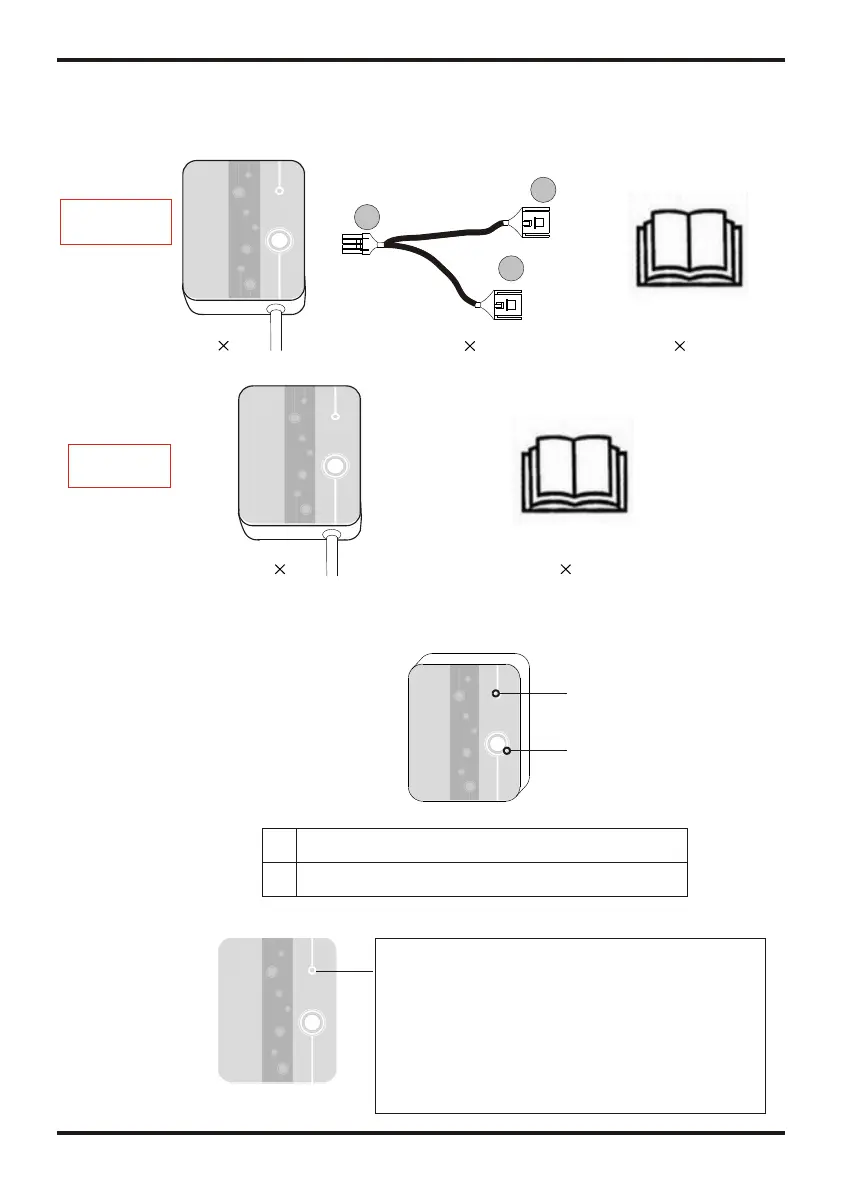
1.1 Contents of the accessory pack
(1)
(1)
1 The brief introduction of Wi-Fi module
1
1
2
(1) (1)
Or
A
B
C
The first kind
of accessory
The second
accessory
OPERATION AND USE
(1)


 To Next Page