8
9
2
1
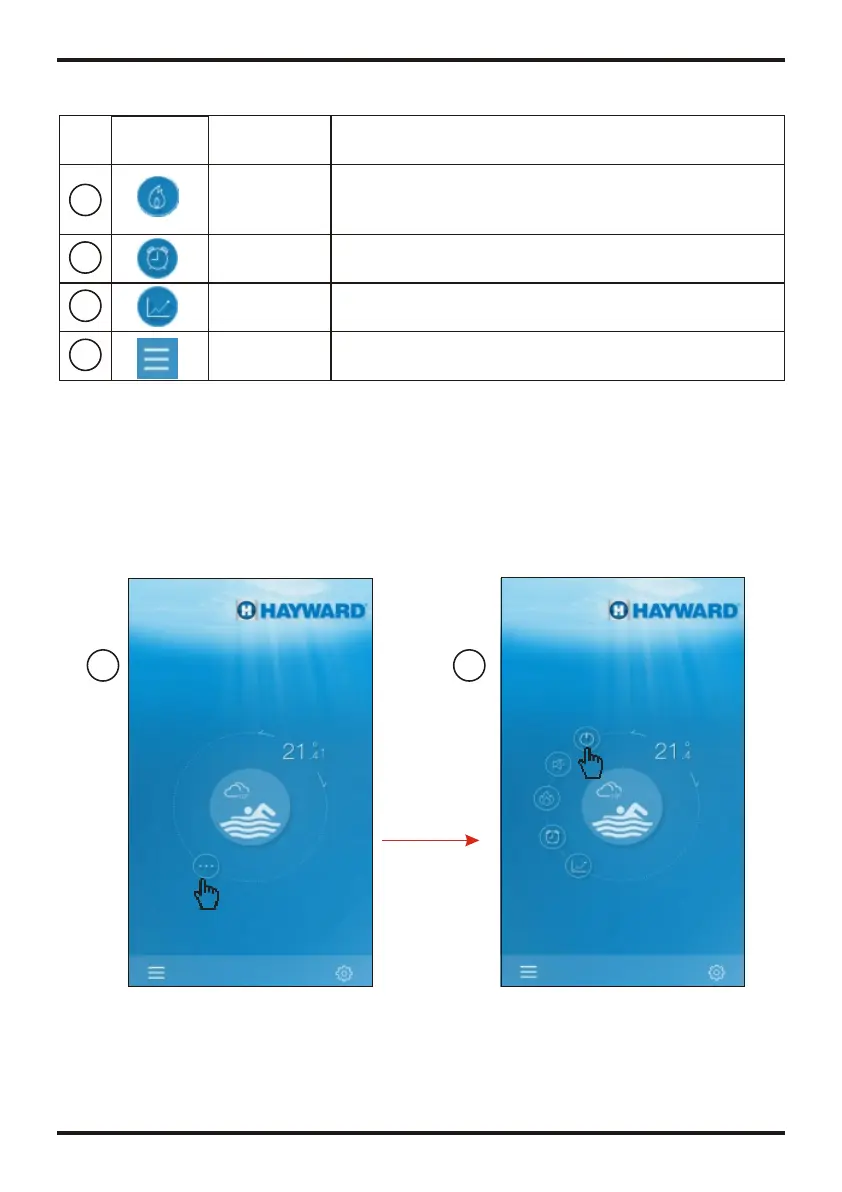
Interface of POWER ON
4.2.1 Turn ON/OFF
4.2 Main Function
4 Operation and Application of APP
4.1 The main icon and function
1
8
3
4
6
7
1
10
2
2
5
9
Menu button
Press the menu button, it will show the function list.
FUNCTIONS
NAME
ICON
Target temp.
Pointer
The current display is the inlet temp.,press and hold to
slide and adjust target temperature.
No.
Weather
Display the weather for the day, click to see the weather
for the next three days
Click it to shift running mode of equipment between two
modes: mute and un-mute (see page.12)
Mute
conversion
Press to control the on/off state of the unit.
On/off button
Setting
Press to set the software.(see page.14)
Mode shift
Click it to shift running mode of equipment among three
modes: Cooling, heating and Auto.The cooling mode does
not display this icon.(see page.10.)
Timer
Device list
Click it to enter the timer on/off and mute timer setting
interface(see page.11).
Device list, press it and goes to deveice list.
Press to show the temperature curve about latest
temperature record in a month.(see page.13).
Temperature
curve
FUNCTIONS
NAME
NO.
ICON
OPERATION AND USE
OPERATION AND USE
1
2
3
4
5
6
7
8
9
10


 To Next Page