12
1
2
On Silence Mode(ON/OFF)
4.2.5 Silence Mode
Power on state
Click mute icon to shift the Silence Mode(ON/OFF) .
3
4
Save it after setting
Slide rightwards
to start timer
Slide leftwards
to close timer
Click "OK" to
finish
13
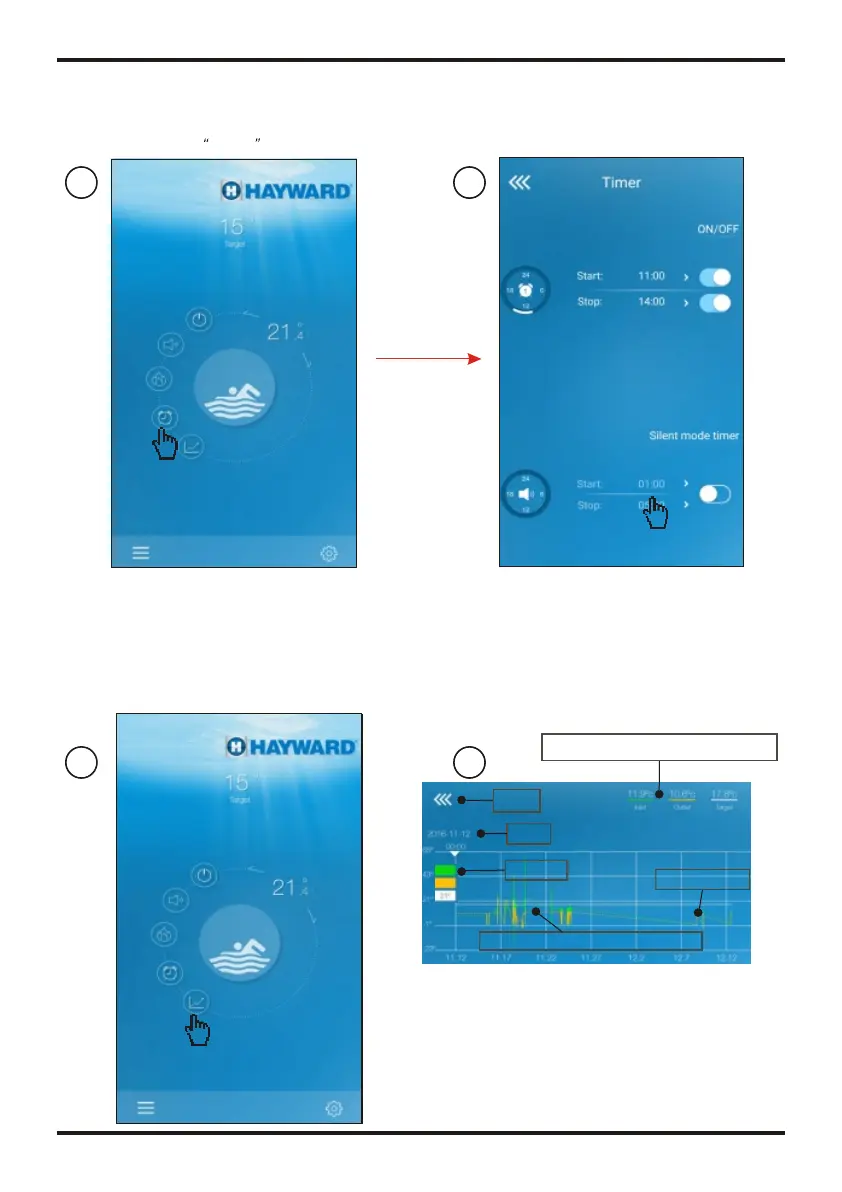
Click to set the time
4.2.6 Timing mute
Click Timer icon
1
2
Press the curve button
1
2
4.2.7 Check the Temp.curve
a.You can get current or history(up to past 30 days) informations of of
temperature variation by easily sliding the pointer.
Time axis
Interface of Temp.curve
History information of Temp.
Temperature axis
Pointer
Current informations of Temp.
Temp.curve
b.With two fingers you can zoom in/out the Temp.curve.
Back
Date
OPERATION AND USE
OPERATION AND USE


 To Next Page