Setting Heat Pumps for Remote Operation
Summit Platform Heat Pumps
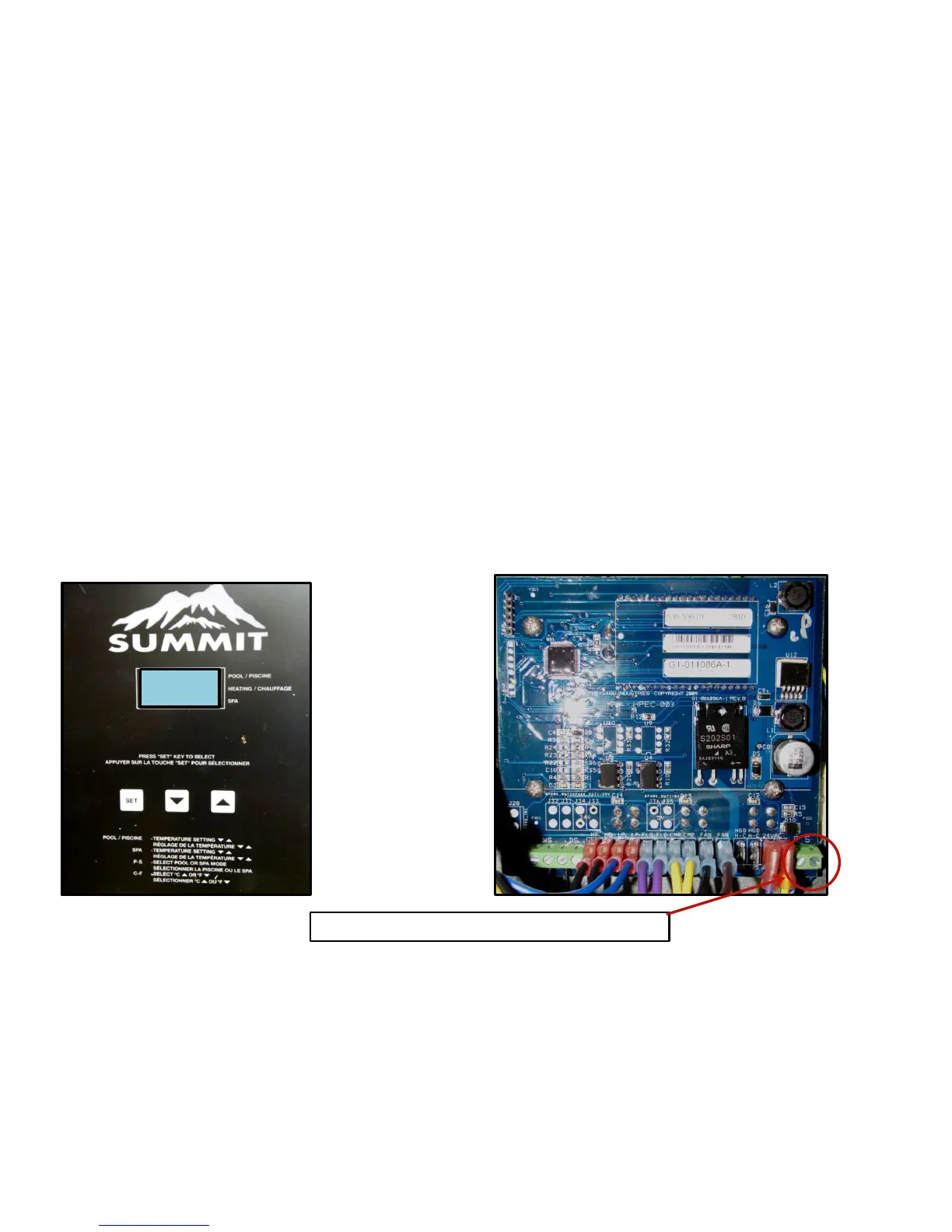
Attach 2 wires from remote to terminals marked ‘P’ and ‘S’ on the lower right corner of the control board.
Set Pool temperature to off. Set Spa temperature to ‘104’. Press and hold ‘Set/Select’ button until ‘Loc’
appears. Release the ‘Set/Select’ button. Press up arrow until 50 appears. This unlocks the set up menu.
Release up arrow. Press and release ‘Set/Select’ button 5 times or until ‘P_S’ appears.
Press up or down arrow until ‘E’ appears. Heat pump is now ready for remote operation.
Note: Move quickly between steps, if the temperature shows on display you will have to start over.
Loc
Attach 2 wires from remote to terminals P and S





 To Next Page