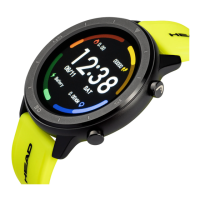
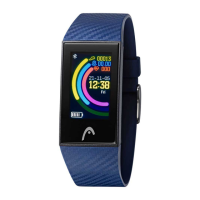
This document is a user manual for the HEAD Smartwatch, model "Los Angeles," version 05.2021. It provides comprehensive instructions and information regarding the smartwatch's functions, usage, and maintenance.
Function Description
The HEAD Smartwatch offers a wide array of functions designed to enhance daily life and health monitoring. Key features include:
Communication and Notifications:
- Push Message: When connected to the app and notification permissions are enabled, the smartwatch receives new messages from the mobile phone's notification bar. It can store up to 10 messages, with older messages being overwritten. Users can clear all message records.
- SMS Notification: With SMS notification enabled in the app, the watch receives one or more SMS reminders when messages arrive on the mobile phone.
- Other Application Message Notifications: Supports notifications from various applications like WhatsApp, Outlook, Facebook, etc., when enabled in the app.
- Phone / Call History: Allows users to turn Bluetooth phone functionality on/off. When on, it prompts for pairing with the Bluetooth name and the last four digits of the Bluetooth address. After successful connection, the watch can be used for calls.
- Bluetooth Phone Answering/Hanging Up: Records connected and dialed calls (up to 50 records, overwritten when 128 are full). Users can call back by clicking any call record or dial a number using the keyboard.
- Frequently Used Contacts: Connects to the app to synchronize up to 20 frequently used contacts to the watch.
- Call Notification: When the call reminder is turned on in the app, the watch will light up and vibrate upon receiving a call.
- Bind Audio Call: On the dial interface, sliding down reveals a drop-down interface where users can turn on the audio call switch, check the Bluetooth name, and connect to the corresponding Bluetooth name in the mobile phone's settings.
Health and Fitness Monitoring:
- Fitness Data: By default, fitness data is enabled. Swiping right on the watch displays current steps, distance, and calorie consumption. Data is cleared daily at 12 o'clock AM.
- Sports Modes: Users can select an exercise mode and start tracking. The start button pauses the exercise, and the end button saves the data. Exercise data is saved only if the duration is greater than 1 minute; otherwise, it prompts "Too little data to save."
- Heart Rate: Worn correctly on the wrist, the smartwatch measures heart rate in a single instance, with data output in 10 seconds and measurement completed in 10-20 seconds.
- ECG (Electrocardiogram): Requires correct wrist placement and the "ECG monitor" interface in the app. Measures ECG value in a single instance, with data output in 10 seconds and completion in 10-20 seconds. A single ECG can be saved synchronously in the app.
- Blood Pressure: Worn correctly, it measures blood pressure in a single instance, with data output in 10 seconds and completion in 10-20 seconds.
- Blood Oxygen: Worn correctly, it measures blood oxygen value in a single instance, with data output in 10 seconds and completion in 10-20 seconds.
- Sleep Monitor: Monitors sleep from 18:00 in the evening to 10:00 the next day. Sleep data can be synchronized to the app for viewing after connecting.
- Breathing: Offers three breathing modes (slow, moderate, fast) with selectable durations of 1, 2, or 3 minutes for measuring breathing data.
- Female Assistants: Records women's menstrual period status, allowing users to view data like last month's end time, menstrual period length, and days between periods on the app.
Convenience and Utility Features:
- Control Center: Accessible by sliding down from the start screen, it displays power, Bluetooth connection status, time, and week. Icons allow for brightness adjustment, weather display (connected to app), "Do not disturb" mode (for messages only, not phone audio), quick use function settings, Bluetooth on/off for audio calls, and "about" information.
- Navigation: Swiping left accesses the step counter, heart rate test, and sleep record. Swiping down opens the control center for brightness, weather, do not disturb, settings, Bluetooth call switch, version, and Bluetooth address. Swiping right shows message notifications. Swiping up enters the menu interface. Long pressing the dial interface allows switching dials.
- Stopwatch: Enters a timing interface to record time.
- Weather: Displays daily weather information (Celsius and Fahrenheit), ultraviolet (UV), atmospheric pressure, and altitude conditions when connected to the app.
- Find Mobile Phone: When connected to the app, clicking this function on the watch makes the phone vibrate or ring.
- Remote Music: When connected to the app, controls phone music (start/pause, previous/next song), with speaker sound appearing on the phone. If call Bluetooth is connected, speaker sound appears on the watch.
- Massager: Starts watch vibration (massage) with a green button and stops with a red button.
- Remote Camera: Tapping the camera icon wakes up the watch's camera mode. Tapping the camera button takes a photo, which is automatically saved to the phone's album.
- Data Synchronization: Watch data can be synchronized to the app when connected.
- Dial Standby: "Open" mode brightens the screen when the wrist is lifted. "Close" mode keeps the screen black, requiring a button press to turn it on.
- Do Not Disturb Mode: Set in the app (Device > More) for a specific time period, during which no phone calls or message sound reminders will occur on the watch.
- Daily Alarm Clock: Set in the app (Device > More). Alarms can be set once or repeatedly for specific days. Alarms can be turned on/off and deleted by selecting and swiping right.
- Movement Reminder (Sedentary Reminder): Set in the app for a start/end time and interval. The watch vibrates and displays a sedentary icon when the time is reached.
- Drink Water Reminder: Set in the app for a start/end time and frequency. The watch vibrates and displays a drink icon when the reminder time arrives.
- Dial Design: Users can push existing watch faces from the app (Device > Dial Push > Select Dial) or customize their own with a background (Dials with pen icons). The watch restarts and reconnects after synchronization.
- Firmware Version: Displays the watch's firmware version and allows for upgrades.
- Unbind: Disconnects the watch from the app. For iOS, users also need to ignore the Bluetooth device in phone settings.
- Menu Style: Offers 3 menu styles to choose from, which changes the watch's menu appearance.
- Settings: Allows switching watch faces by long-pressing the screen, setting screen-on time (5 to 30 seconds), adjusting vibration intensity (levels 1, 2, 3), turning Bluetooth phone on/off, and restoring factory settings.
Important Technical Specifications
- Charging Time: Approximately 2 hours using the provided USB charging cable.
- Water Resistance: IP68 waterproof. This means it is protected against splashes of water and sweat but is not suitable for swimming, bathing, or showering. Avoid washing hands with the smartwatch. The manual explicitly warns against hot baths due to potential damage from water vapor.
- Storage Capacity: Stores up to 10 messages (overwritten) and over 50 call records (overwritten when 128 are full).
Usage Features
- Starting/Shutting Down: Press the button for a few seconds to start. To shut down, press the button for a few seconds and confirm, or long-press the button on the dial interface and choose "v".
- Screen On/Off: Short press the button on the dial interface to turn the screen on/off.
- Navigation: Swipe gestures (left, right, up, down) and button presses are used for navigating through interfaces and functions.
- App Integration: The smartwatch requires the "HEAD WATCHES" app, downloadable from www.headwatches.com/app, Apple App Store, or Google Play Store, for full functionality, synchronization, and advanced settings.
- Bluetooth Connection: Essential for message notifications, call functions, data synchronization, and app control. The watch is always in a searchable state when turned on.
- Customization: Offers customizable watch faces and menu styles.
Maintenance Features
- Charging: Use the USB charging cable provided. If the battery is empty or the watch doesn't turn on, charge it for at least half an hour to activate.
- Factory Reset: Available in settings to restore the watch to its factory state.
- Firmware Upgrade: Users can upgrade the firmware version through the app.
- Temperature Avoidance: Avoid exposing the device to extreme hot or cold temperatures for prolonged periods to prevent permanent damage.
- Water Exposure: While IP68 rated for splashes and sweat, it's crucial not to swim, bathe, or shower with the watch. Avoid hot baths entirely.
- Warranty: The motherboard is guaranteed for one year, and the battery and charger for half a year from the purchase date, covering manufacturing, material, and design defects under normal use. The warranty does not cover failures due to unauthorized disassembly, accidental falls, water damage, external force cracks, scratches, damage to peripheral components, or misuse. A warranty card with purchase date and stamp is required for free warranty requests. For repairs, the product should be taken to the company or its dealership.

 Need help?

 To Next Page

 General