The Max Owner’s Manual
5
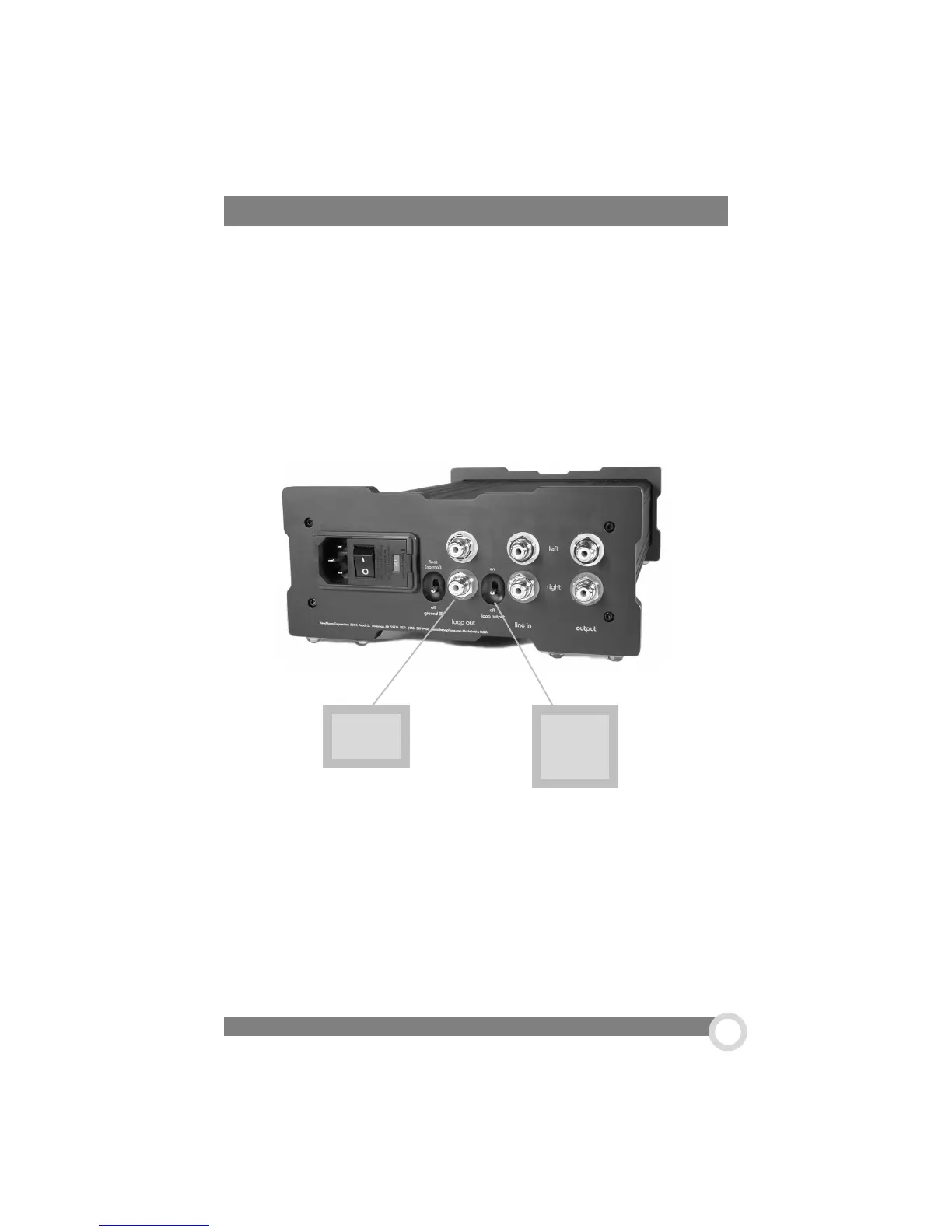
1. Loop Outs. The Loop Outs pass a signal directly in and out without any
interference.
2. Loop Output Switch. With the loop output switch in the “on” position the
line inputs are connected to the loop output. This feature allows you to use the
record output of a preamp as the source for the headphone amp (which is really
the best way to do it), and use the loop output as the source for a tape recorder.
When not using the tape recorder, you can turn the loop output off to disconnect
any performance degrading reactance of the tape deck input.
1. Loop
Outs
2. Loop
Output
Switch
When purchasing The Max HeadRoom, you are given a choice of having a loop out
put or a second line out on the back of the amp. Most people will prefer to have a
2nd output, but if you have chosen to go with the ‘Loop Out’ option read on here.
Rear Panel- Loop Out Option
Connect the cables from your audio source to the RCA inputs on the back of the amp.
This connection can be made to any line-level audio source, like a CD player, tape
deck, phono section or the tape loop of a preamp. Audio cables are usually color
coded with the red connector representing the right channel. The left channel connector
is usually either black or white.


 To Next Page