6
800.828.8184
www.headphone.com
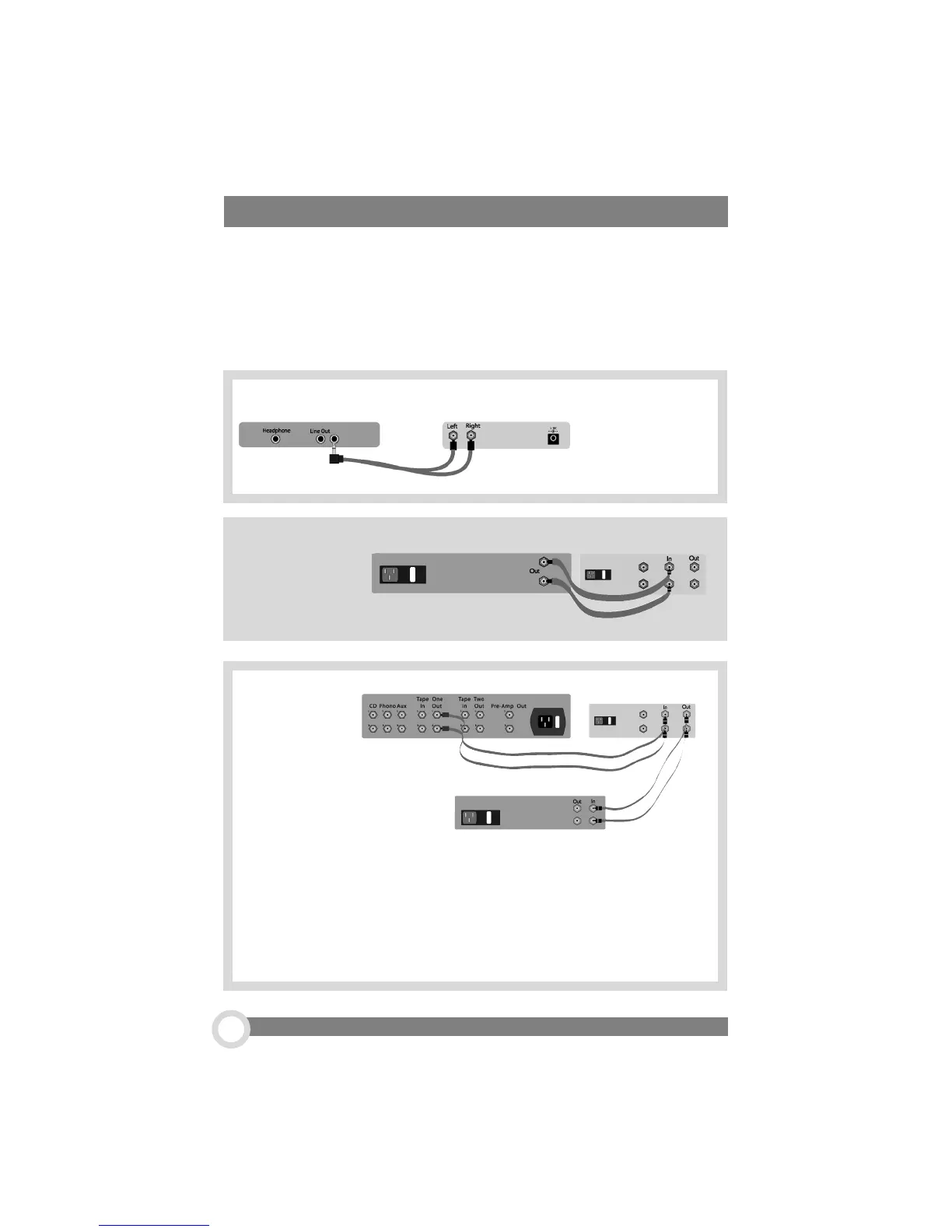
Connect the cables from your audio source to the RCA inputs on the back of the amp.
This connection can be made to any line-level audio source, like a CD player, tape
deck, phono section or the tape loop of a preamp. Audio cables are usually color
coded with the red connector representing the right channel. The left channel connector
is usually either black or white.
How to Hook Up Your Max Amplifier
How about another helpful feature: The Max can double as a very good
sounding, dual-source, active preamp. Make sure the Processor, Filter,
and Ground Lift switches are in the OFF position when listening through
speakers to avoid goofing up your imaging and frequency response.
To hook it up, all you have to do is run a pair of interconnects from the line-
level RCA output jacks on the back of The Max to a power amplifier.
...To a Player
...To a Portable
Player
...As a PreAmp
HeadRoom Amp
Portable Player
HeadRoom Amp
PreAmplifier
Player
HeadRoom Amp
Player


 To Next Page