EasyManua.ls Logo

Health O Meter 800KL - User Manual

Health O Meter 800KL
2 pages
Print Icon
To Next Page IconTo Next Page
Loading...
www.healthometermedical.com
800KL Instruction Manual
Please read this instruction manual carefully before use.
1. There is a plastic film with a red arrow under the Lithium battery cover to prevent battery drain in shipping. Please remove the strip before continuing with these
instructions. Also, some models have a static cling label on the lens to prevent scratching. Please remove before use.
2. Your scale has been set at the factory to read weight in pounds. You may select kilograms or stone units of measurement by pressing the “kg/st/lb” button on the
bottom of the scale.
3. Place scale on flat, hard surface. Carpeted or uneven floors may affect accuracy.
4. Step on the scale (disregarding the reading) and step off. This process insures the scale is set and is now ready for use. Do this whenever the scale is moved.
At all other times step straight onto the scale.
5. Step onto the scale platform and remain still. The display will show “0.0”, then count up to your weight. The display will flash twice when the weight is locked.
Your weight is now displayed.
6. If you step off of the scale, the display will turn off automatically within 5 seconds. If you continue to stand on the scale, your weight will be displayed for 10
seconds and then the scale will turn off automatically.
Precautions
1. Clean exposed parts with a soft, slightly damp cloth. To remove stains, use a mild soap. Never use detergents, excess water, treated cloths, harsh cleaning
agents, or sprays. Do not attempt to lubricate or open scale casing.
2. Although your scale is designed to be maintenance-free, it contains sensitive electronic parts. Avoid rough treatment. Do not drop, kick, or jump on it. Treat it with
care to ensure the best performance.
3. This scale is designed to read weights between 25 and 400 lbs / 12 and 180 kgs / 2 and 28 st 8 lbs. To prevent damage, do not place more than
400 lbs / 180 kgs /28 st 8 lbs on it.
4. Do not store scale where you store cleaning chemicals. The vapors from some household products may affect the electronic components of your scale. Do not
store scale on its side.
5. This scale is an extremely sensitive weighing device. In order to prevent run down of the battery, do not store anything on the scale.
6. Do not dispose of batteries in fire. Batteries may explode or leak. Remove the battery if the scale will not be used for a long period of time.
Battery Replacement
1. Use one 3 volt CR2032 lithium battery (as installed).
2. Open the battery compartment on the bottom of the scale by pushing the tab and lifting up the cover.
3. Remove the old battery from the compartment.
4. Place the new battery with the “+” sign up into the battery compartment.
5. Push gently down on the compartment cover until it clicks shut.
Low Battery
Your scale is equipped with a low battery indicator. It will display “LO” or readings will grow dim or become irregular if the battery needs replacement.
Trouble Shooting
1. Place your feet in the same position every time you weigh yourself. Stand still during measurement.
2. Weigh yourself without clothing whenever possible. Clothes can vary in weight.
3. Move the scale to a location where it won't be bumped. If your scale is bumped while being activated or while in use, an inaccurate reading may occur.
4. For the most consistent readings, weigh yourself at the same time of day. Allow for weight fluctuations due to food or drink in your system.
5. The maximum capacity of this scale is 400 lbs / 180 kgs / 28 st 8 lbs.. Should “Err ” appear on the display during a weighing, this indicates that the maximum
weighing capacity of the scale has been exceeded. Remove the weight immediately; otherwise, permanent damage may occur.

Other manuals for Health O Meter 800KL

Question and Answer IconNeed help?

Do you have a question about the Health O Meter 800KL and is the answer not in the manual?

Summary

Scale Operation and Setup

Initial Setup and Usage

Steps for preparing the scale and performing initial calibration for accurate measurements.

Taking Measurements

How to step on the scale and interpret the display readings for weight.

Precautions and Care

Cleaning and Handling

Guidelines for cleaning, avoiding damage, and general care of the scale.

Usage Limits and Storage

Weight capacity, storage conditions, and battery disposal recommendations.

Battery Management

Battery Replacement Procedure

Step-by-step guide to replacing the scale's CR2032 lithium battery.

Low Battery Indicator

Information on how to recognize when the scale's battery needs replacement.

Troubleshooting

Common Issues and Solutions

Advice for consistent readings and interpreting error messages like 'Err'.

Limited Warranty Information

Warranty Coverage Details

Duration and scope of the product warranty against defects.

Warranty Exclusions

Situations and damages not covered by the warranty terms.

Warranty Service and Claims

How to obtain warranty service and required documentation for claims.

Overview

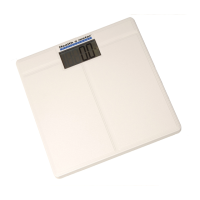
This document describes the Health o meter® 800KL Professional scale, a device designed for accurate personal weight measurement. The scale is intended for home use and offers a straightforward user experience with several features to ensure reliable readings and ease of maintenance.

Function Description

The primary function of the Health o meter® 800KL Professional scale is to measure and display an individual's weight. It operates by detecting the pressure exerted on its platform and converting this into a digital weight reading. The scale is designed to provide consistent and accurate measurements, making it suitable for regular personal use. It offers the flexibility to display weight in different units, including pounds (lbs), kilograms (kgs), and stone (st), catering to various user preferences and regional standards. The scale incorporates an automatic shut-off feature to conserve battery life, turning off after a period of inactivity or after displaying the weight for a set duration.

Usage Features

To ensure optimal performance and accuracy, the Health o meter® 800KL Professional scale includes several usage features and recommendations:

  • Initial Setup: Before first use, or after the scale has been moved, it requires a simple calibration step. Users should step onto the scale (disregarding the initial reading) and then step off. This process prepares the scale for accurate measurements. Once this is done, users can step directly onto the scale for subsequent weighings.
  • Unit Selection: The scale allows users to easily switch between measurement units (pounds, kilograms, or stone) by pressing a dedicated "kg/st/lb" button located on the bottom of the device. This flexibility ensures that users can view their weight in their preferred unit.
  • Measurement Process: To obtain a weight reading, users should step onto the scale platform and remain still. The display will initially show "0.0" and then count up to the current weight. Once the weight is locked, the display will flash twice, indicating a stable and final reading.
  • Automatic Shut-off: The scale is equipped with an automatic shut-off function to preserve battery life. If a user steps off the scale, the display will turn off automatically within 5 seconds. If a user remains on the scale, their weight will be displayed for 10 seconds before the scale automatically turns off.
  • Placement Recommendations: For the most accurate readings, the scale should always be placed on a flat, hard surface. Carpeted or uneven floors can affect the accuracy of measurements.
  • Consistency in Weighing: To achieve the most consistent and reliable weight readings, it is recommended that users place their feet in the same position each time they weigh themselves and stand still during the measurement. Weighing oneself without clothing whenever possible is also advised, as clothing can vary in weight and impact accuracy. For the most consistent results, weighing at the same time of day is recommended, accounting for natural weight fluctuations due to food or drink intake.
  • Error Indicators: The scale is designed to alert users to potential issues. If "Err" appears on the display during a weighing, it indicates that the maximum weighing capacity of the scale has been exceeded. In such cases, the weight should be removed immediately to prevent permanent damage to the device.
  • Low Battery Indicator: The scale includes a low battery indicator. When the battery needs replacement, the display will show "LO" or the readings may become dim or irregular, signaling that it's time to change the battery.

Maintenance Features

The Health o meter® 800KL Professional scale is designed for ease of maintenance, focusing on simple cleaning and battery replacement:

  • Cleaning: Exposed parts of the scale can be cleaned with a soft, slightly damp cloth. For stains, a mild soap can be used. It is important to avoid using detergents, excess water, treated cloths, harsh cleaning agents, or sprays, as these can damage the electronic components or the scale's finish.
  • Battery Replacement: The scale uses one 3-volt CR2032 lithium battery. To replace the battery, users need to open the battery compartment located on the bottom of the scale by pushing a tab and lifting the cover. The old battery can then be removed, and a new battery should be inserted with the "+" sign facing up. The compartment cover should be gently pushed down until it clicks shut.
  • Storage Recommendations: To prevent damage and ensure longevity, the scale should not be stored in areas where cleaning chemicals are kept, as their vapors can affect the electronic components. It should also not be stored on its side. To prevent battery rundown, nothing should be stored on the scale when not in use. Batteries should not be disposed of in fire, as they may explode or leak. If the scale will not be used for an extended period, it is advisable to remove the battery.
  • Durability and Care: While the scale is designed to be maintenance-free and contains sensitive electronic parts, it is important to avoid rough treatment such as dropping, kicking, or jumping on it. Treating the scale with care will help ensure its best performance and extend its lifespan.

Health O Meter 800KL Specifications

General IconGeneral
DisplayLCD
TypeDigital
Graduation0.2 lb
Power SourceBatteries
Platform Size14.5" (w) x 14.5" (d) x 3.25" (h) / 368 mm (w) x 368 mm (d) x 83 mm (h)

Related product manuals