EasyManua.ls Logo

Heath Zenith SECUR360 9311 - User Manual

Heath Zenith SECUR360 9311
28 pages
Print Icon
To Next Page IconTo Next Page
Loading...
To see operational and troubleshooting information and videos,
go to www.hzsupport.com
Dated receipt required for warranty replacement.
FEATURES
1080p HD Video
180° Motion Sensor
Energy Saving LED
UNPACKING
Be sure to remove all contents from packaging and verify
all items are present before assembling this light xture.
is package includes the following items:
Security Light
Owners Manual
SECUR360 App Quick Start Guide
Mounting Hardware
© 2020 HeathCo LLC 210228-01A
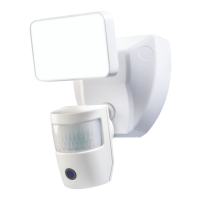
Connected LED Video
Security Motion Light
Model: 9311
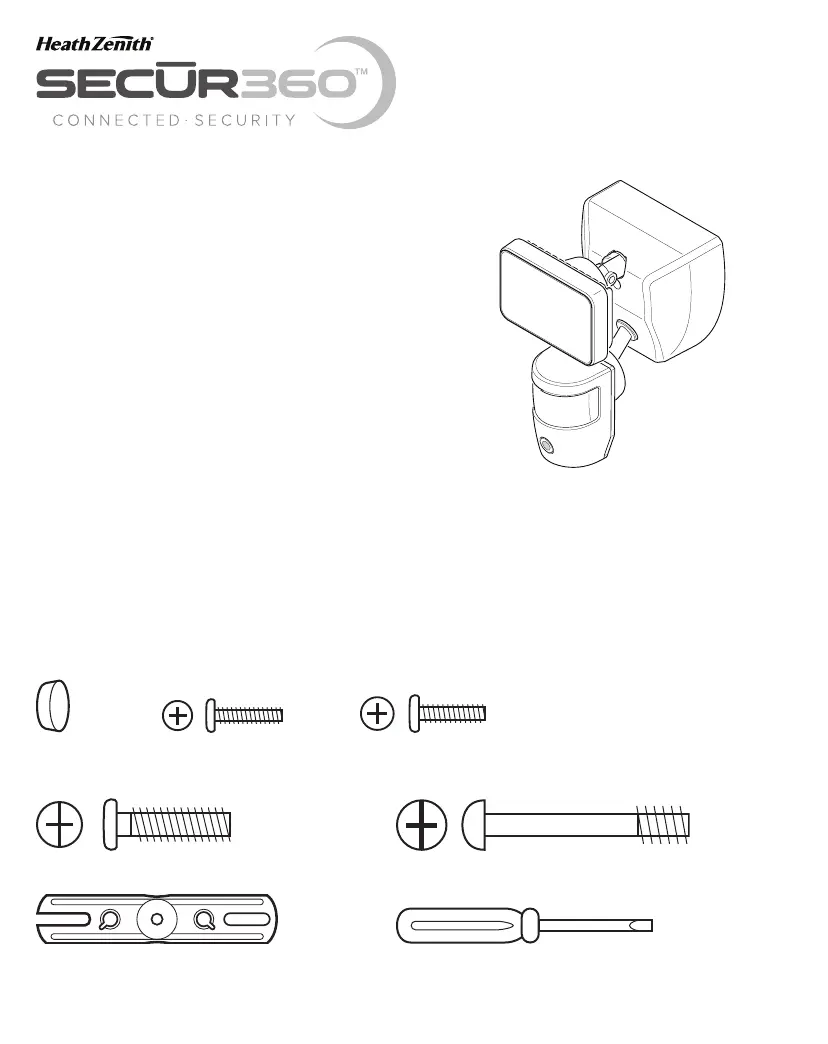
HARDWARE INCLUDED
Note: Six mounting bracket screws are included. e installation will only require two. Discard the unused mounting
bracket screws after installation.
Plastic plug #6 Mounting Bracket #8 Mounting Bracket
Screw (x2) Screw (x2)
Mounting Bolt Mounting Bolt (Pre-Installed in Light Fixture)
FRONT
Mounting Bracket Mini Screwdriver

Questions and Answers

  • P
    Patricia FigueroaAug 4, 2025
    How to fix a Heath Zenith Lighting Equipment that will not come on?
    • S
      shannonlopezAug 4, 2025
      If your Heath Zenith Lighting Equipment won't turn on, try the following: Ensure the light switch is on. Check and replace the fuse or turn the circuit breaker on. Make sure to recheck after dark. Verify that the wiring is correct. Re-aim the motion sensor to properly cover the desired area. Increase the sensitivity setting. Also, ensure the light is set to “AUTO” mode using the app.
  • M
    Melissa MurrayAug 9, 2025
    Why does my Heath Zenith Lighting Equipment stay on all the time?
    • K
      kristinagonzalesAug 9, 2025
      If your Heath Zenith Lighting Equipment stays on continuously, it might be due to a heat source activating the motion sensor. Try decreasing the sensitivity setting or repositioning the sensor. Also, use the app to set the light to “AUTO” or “OFF” mode. Avoid using a dimmer or timer; instead, use a standard on/off wall switch. Ensure the light fixture is installed on a circuit without motors, transformers, or fluorescent bulbs.
  • S
    Sharon BrownAug 13, 2025
    Why does my Heath Zenith Lighting Equipment turn on during the day?
    • M
      Michael ReedAug 14, 2025
      If your Heath Zenith Lighting Equipment turns on during the day, it may be operating normally. Alternatively, try setting the “Full Brite Setting” in the app to the 1, 5, or 20 minute setting.
  • J
    jacob14Aug 19, 2025
    What to do if my Heath Zenith Lighting Equipment flashes on and off?
    • Y
      Yvonne WeberAug 19, 2025
      If your Heath Zenith Lighting Equipment is flashing on and off, it could be due to several reasons. First, reposition the lamp head away from the motion sensor to prevent heat or light from triggering it. Second, decrease the sensitivity setting or reposition the sensor to avoid reflected heat. Third, if the “Full Brite Setting” is in “TEST” mode, set it to the 1, 5, or 20 minute setting in the app. Finally, relocate the fixture if a Smart Meter device is nearby.
  • N
    Nicole LindseyAug 25, 2025
    Why does my Heath Zenith Lighting Equipment turn off too late?
    • W
      williamsbenjaminAug 25, 2025
      If your Heath Zenith Lighting Equipment turns off too late in Dusk-to-Dawn setting, it may be installed in a dark location. Try relocating the light fixture or use the 3 hour or 6 hour setting.
  • M
    Melissa JonesAug 29, 2025
    Why does Heath Zenith Lighting Equipment flash once then stay off?
    • D
      Douglas HillAug 29, 2025
      If your Heath Zenith Lighting Equipment flashes once and then stays off in manual mode, the motion sensor might be detecting light from the lamp head. Reposition the lamp head to keep the area below the motion sensor relatively dark.

Summary

Installation Procedure

Wiring Connections

Details the electrical connections for the light fixture.

Final Assembly Steps

Describes attaching the fixture to the mounting plate and tightening.

Testing and Adjustments

App-Based Testing and Setup

Utilizes the SECUR360 app for testing motion and camera detection zones.

Manual Sensor and Light Adjustment

Fine-tunes the motion sensor and light head for optimal coverage.

Key Operational Considerations

Avoiding False Triggers

Lists heat sources and conditions that may cause unintended motion detection.

Seasonal Sensitivity Adjustments

Guides on adjusting sensitivity based on ambient temperature changes.

Heath Zenith SECUR360 9311 Specifications

General IconGeneral
BrandHeath Zenith
ModelSECUR360 9311
CategoryLighting Equipment
TypeMotion Sensor Light
Power SourceHardwired
Light SourceLED
Brightness2000 Lumens
Adjustable TimeYes
Adjustable SensitivityYes
Adjustable HeadsYes
Weather ResistanceYes
Mounting TypeWall Mount
ColorWhite
WiredYes
Color Temperature5000K
Detection Range70 feet
MaterialMetal

Related product manuals