EasyManua.ls Logo

Heathkit HM-2102 - Page 8

Heathkit HM-2102
26 pages
Print Icon
To Next Page IconTo Next Page
To Previous Page IconTo Previous Page
Loading...
Ge
guestHxir
3
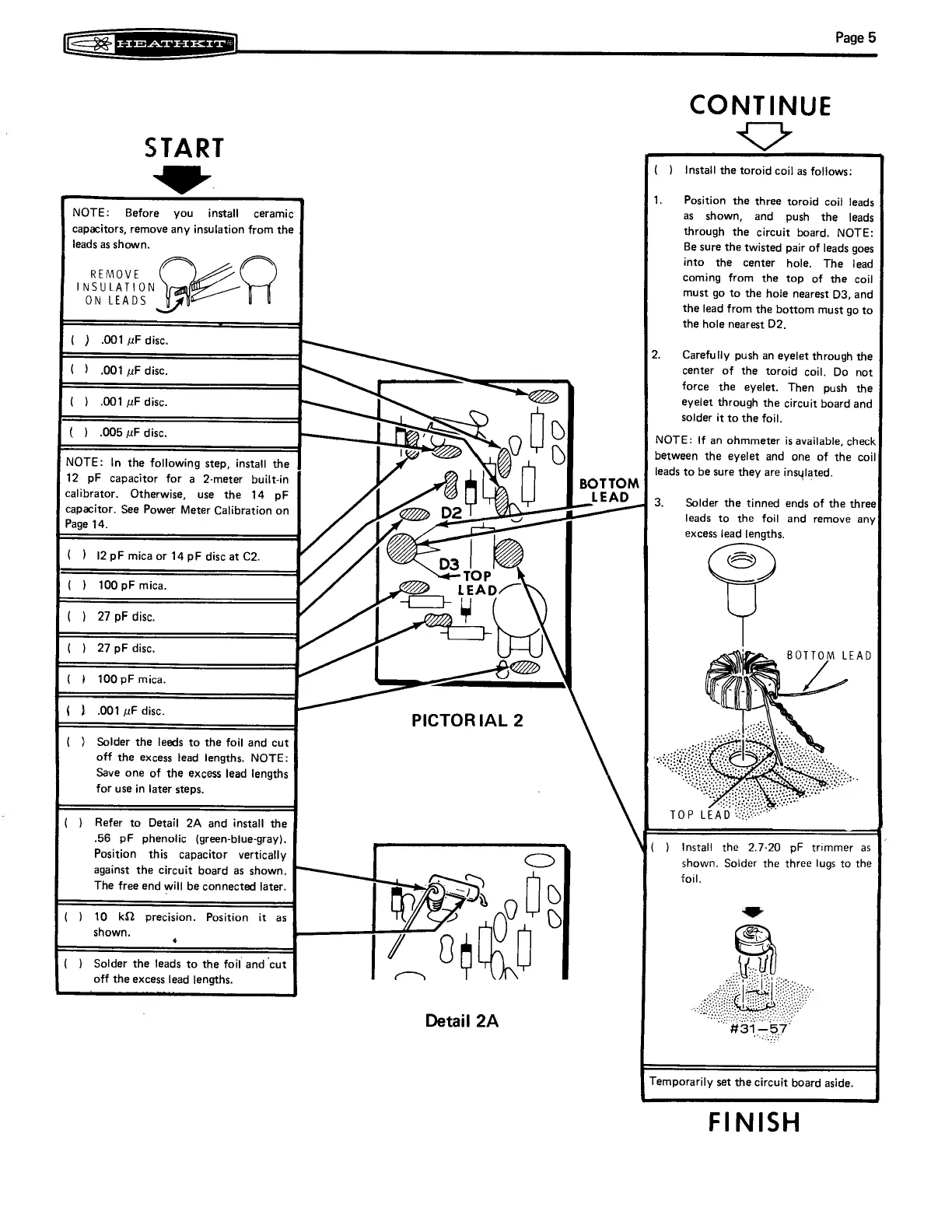
START
NOTE:
Before
you
install
ceramic
capacitors,
remove
any
insulation
from
the
leads
as
shown.
REMOVE
INSULATION
ON
LEADS
J
(
)
001
uF
disc.
()
.0017
YF
disc.
(
)
.005
uF
disc.
NOTE:
In
the
following
step,
install
the
12
pF
capacitor
for
a
2-meter
built-in
calibrator.
Otherwise,
use
the
14
pF
capacitor.
See
Power
Meter
Calibration
on
Page
14.
(
)
12
pF
mica
or
14
pF
disc
at
C2.
(
)}
100
pF
mica.
()
27
pF
disc.
(
)
27
pF
disc.
es
SLID
(
}
>
100
pF
mica.
————
{
}
.001
uF
disc.
—————
(
)
Solder
the
leeds
to
the
foil
and
cut
off
the
excess
lead
lengths.
NOTE:
Save
one
of
the
excess
lead
lengths
for
use
in
later
steps.
PICTORIAL
2
Refer
to
Detail
2A
and
install
the
-56
pF
phenolic
(green-blue-gray).
Position
this
capacitor
vertically
against
the
circuit
board
as
shown.
The
free
end
will
be
connected
later.
()
(
)
10
kQ
precision.
Position
it
as
shown.
t
(
)
Solder
the
leads
to
the
foil
and
cut
off
the
excess
lead
lengths.
Detail
2A
Page
5
CONTINUE
VY
(
)
Install
the
toroid
coil
as
follows:
Position
the
three
toroid
coil
leads
as
shown,
and
push
the
leads
through
the
circuit
board.
NOTE:
Be
sure
the
twisted
pair
of
leads
goes
into
the
center
hole.
The
lead
coming
from
the
top
of
the
coil
must
go
to
the
hole
nearest
D3,
and
the
lead
from
the
bottom
must
go
to
the
hole
nearest
D2,
Carefully
push
an
eyelet
through
the
center
of
the
toroid
coil.
Do
not
force
the
eyelet.
Then
push
the
eyelet
through
the
circuit
board
and
solder
it
to
the
foil.
NOTE:
(f
an
ohmmeter
is
available,
check
between
the
eyelet
and
one
of
the
coil
leads
to
be
sure
they
are
insylated.
3.
Solder
the
tinned
ends
of
the
three
leads
to
the
foil
and
remove
any
excess
lead
lengths.
TOP
LEAD
()
Install
the
2.7-20
pF
trimmer
as
shown.
Solder
the
three
lugs
to
the
foil.
os
sr
ml
Temporarily
set
the
circuit
board
aside.
FINISH

Related product manuals