EasyManua.ls Logo

Heathkit IG-4505 - Page 16

Heathkit IG-4505
54 pages
Print Icon
To Next Page IconTo Next Page
To Previous Page IconTo Previous Page
Loading...
Page
16
92899
df
ey
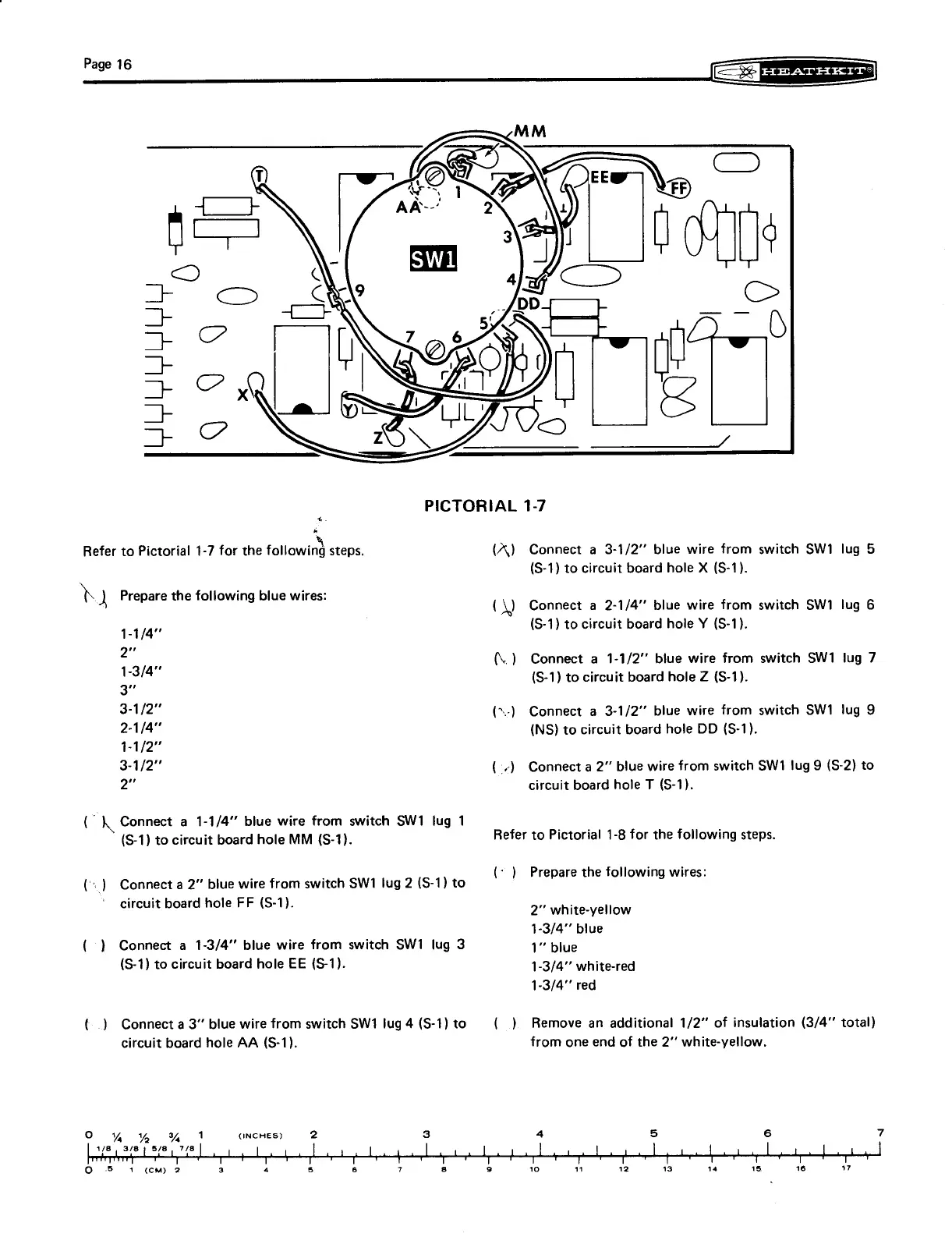
PICTORIAL
1-7
Refer
to
Pictorial
1-7
for
the
following
steps.
(A)
Connect
a
3-1/2”
blue
wire
from
switch
SW1
lug
5
(S-1)
to
circuit
board
hole
X
(S-1).
)
P
the
following
bl
ires:
i)
repare
the
following
blue
wires
(\)
Connect
a
2-1/4”
blue
wire
from
switch
SW1
lug
6
(S-1)
to
circuit
board
hole
Y
(S-1).
1-1/4"
2"
,
(.)
Connect
a
1-1/2’’
blue
wire
from
switch
SW1
lug
7
(S-1)
to
circuit
board
hole
Z
(S-1).
3-1/2”
(~-)
Connect
a
3-1/2”
blue
wire
from
switch
SW1
lug
9
2-1/4"
(NS)
to
circuit
board
hole
DD
(S-1).
1-1/2”
3-1/2"
(:-)
Connect
a
2”
blue
wire
from
switch
SW1
lug
9
(S-2)
to
2”
circuit
board
hole
T
(S-1).
(
IN
Connect
a
1-1/4’
blue
wire
from
switch
SW1
tug
1
(S-1)
to
circuit
board
hole
MM
(S-1).
Refer
to
Pictorial
1-8
for
the
following
steps.
.
Prepare
the
following
wires:
(«)
Connect
a
2”
blue
wire
from
switch
SW1
lug
2
(S-1)
to
ry
P
g
circuit
board
hole
FF
(S-1).
2”
white-yellow
1-3/4”
blue
()
Connect
a
1-3/4”
blue
wire
from
switch
SW1
lug
3
1”
blue
(S-1)
to
circuit
board
hole
EE
(S-1).
1-3/4"
white-red
1-3/4"
red
(.)
Connect
a
3”
blue
wire
from
switch
SW1
lug
4
(S-1)}
to
(_
}.
Remove
an
additional
1/2’
of
insulation
(3/4
total)
circuit
board
hole
AA
(S-1).
from
one
end
of
the
2”
white-yellow.
ce]
Ui
%,
1
(INCHES)
2
3
4
5
6
7
[vs
seis
7e]
7
oy
ly
tt
ta
tT
tt
tt
dt
AAA20
LALA
PERERA
a
SEES
GEL
EEREEL
UOREEE
RR
SERRE
TERRA
RAO
SER
GL
EO
GE
RE
Re
CER
Senne
Ann
Ge
RR
(e)
53
4
(CM)
2 3
4
5 6 8
g
10
41
12
413
14
16
16
V7

Related product manuals