EasyManua.ls Logo

Heathkit IG-4505 - Page 24

Heathkit IG-4505
54 pages
Print Icon
To Next Page IconTo Next Page
To Previous Page IconTo Previous Page
Loading...
Page
24
eee
HE
ATHEITS
>
Lo
RED
_
LENS
nes
DING POST
BASE
|
\
>
BINDING
POST
é
INSULATOR
a
ik.
PUSH
-ON
f
NUT
2
SOLDER
LUG
#6
LOCKWASHER
Detail
2-6A
Detail
2-6D
CHASSIS
PARTS
MOUNTING
(>)
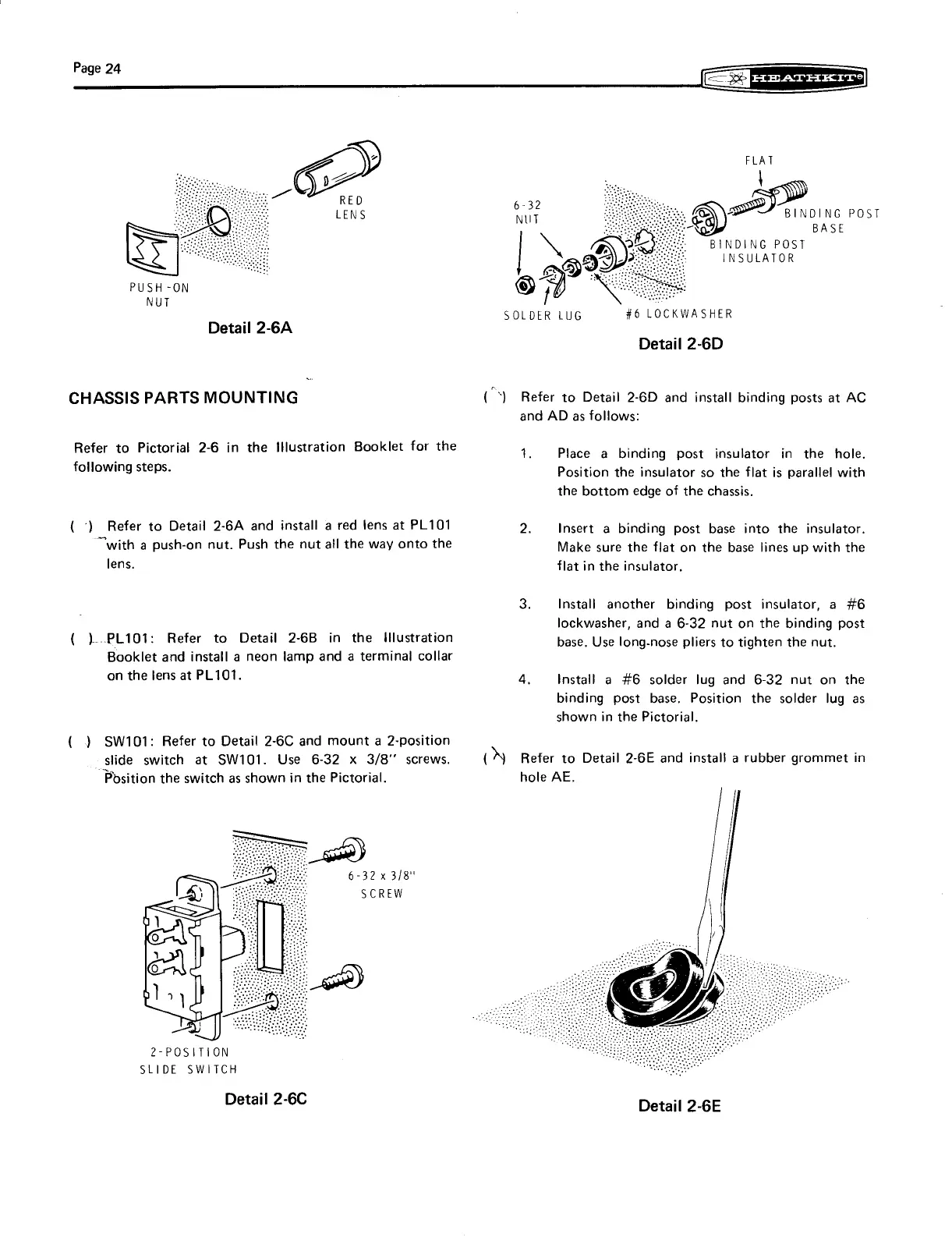
Refer
to
Detail
2-6D
and
install
binding
posts
at
AC
and
AD
as
follows:
Refer
to
Pictorial
2-6
in
the
Illustration
Booklet
for
the
1.
Place
a
binding
post
insulator
in
the
hole.
following
steps.
Position
the
insulator
so
the
flat
is
parallel
with
the
bottom
edge
of
the
chassis.
(°)
Refer
to
Detail
2-6A
and
install
a
red
lens
at
PL101
2.
Insert
a
binding
post
base
into
the
insulator.
“with
a
push-on
nut.
Push
the
nut
all
the
way
onto
the
Make
sure
the
flat
on
the
base
lines
up
with
the
lens.
flat
in
the
insulator,
3.
Install
another
binding
post
insulator,
a
#6
lockwasher,
and
a
6-32
nut
on
the
binding
post
(
)..-PL101:
Refer
to
Detail
2-6B
in
the
Illustration
base.
Use
long-nose
pliers
to
tighten
the
nut.
Booklet
and
install
a
neon
lamp
and
a
terminal
collar
on
the
lens
at
PL101.
4.
Install
a
#6
solder
lug
and
6-32
nut
on
the
binding
post
base.
Position
the
solder
lug
as
shown
in
the
Pictorial.
(
)
SW101:
Refer
to
Detail
2-6C
and
mount
a
2-position
slide
switch
at
SW101.
Use
6-32
x
3/8"
screws.
(A
Refer
to
Detail
2-GE
and
install
a
rubber
grommet
in
Position
the
switch
as
shown
in
the
Pictorial.
hole
AE.
soe)
6-32
x
3/8"
SCREW
2-POSITION
SLIDE
SWITCH
Detail
2-6C
Detail
2-6E

Related product manuals