EasyManua.ls Logo

HeathZenith 7368 - User Manual

HeathZenith 7368
24 pages
Print Icon
To Next Page IconTo Next Page
Loading...
© 2017 HeathCo LLC 207472-02A
Wireless
Home Alert Kit
Install Wireless Chime
Plug in wireless chime. IMPORTANT: To
avoid resetting chime memory, wait 30
seconds before pressing the push button
or the “TEST” button inside the sensor. See
Troubleshooting, Problem 3 if chime memory
was accidentally reset.
WARNING: To prevent possible
SERIOUS INJURY or DEATH:
NEVER allow small children near
batteries.
If battery is swallowed, immediately
notify doctor.
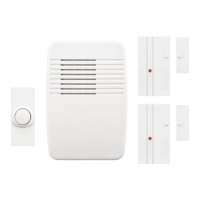
Wireless
plug-in
chime
Door sensor with battery,
Door magnet, Magnet spacer
Wireless
push button
Hardware
pack
Model
7368
7352
(x2)
Important considerations: The sensor must be mounted to the door jamb. The
magnet should be attached to the door. Sensor is for indoor use only.
This package includes (Style of door sensor, push button, and chime may vary
from illustration):
Chime
Volume
Control
Multifunction
Button
Figure 1
Question and Answer IconNeed help?

Do you have a question about the HeathZenith 7368 and is the answer not in the manual?

Summary

Install Wireless Chime

Important Considerations for Sensor Mounting

Sensor must be mounted to door jamb, magnet to door. Sensor for indoor use only.

Chime Installation and Reset

Plug in chime, wait 30 seconds before pressing buttons to avoid memory reset.

Install Door Sensor

Sensor Mounting and Alignment

Mount sensor with screws or tape. Ensure arrows align and gap is 1/2" max. Use spacer if needed.

Door Sensor Testing

Test range before mounting by moving magnet away from sensor.

Install Push Button

Push Button Mounting

Mount push button with screws or tape to door jamb or wall.

Push Button Testing

Temporarily position button and test chime operation.

Adjust Chime Volume Control

Chime Volume Adjustment

Unplug chime, adjust volume control, then plug back in.

Tune Settings

Selecting Chime Tunes

Chime has selectable tunes (Ding, Ding-Dong, Westminster). Factory setting is Westminster.

Tune Setting Table

Table shows how to set tunes using jumpers for Push Button/Sensor.

Troubleshooting

Chime Not Sounding or Quitting

Check syncing, battery installation, battery charge, and chime power.

Chime Not Working After Installation

Check for metal interference or concrete proximity affecting transmission range.

False Triggers

Address interference from other wireless devices by resetting chime.

Regulatory Information

Technical Service and Warranty

Contacting Technical Service

Provide specific information when contacting for assistance.

One Year Limited Warranty

Covers factory defects for one year; excludes misuse, abuse, and expendables.

Chime Purchase Information

Warranty Request Requirement

Keep dated sales receipt for all warranty requests.

Summary

Install Wireless Chime

Important Considerations for Sensor Mounting

Sensor must be mounted to door jamb, magnet to door. Sensor for indoor use only.

Chime Installation and Reset

Plug in chime, wait 30 seconds before pressing buttons to avoid memory reset.

Install Door Sensor

Sensor Mounting and Alignment

Mount sensor with screws or tape. Ensure arrows align and gap is 1/2" max. Use spacer if needed.

Door Sensor Testing

Test range before mounting by moving magnet away from sensor.

Install Push Button

Push Button Mounting

Mount push button with screws or tape to door jamb or wall.

Push Button Testing

Temporarily position button and test chime operation.

Adjust Chime Volume Control

Chime Volume Adjustment

Unplug chime, adjust volume control, then plug back in.

Tune Settings

Selecting Chime Tunes

Chime has selectable tunes (Ding, Ding-Dong, Westminster). Factory setting is Westminster.

Tune Setting Table

Table shows how to set tunes using jumpers for Push Button/Sensor.

Troubleshooting

Chime Not Sounding or Quitting

Check syncing, battery installation, battery charge, and chime power.

Chime Not Working After Installation

Check for metal interference or concrete proximity affecting transmission range.

False Triggers

Address interference from other wireless devices by resetting chime.

Regulatory Information

Technical Service and Warranty

Contacting Technical Service

Provide specific information when contacting for assistance.

One Year Limited Warranty

Covers factory defects for one year; excludes misuse, abuse, and expendables.

Chime Purchase Information

Warranty Request Requirement

Keep dated sales receipt for all warranty requests.

HeathZenith 7368 Specifications

General IconGeneral
BrandHeathZenith
Model7368
CategorySecurity System
LanguageEnglish