5
Tip:
After adding the new camera, please right click to show the Menu bar, then select Split
Screen to change the number of the channels showing in the same screen.
EXTEND THE WIFI RANGE
The Wifi signal will be weaker when going through the wall, stairs and other obstacles.
However, there are some solutions that may help to extend the Wifi range.
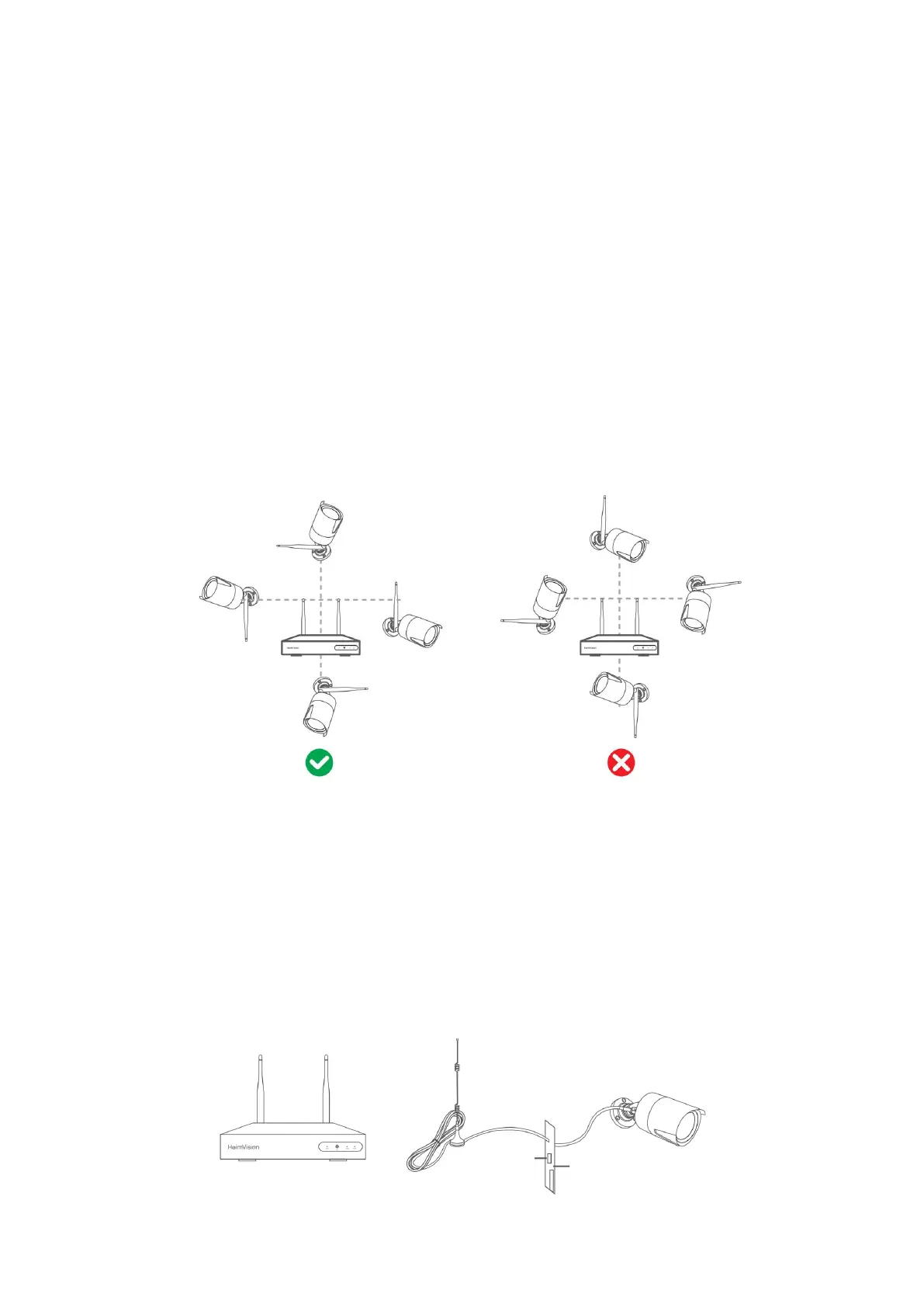
Adjust the Antennas to the Appropriate Angle
According to the signal transmission character of antenna, it’s better to adjust the
antennas of the cameras to be paralleled with the antennas of the NVR system when
they are in the flat plane or adjust the antennas of the cameras to be vertical to the
antennas of the NVR system when they are in the vertical plane, to receive better signal.
Tip:
Place the NVR on the desk and be far away from the devices that are easy to interfere
the connection, such as microwave oven and TV. Make sure the obstacles between the
NVR and the cameras are as few as possible.
Get an extra Antenna Extension Cable with Stand
Take off the antenna of the IP camera, then install the Antenna Extension Cord into the
IP Camera and put it to the place where the Wifi signal is strong.


 To Next Page