With the MagSafe Adapter in place,
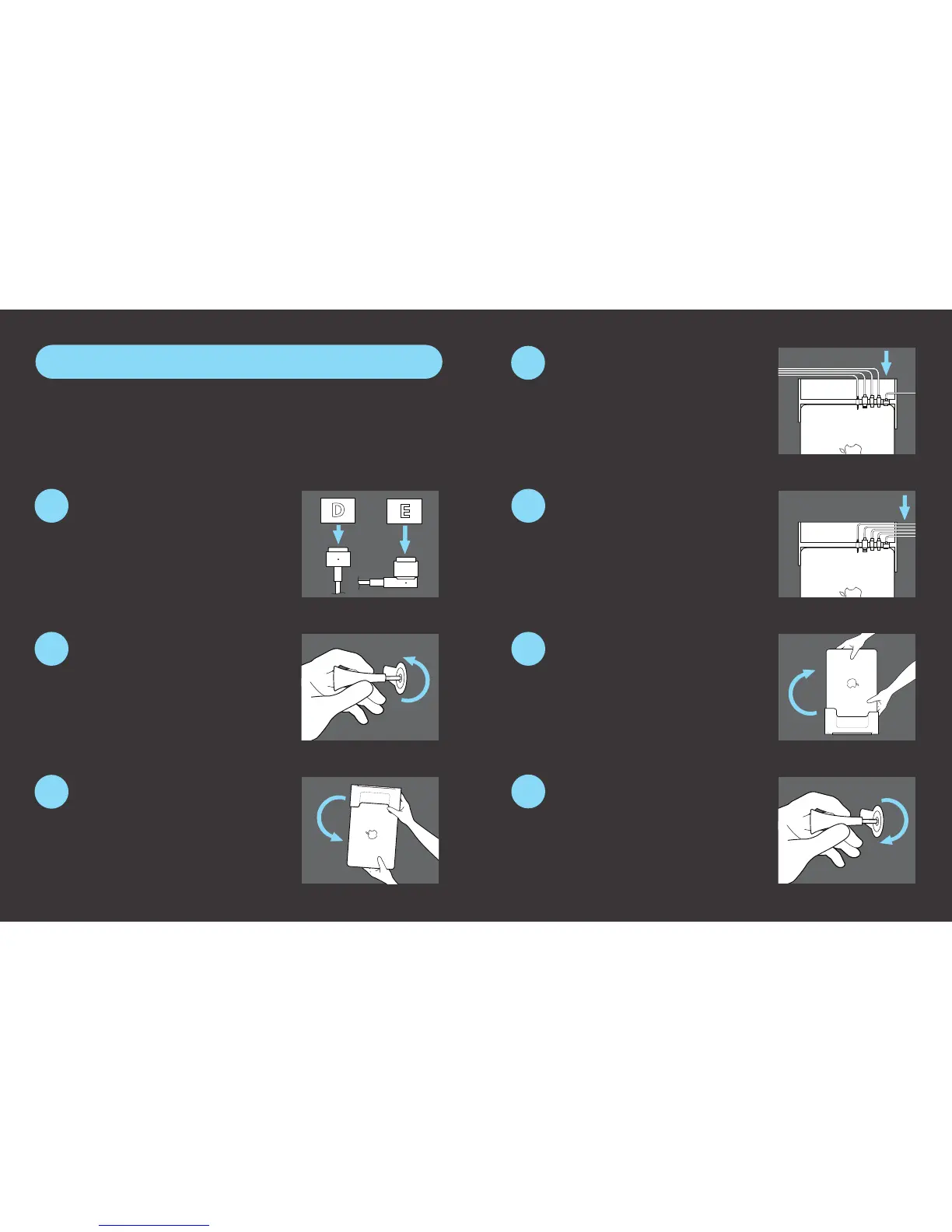
secure the cover anchor using
the hex key. Connect peripherals to
preinstalled cables.
Slide the cables into the cable
organizer at the back of the docking
station.
Carefully ip computer and dock
back over, placing unit on a at,
stable surface.
Select the correct Adapter Tool
for your type of MagSafe power
supply. (“D” for MagSafe 2, “E” for MagSafe
2 Converter.) Slide the selected Adapter
Tool around the MagSafe connector head.
Using the included hex key (located
in the bottom of the docking station),
loosen the cover anchor. Slide the cables
out of cable organizer at the rear of the
dock.
While seated, place your MacBook
in the dock, and carefully pick up
the dock and computer as one unit and
ip them over in your lap.
If connecting to a Thunderbolt device, complete steps 1- 4, and proceed to
Thunderbolt Installation Guide on step 8 before connecting peripherals.
Your setup is complete!
Insert the MagSafe and Adapter
Tool through the corresponding
port void inside the docking station and
into the MacBook.
Thunderbolt installation skip to step 8.
1
2
3
5
4
6
7
Quick Start Guide


 To Next Page