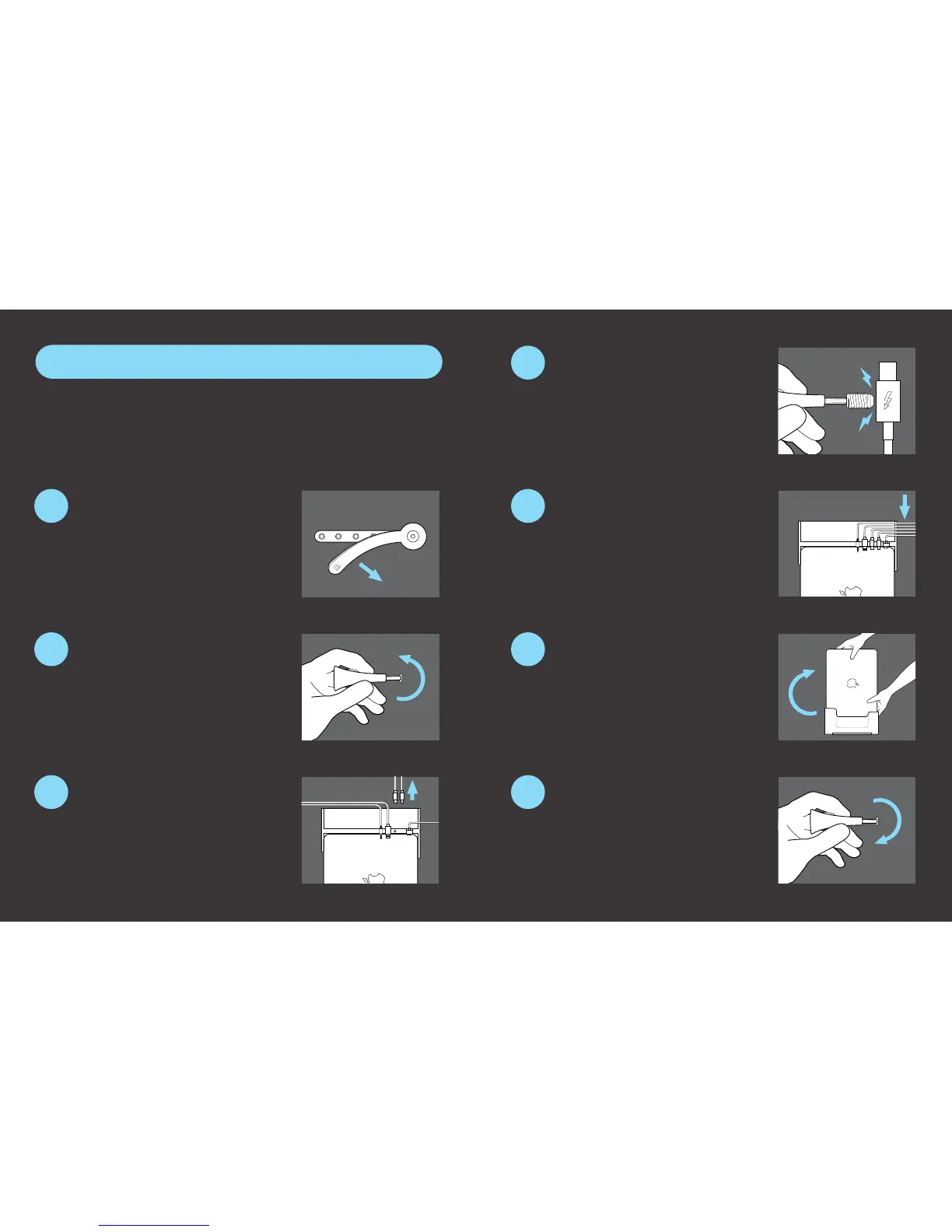
With cover anchor loosened, pull
back the screw cover to access
the setscrews.
Remove Mini DisplayPort cable(s)
from the bottom of the docking
station and insert Thunderbolt cable(s)
into the vacated port(s) inside the docking
station and into the MacBook.
Tighten the Thunderbolt setscrews,
realign the screw cover, and secure
the cover anchor using the hex key.
Connect peripherals to preinstalled cables.
To connect one or more Thunderbolt devices to the Henge Dock, one
or both of the preinstalled Mini DisplayPort cables must be removed
and replaced with Thunderbolt cables.
Locate the ports on the docking
station for the Mini DisplayPort
cable(s), and loosen one or both of the
corresponding setscrews.
Carefully ip computer and dock
back over, placing unit on a stable,
at surface.
Slide the cables into the cable
organizer at the back of the docking
station.
Please note that setscrews may
leave a slight cosmetic indent on
the Thunderbolt cables.
Your setup is complete!
8
9
10
12
11
13
14
Thunderbolt Installation Guide


 To Next Page