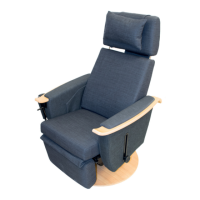
The Hepro Aurora is a rise-recliner chair, a Norwegian quality product designed and manufactured by Hepro. It is part of the Aurora series, which has been upgraded for maximum comfort, user-friendly controls, and quality upholstery. The chair is designed to assist individuals who may experience difficulties sitting down or standing up from a conventional chair. It meets industry standards for safety, quality, and functionality.
Function Description:
The Hepro Aurora is a versatile rise-recliner chair offering a range of functionalities to enhance user comfort and independence. Its primary function is to assist users in rising to a standing position or reclining to a comfortable resting position. The chair is operated via a TiMotion-handheld remote control, which is conveniently located in a loop on the outside of the right armrest by default, but can be moved to the left side if needed.
The remote control features several buttons for different functions:
- Lifting the chair (Button A): When held, this button activates the rise function. If the back and leg supports are in use, they will automatically realign before the chair begins to rise.
- Default position (Button B): Holding this button returns the chair from a risen position to its default sitting position.
- Leg support up (Button C): This button raises and extends the leg support. For the leg support to operate, the chair must be in its default sitting position. If it doesn't work, returning the chair to the default position by pressing button B is recommended.
- Leg support down (Button D): Holding this button lowers and retracts the leg support back into the chair.
For models with a tilt motor, additional functions are available:
- Tilt backwards (Button F): When held, this button tilts/reclines the entire seat unit backwards. This function allows the user to tilt the entire unit, regardless of the angle of the seat and back. For safety, this function can only be activated when the chair is in a default position.
- Tilt forwards (Button E): Holding this button tilts the chair forward.
For synchronous motion, the Aurora offers:
- Synchronous motion (Button G): Two buttons control the seat and leg support synchronously. The left button moves the chair to a horizontal position, and the right button moves it to an upright position.
The Aurora also includes a turn lock function for models with a swivel base. The chair can be swiveled by lifting a lever, and then locked into the nearest "locking hole" when the desired position is reached. The chair can turn 180° and lock at 15° intervals. The lever is on the right side as standard but can be easily moved to the left.
A USB port is integrated into the armrest, allowing users to charge or operate USB devices. It's important to note that the USB ports only function when the chair is connected to mains power.
Important Technical Specifications:
The Hepro Aurora series includes several models: Aurora 40, Aurora 45, Aurora 50, Aurora 55, and Aurora 60.
Electrical Specifications:
- Product name: Hepro Aurora
- Model number: 3610X
- Input voltage: 200~240V AC
- Output channel: 3
- Max output: 29V DC, 4A
- Transformer type: SMPS
- Timer: 2 Min ON/ 18 Min OFF
- Control: Analog
- Operating conditions:
- Temperature: 5~40 °C
- Relative Humidity (R.H.): 0~80 %
- Atmospheric Pressure (ATM): 700~1060 hPa
- Storage conditions:
- Temperature: -10~50 °C
- Relative Humidity (R.H.): 0~90 %
- Atmospheric Pressure (ATM): 700~1060 hPa
- IP Rating: IP54
Measurements and Dimensions (in cm, unless otherwise specified):
| Measurement / Model |
Aurora 40 |
Aurora 45 |
Aurora 50 |
Aurora 55 |
Aurora 60 |
| Seat height in front min |
45 |
45 |
45 |
45 |
47 |
| Seat height in front max |
55 |
55 |
55 |
55 |
57 |
| Seat height in front end, upright position inclined lift |
59-69 |
59-69 |
59-69 |
59-69 |
59-69 |
| Seat height in rear end, upright position sloping back |
71-78 |
71-78 |
71-78 |
71-78 |
73-80 |
| Seat height in front end, upright position horizontal lift |
69-79 |
69-79 |
69-79 |
69-79 |
NA |
| Seat height in front, upright position horizontal lift |
73-80 |
73-80 |
73-80 |
73-80 |
NA |
| Seat depth min |
36 |
39 |
39 |
39 |
42 |
| Seat depth max |
45 |
48 |
48 |
48 |
52 |
| Seat width |
40 |
45 |
50 |
55 |
60 |
| Back height |
81-99 |
81-99 |
81-99 |
81-99 |
81-99 |
| Armrest distance min (inner) |
40 |
45 |
50 |
55 |
60 |
| Armrest distance max |
50 |
55 |
60 |
65 |
70 |
| Armrest height min |
6 |
6 |
6 |
6 |
6 |
| Armrest height max |
22 |
22 |
22 |
22 |
22 |
| Armrest width |
13 |
13 |
13 |
13 |
13 |
| The maximum width of the chair |
67 |
72 |
77 |
82 |
87 |
| The chair's maximum length |
182 |
182 |
182 |
182 |
182 |
| Tilt in degrees (Tilt chairs only) |
23 |
23 |
23 |
23 |
23 |
| Max user weight (kg) |
165 |
165 |
165 |
165 |
260 |
| Weight of the chair (kg) |
57 |
59 |
61 |
63 |
79 |
Usage Features:
The Aurora chairs are designed for maximum comfort and user-friendliness, with extensive adjustment possibilities to ensure optimal benefit for each user.
- Back Adjustment: The upper part of the backrest can be extended or compressed to adjust the back height. It locks into stepped grooves. The upper part can also be angled forward or backward to find the most comfortable position. For a shorter back, the upper part can be completely removed.
- Neck Pillow Adjustment: The neck pillow hangs loosely over the backrest, guided by a cloth guard. A counterweight ensures the pillow stays in place in the desired position. If only the lower part of the back is used, the neck pillow can be moved down.
- Leg Support Adjustment: The leg support is attached to a scissor mechanism with two sliding rails. A tension strap pulls the foot pad in when the leg rest is pushed in. The leg support extends in length when released and retracts when returned to the default position.
- Armrest Adjustment: Armrests can be adjusted in height by loosening a wheel (C) and then raising or lowering them. Once the desired position is found, the wheel locks again. For easier side entry, the armrests can be folded all the way down to align with the seat. Armrests can also be adjusted sideways, extending the chair's width by up to 5 cm on each side (10 cm total). To do this, loosen the ratchet bracket (D), pull the armrest to the desired position, and then fasten the bracket. Ensure the ratchet mount (D) always points forward (parallel to the chair's direction) after adjustment. Always raise the armrests from the folded position before adjusting them sideways to allow free movement.
- Seat Height Adjustment: To adjust the seat height, lift the chair about halfway up using the hand controller. Remove the seat plate by removing the wing nuts below the screws at the back. Loosen the screws so the actuator bracket (A) moves freely. Loosen the column by opening screws (B). Adjust the chair to the desired height by turning screw (C). Fasten screws (A) and (B), and reattach the seat plate. Ensure the swing wire for the swivel function is not too tight and glides freely. Also, ensure the fabric strap from the foot pad is moved forward on the seat plate so it's not too tight. Do not adjust higher/lower than the recommended height.
- Seat Depth Adjustment: The seat cushion is attached to the seat plate with Velcro and can be adjusted in depth for optimal comfort. The seat plate itself is attached to the seat frame with two bolts and wing nuts, offering three holes for regulation. By default, it's in the middle hole. Combining seat plate and cushion positions allows for optimal seat depth.
- Seat Angle Adjustment: The seat angle can be adjusted by tightening or loosening the wheels under the seat (one on each side). Before adjusting, slightly loosen the wing nuts securing the seat plate, then tighten them once the desired angle is achieved.
- Seatback Angle Adjustment: To change the back angle, the entire back is pulled off the chair. The upper actuator mount offers three mounting holes. The standard position uses the middle hole. Mounting the lifting actuator in the upper hole changes the back angle approximately 7 degrees backward, while mounting it in the lower hole changes it approximately 7 degrees forward. When re-mounting the backrest, ensure the two holes on its underside are threaded onto the guide pins in the backrest frame (B) and that the back is firmly attached.
Maintenance Features:
- Cleaning:
- Fabric covers can be machine-washed at temperatures up to 60°C. Do not tumble dry. After drying, they can be gently ironed.
- When washing the neck fabric, remove the counterweight from the pouch to prevent corrosion.
- Furniture cleaning products can be used for stains.
- Other parts can be wiped clean with a damp cloth.
- Leather upholstery should be dusted gently with mild soapy water and a damp (not wet) cloth or sponge. It should be treated once a year with neutral leather cream.
- Other Maintenance:
- Generally, no additional maintenance beyond recommended cleaning is needed.
- Over time, moving parts may require lubrication with a mild, thin, non-aggressive oil if they become stiff or noisy.
- In case of further malfunction, contact the supplier (Hepro) at Tel. +47 46 74 55 55.
- Environment: The chair is designed for durability. If cushions become dirty, uncomfortable, or need recycling, Hepro offers new quality cushion sets that can be easily removed and replaced. This reduces environmental impact. Note that slight color differences may occur in fabric, so replacing the full set of cushion covers is recommended.
- The chair is an aid and should not be used as a toy for children.
- Overloading can damage both the user and the product.
- If the chair malfunctions, contact the supplier immediately for inspection.
- Do not lean forward or allow others to sit on the footrest when it is extended, as the chair may overturn.
- Although the upholstery is fire-resistant, exercise caution with open flames near the product (e.g., smoking).
- Always check that no people or pets are under the chair before operating electrical functions, as the lifting mechanism can pose a pinch hazard.
Electromagnetic Interference:
The Hepro Aurora has been tested according to NS EN 60601-1-2:2015.
- The rise-recliner is not affected by external electromagnetic fields, provided they meet their own and required specifications.
- The lifting chair does not affect other electrical equipment due to the electromagnetic field it radiates.
- If you suspect the chair is affected by or affecting other electrical equipment, contact the Help Centre or Hepro immediately.
Transport:
When moving the chair, extend the footrest. Ensure the footrest is in the same driving direction as the transport wheels before lifting the chair by the footrest and moving it to the desired location.

 Need help?
 General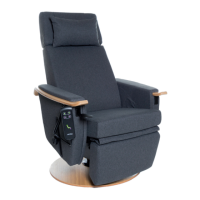

 To Next Page