Need help?
Do you have a question about the Hercules WAE Outdoor 04Plus FM and is the answer not in the manual?
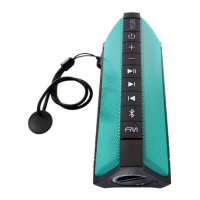
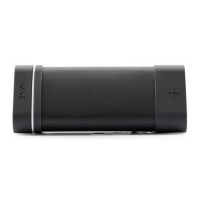
The Hercules WAE Outdoor 04Plus FM is a portable wireless speaker designed for outdoor use, offering both Bluetooth and FM radio functionalities. Its robust design is highlighted by an IP67 protection rating, ensuring it is water- and dust-tight when the protective cover is properly closed.
The speaker serves as a versatile audio device, capable of playing music wirelessly via Bluetooth from various sources such as smartphones, tablets, MP3 players, and computers. It also features an integrated FM radio, allowing users to listen to their favorite stations on the go. An auxiliary line input is available for connecting MP3 players directly, providing a wired audio option. The device includes a battery indicator to show the current charge level and an FM/Bluetooth indicator that changes color to reflect the active mode (blue for Bluetooth, green for FM). For power management, the speaker automatically enters standby mode after 10 minutes of inactivity (no music playing via Bluetooth or FM radio) to conserve battery life. It can be woken up from standby by pressing the on/off button or using the WAE Music app.
To power on the speaker, users press the on/off button. A long press (2 seconds) on the same button powers it off. For first-time use, the speaker automatically enters pairing mode, indicated by a flashing blue Bluetooth indicator. Users can then enable Bluetooth on their device, search for "WAE Outdoor 04Plus FM," and pair. If an access code is required, "0000" should be entered. Once paired, the Bluetooth indicator remains solid blue.
Volume is controlled using the dedicated "+" and "-" buttons. These buttons also allow users to switch to the next or previous track with a long press. Pressing both the "+" and "-" buttons simultaneously pauses or resumes playback. For devices supporting Absolute Volume (AVRCP 1.4), the speaker's volume directly controls the device's volume.
To disconnect a currently paired Bluetooth device and pair a new one, users can press and hold the FM button for 3 seconds until a beep is heard. The Bluetooth indicator will flash blue, signaling readiness for a new pairing. The speaker can store pairing information for up to 8 devices. This saved list can be cleared by a long press (8 seconds) on the FM button.
Pressing the FM Radio button enables the FM radio function, with the indicator turning green. For first-time use, an automatic scan saves all detected stations, and the first station begins playing. Users can then switch between stations by long-pressing the "+" and "-" buttons. The Play/Pause button (achieved by pressing both "+" and "-" simultaneously) mutes or unmutes the radio. To initiate a new scan for stations, users press and hold the FM Radio button for 3 seconds; the indicator will flash green during the scan. Up to 40 stations can be saved. A short press on the FM button returns the speaker to Bluetooth mode.
The WAE Music app enhances the speaker's functionality, particularly for FM mode. It allows users to display frequencies, manage station lists, and offers a main panel for overall control. The app provides access to speaker options, battery level information, the online manual, a music player, and an auto-scan feature for FM stations. It also includes sound settings, a standby control, and an FM control panel. For FM radio, the app enables geolocation scans to display available stations (requiring GPS and internet access), shows the currently selected station, and displays station names. Users can manage stations by saving them to favorites lists (Mem 1 or Mem 2) or removing them. The app also allows for manual frequency selection and offers advanced FM settings, including the ability to choose between Europe or US frequency bands and to enable/disable automatic frequency updates for favorite stations during geolocation scans.
The WAE Music app provides an advanced settings panel where users can configure sleep mode, view the speaker's name and firmware version, enable or disable tones (for power on/off, Bluetooth pairing), and set an alarm. It also allows linking the currently connected speaker to the WAE app, which is crucial for controlling new WAE speakers or after firmware updates.
Before first use, the speaker should be fully charged. The Micro-USB to USB cable (13) connects the speaker's Micro-USB port (7) to a computer's USB port or a 5V/1A smartphone/tablet USB power adapter. The standard charging time is 4 hours. During charging, the charge indicator (5) flashes; it stops flashing when fully charged. The indicator also flashes when the battery level is low.
To maintain the IP67 water- and dust-tight rating, it is essential to ensure that the protective cover (9) is properly closed. This prevents damage from environmental elements.
The speaker includes a screw thread for a 1/4" mount (10), allowing it to be attached to various accessories. A wrist strap attachment hoop (11) and a wrist strap (12) are provided for easy portability and secure handling.
 General
| Type | Portable Bluetooth Speaker |
|---|---|
| Water Resistance | Yes |
| Battery Life | 12 hours |
| Bluetooth Range | 10 meters |
| FM Radio | Yes |
| Power Source | Rechargeable battery |
| Wireless Technologies | Bluetooth |
| Sensitivity | 85 dB |
| Impedance | 4 Ohms |
| Color | Black |
| Weather Resistance | Yes |
| Frequency Response | 80 Hz - 20 kHz |
| Material | Plastic |
| Power Output | 10 W |
| USB Connector Type | Micro USB |

 To Next Page