EasyManua.ls Logo

Hercules Wae Outdoor Rush - User Manual

Hercules Wae Outdoor Rush
4 pages
Print Icon
To Next Page IconTo Next Page
Loading...
1
2
3
4
5
6
7
8
ON/OFF
Play/Pause
Next
Previous
FM
12
9
10
11
USB Out
USB In
Line In
1. Charge completely before rst use
Completely charge your WAE Outdoor Rush
speaker before using it for the rst time.
Connect the Micro-USB connector on the
Micro-USB to USB cable (12) to the Micro-USB
port (11) on the WAE Outdoor Rush speaker,
and the other end of the cable to the USB port
on a computer or on a smartphone/tablet USB
power adapter (5V/1A)*.
The standard charging time is 3.5 hours.
While charging, the charge indicator (1) ashes
green. When the battery is fully charged, the
charge indicator (1) stops ashing.
When the battery level is low, the charge
indicator (1) ashes.
2. Getting started with your speaker
To power on your WAE Outdoor Rush speaker,
press the on/o button (1). To power o the
speaker, press the on/o button (1) for 2
seconds.
When used for the rst time, your WAE Outdoor
Rush speaker is ready for pairing: the Bluetooth®
indicator (7) ashes blue.
- On your smartphone/tablet, MP3 player or
computer, enable the Bluetooth® wireless
technology function, and search for available
Bluetooth® devices.
- Select WAE Outdoor Rush in the list of available
Bluetooth® devices and carry out the pairing (if
an access code is required, enter 0000).
Once the devices are paired and connected, the
Bluetooth® indicator (7) stays lit up in blue. You
are now ready to play your music.
3. Volume and music controls
The volume + and volume – buttons (2 and 3)
let you control the volume of your WAE Outdoor
Rush speaker, independently of the controls on
your Bluetooth® device (smartphone, tablet,
MP3 player, computer…).
For devices supporting Absolute Volume
(AVRCP 1.4) mode, their volume level is directly
controlled by the WAE Outdoor Rush speaker.
4. Playing music on the WAE
Outdoor Rush from another music
source
If you want to play music from a dierent
Bluetooth® music source (smartphone, tablet,
lecteur MP3, PC...) than that currently used,
press and hold the Bluetooth® button (7) for 3
seconds until it beeps to disconnect the
connected device. The Bluetooth® indicator (7)
ashes blue to indicate that you can now pair
and connect a new Bluetooth® device.
5. Clearing the saved list of paired
devices
Your WAE Outdoor Rush speaker can save
pairing information for up to 8 devices. A long
press (8 seconds) on the Bluetooth® button (7)
lets you clear the saved list of paired devices.
6. FM radio
Press the FM Radio button (8) to enable the FM
radio function: the FM Radio indicator (8) lights
up in white.
When used for the rst time, an automatic scan
is carried out: the automatic scan will save all
detected stations, and will start playing the rst
station when the scan is complete. You can then
switch between the dierent stations using the
Next (5) and Previous (6) buttons.
Pressing the Play/Pause button (4) enables or
disables the mute mode.
To launch a new scan for stations, press and
hold the FM Radio button (8) for 3 seconds.
During a scan, the indicator (8) ashes white.
You can save up to 40 stations.
Download and check out all the FM
functionalities thanks to the WAE Music app:
display frequencies, stations list…
In the US only: in order to improve the quality of
the FM reception, you need to download and
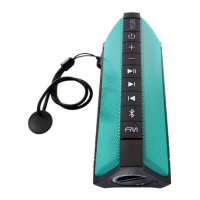
1. On/o button and charge indicator
2. Volume + button
3. Volume – button
4. Play/Pause/Mute button
5. Next button
6. Previous button
7. Bluetooth® button and indicator
8. FM Radio button and indicator
9. Line input connector
10. USB port
11. Micro-USB port
12. Micro-USB to USB cable
install the WAE Music app. Once connected to
the WAE Outdoor Rush, from the FM panel, go
to the advanced settings and change the
EU/US setting to US.
7. Line input
You can connect your MP3 player directly to
the speakers line input connector (9).
8. Standby mode
When the WAE Outdoor Rush speaker plays
no music (via the Bluetooth® function or the
FM radio) for 10 minutes or more, it switches
to standby mode in order to save battery
power. You can “wake it up from standby
mode by pressing the on/o button (1) or
using the
WAE Music app
.
9. Charging function**
When the Bluetooth® mode is enabled (only in
this mode), you can charge your smartphone
by connecting it to the USB port (10).
You can reduce the charging time by turning
o the Bluetooth® function: to do so, press the
Bluetooth® button (7) twice. When your device
is fully charged, press the Bluetooth® button (7)
twice again to enable the function.
Your WAE Outdoor Rush speaker features a
USB port (10), allowing you to charge an
external device (smartphone, MP3 player).
The charging power level provided by the
speaker is 500 mA, allowing you to charge
most smartphones. You cannot use the
speaker to charge a tablet.
10. IP67 protection
Make sure that the protective cap is fully
screwed on, in order to ensure that the
product is water- and dust-tight.
Use the tool attached to the wrist strap to
lock/unlock the protective cap.
* Not included.
** A specic cable (not included) may be
required.
ENGLISH
Download the
WAE Music app
www.hercules.com
Question and Answer IconNeed help?

Do you have a question about the Hercules Wae Outdoor Rush and is the answer not in the manual?

Overview

The WAE Outdoor Rush is a wireless audio experience speaker designed for robust outdoor use, offering a range of features for music playback, FM radio, and device charging.

Function Description

The WAE Outdoor Rush serves as a portable speaker with Bluetooth® connectivity, an integrated FM radio, and a line input for wired connections. It also functions as a power bank, allowing users to charge external devices. The speaker is designed with IP67 protection, ensuring it is water- and dust-tight, making it suitable for various outdoor environments. An accompanying WAE Music app enhances the user experience by providing advanced controls and functionalities.

Usage Features

Initial Setup and Charging:

Before first use, the speaker requires a full charge. This is done by connecting the Micro-USB port (11) on the speaker to a USB power source (computer or 5V/1A adapter) using the provided Micro-USB to USB cable (12). The standard charging time is approximately 3.5 hours. During charging, the charge indicator (1) flashes green, turning solid green once fully charged. A flashing indicator also signals a low battery level.

Powering On/Off and Bluetooth® Pairing:

To power on the speaker, press the on/off button (1). To power off, press and hold the same button for 2 seconds. Upon first power-on, the speaker automatically enters pairing mode, indicated by a flashing blue Bluetooth® indicator (7). Users can then enable Bluetooth® on their smartphone, tablet, MP3 player, or computer, search for available devices, and select "WAE Outdoor Rush" to pair. If prompted for an access code, enter "0000". Once paired, the Bluetooth® indicator (7) remains solid blue.

Volume and Music Controls:

The speaker features dedicated volume up (2) and volume down (3) buttons, allowing independent volume control from the connected Bluetooth® device. For devices supporting Absolute Volume (AVRCP 1.4), the speaker's volume directly controls the device's volume. The Play/Pause button (4) controls music playback. The Next (5) and Previous (6) buttons allow navigation through tracks.

Switching Music Sources:

To disconnect from a currently connected Bluetooth® device and pair with a new one, press and hold the Bluetooth® button (7) for 3 seconds until a beep is heard and the indicator flashes blue. This allows for pairing with a different music source.

Clearing Paired Devices:

The speaker can store pairing information for up to 8 devices. To clear this list, press and hold the Bluetooth® button (7) for 8 seconds.

FM Radio Functionality:

To activate the FM radio, press the FM Radio button (8), which will light up white. The first time the FM radio is used, an automatic scan will be performed to detect and save available stations. The speaker will then start playing the first detected station. Users can navigate between saved stations using the Next (5) and Previous (6) buttons. The Play/Pause button (4) can mute or unmute the radio. To initiate a new station scan, press and hold the FM Radio button (8) for 3 seconds; the indicator (8) will flash white during the scan. The speaker can save up to 40 stations.

WAE Music App for Enhanced FM Control:

The WAE Music app, available on Google Play and the App Store, provides advanced FM functionalities, including displaying frequencies, station lists, and more. For users in the US, downloading and installing the app and changing the EU/US setting to US in the advanced FM panel settings can improve FM reception quality.

Line Input:

For wired connections, an MP3 player can be directly connected to the speaker's line input connector (9).

Standby Mode:

To conserve battery, the speaker automatically enters standby mode after 10 minutes of inactivity (no music playback via Bluetooth® or FM radio). It can be woken up by pressing the on/off button (1) or through the WAE Music app.

Charging External Devices:

The speaker features a USB port (10) that allows charging of external devices like smartphones. This function is available only when Bluetooth® mode is enabled. To reduce charging time, users can double-press the Bluetooth® button (7) to temporarily disable Bluetooth®. Double-pressing it again re-enables Bluetooth® once the device is charged. The USB port provides 500 mA of charging power, suitable for most smartphones but not tablets.

Maintenance Features

IP67 Protection:

The WAE Outdoor Rush is designed with IP67 protection, meaning it is resistant to water and dust. To ensure this protection, it is crucial to make sure the protective cap is fully screwed on. A tool attached to the wrist strap is provided to help lock/unlock the protective cap securely.

WAE Music App for Firmware Updates:

While not explicitly detailed in the provided text, companion apps often facilitate firmware updates for devices, which can improve performance and add new features. The "Speaker Options" section in the app's main panel mentions "firmware version," suggesting that updates might be managed through the app.

Battery Management:

The app's main panel provides information regarding the speaker's battery level, allowing users to monitor and manage charging cycles effectively. The "Standby mode" feature also contributes to battery longevity by conserving power during inactivity.

Hercules Wae Outdoor Rush Specifications

General IconGeneral
TypePortable Bluetooth Speaker
Battery Life12 hours
Bluetooth Range10 meters
ConnectivityBluetooth, 3.5mm Aux-in
Frequency Response130Hz - 20kHz
Built-in MicrophoneYes
Water ResistanceIPX7
Color OptionsBlack

Related product manuals