EasyManua.ls Logo

Hercules XPS 2.0 60 - User Manual

Hercules XPS 2.0 60
8 pages
Print Icon
To Next Page IconTo Next Page
Loading...
Р
у
сский
ITALIANO
DEUTSCH
NEDERLANDS
ENGLISH
ESPAÑOL
PORTUGUÊS
FRANÇAIS
XPS 2.0 60
CONTENTS
CONTENTS...................................................................................................................................1
1. INTRODUCTION.................................................................................................................2
1.1. Box contents................................................................................................................2
1.2. Technical specifications...............................................................................................2
1.3. Recommendations.......................................................................................................3
2. INSTALLING YOUR XPS 2.0 60 SPEAKER KIT...............................................................3
2.1. Positioning the speaker kit...........................................................................................3
2.2. Connections.................................................................................................................4
2.2.1. Connection to a PC..........................................................................................5
2.2.2. Connection to a television set equipped with a headphone jack .....................6
2.2.3. Connection to a DVD player/television set equipped with Left
and Right audio outputs ...................................................................................6
2.2.4. Connection to a game console ........................................................................6
3. USING YOUR XPS 2.0 60 SPEAKER KIT .........................................................................7
4. TECHNICAL SUPPORT .....................................................................................................7
5. WARRANTY........................................................................................................................8
ENVIRONMENTAL PROTECTION RECOMMENDATION..........................................................8
Question and Answer IconNeed help?

Do you have a question about the Hercules XPS 2.0 60 and is the answer not in the manual?

Overview

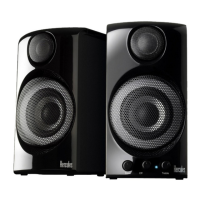
The XPS 2.0 60 is an amplified speaker kit designed for a variety of audio sources, including PCs, TV sets, DVD players, game consoles, CD-Audio players, and MP3 players. It consists of two amplified satellite speakers, a power adapter, a male-male minijack cable, and two connection cables between the satellites (1.8m and 3m).

Technical Specifications:

  • Output Power (effective power): Each satellite speaker delivers 15W RMS, totaling 30W RMS for the system.
  • Frequency Response: The satellite speakers have a frequency response range of 50 – 20kHz.
  • Magnetic Shielding: The speakers are magnetically shielded, allowing for placement close to a monitor without disturbing the display.

Usage Features:

The right speaker serves as the main control unit and features:

  • Audio Outputs: One RCA type audio output to connect the left speaker.
  • Audio Inputs:
    • One line-in connector at the back for the main audio input.
    • One auxiliary input on the right side for connecting MP3 players or other audio sources.
  • Headphone Connector: One headphone connector on the right side. When headphones are connected, the satellite speakers are automatically disabled, and only the headphone output is active.
  • Controls:
    • One volume control knob with a standby position.
    • One treble control knob.
    • One bass control knob.
  • Power LED: An indicator light for power status.

Installation and Connections:

  1. Positioning: Place the satellite speakers on a flat surface, one on each side of your monitor, ensuring they are at least 50cm away from side walls. Position them at an equal distance from the listener and direct them towards the listening position.
  2. General Connection: Before connecting, switch off the audio source (PC, television set, DVD player, or game console).
    • To a PC: Connect the speaker kit's main input (on the back of the right satellite speaker) to the green FRONT SPEAKERS or FRONT OUT connector on your sound card using the included male-male minijack cable.
    • To a Television (headphone jack): Connect the speaker kit's main input to the headphone jack on your television set.
    • To a DVD Player/Television (Left and Right audio outputs): This requires a female minijack/double male RCA cable (not included). Connect the speaker kit's minijack connector to this cable. Then, connect the white RCA connector to the corresponding audio output on your DVD player/television set, and the red RCA connector to the other corresponding audio output.
    • To a Game Console: This requires a female minijack/double female RCA cable (not included). Connect the speaker kit's minijack connector to this cable. Then, connect the white and red audio connectors on your console's A/V cable to the female minijack/double female RCA cable. Refer to your console's user manual for more details.
  3. Power On: After connecting, switch on the audio source.
  4. Adjustments: Adjust the master volume, treble, and bass controls on the right speaker. It is recommended to start with minimum values and progressively increase them to find ideal settings.
  5. Auxiliary Input Priority: When an audio source is connected to the auxiliary audio input on the right satellite speaker, the main audio source is disabled.

Maintenance Features and Recommendations:

  • Safety:
    • Never open the speaker kit, as this risks damaging internal components.
    • The speaker kit is intended for use in a temperate environment.
    • Keep the speaker kit away from rain, humidity, fluids (water, chemicals), heat sources (heaters, stoves, amplifiers), and direct sunlight to prevent fire or electrical discharge.
    • Do not expose the speaker kit to drips or splashes of water.
    • Never place objects filled with liquid (e.g., glasses, vases) on the speaker kit.
  • Power Management:
    • The system has a standby consumption of 1.5W.
    • Unplug the power cord if the speaker kit will not be used for an extended period. Always pull the plug itself, not the cord.
    • Ensure the power plug connected to an electrical outlet is easily accessible, as it serves to power off the device.
  • Cleaning: Disconnect the speaker kit before cleaning. Use a damp cloth and avoid aerosol cleaners.
  • Hearing Protection: Prolonged listening at full volume with headphones may cause damage to the user's ears and hearing.
  • Markings: Important markings are located on the back of the speakers.

Environmental Protection Recommendation:

At the end of its working life, this product should not be disposed of with standard household waste. Instead, it should be dropped off at a collection point for the disposal of Waste Electrical and Electronic Equipment (WEEE) for recycling. This is indicated by the symbol on the product, user manual, or packaging. Recycling helps protect the environment. Contact local authorities for information on nearby collection points.

Warranty:

Guillemot Corporation S.A. provides a two-year warranty from the original purchase date against material defects and manufacturing flaws. If a defect occurs within this period, contact Technical Support for assistance. The product may be repaired or replaced at Technical Support's discretion. The warranty does not cover damage from modification, inappropriate use, negligence, accidents, normal wear, or failure to comply with instructions. It also excludes software not published by Guillemot. Additional warranty provisions apply in the United States and Canada, limiting implied warranties to two years and excluding liability for consequential or incidental damages, unless otherwise mandated by state or provincial law.
Hercules XPS 2.0 60 Specifications

General IconGeneral
BrandHercules
ModelXPS 2.0 60
CategorySpeakers
LanguageEnglish

Related product manuals