Hermida Audio Technology Pedal Quick-Start Guide
Page 2 of 5
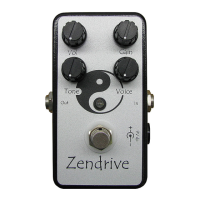
Knob Functionality
1. Vol(ume) - Adjust s the over all vol ume of t he unit . The fully count er clockwi se
position is zero.
2. Ga i n - Adjusts the amount of gain in the unit. For cleaner settings, rot ate
counter clockwi se. The maxi mum gai n in the pedal is al so l i mit ed by the Voice knob
set t i ngs. To set the maximum gain in the pedal, the Voice knob must be rotated fully
clockw i se.
3. Voice - “Tunes” t he pedal t o the ampli fi er and gui t ar . The Voi ce knob per for ms t wo
functions:
a. Limits or incr eases the total amount of gain in the pedal. To limit the gain,
rotate counterclockwise. To increase the gain, rotate clockwise.
b. Adjusts the bottom-end r esponse of t he pedal . To i ncr ease t he bot t om-end
response, rotate counterclockwise. To reduce the bottom-end, r ot at e t he
clockw i se. Remember t o adjust t he Gain knob t o compensat e for changes in
the overall gain of the pedal which occur during the Voice knob adjustment
process.
4. Tone - Per for ms a basic “high cut” funct ion. Wi th t he Tone knob set full y
counter clockwi se, high fr equencies ar e ful l y at t enuat ed.
5. In/ Out Jacks - Co n n ec t a ca b l e w i t h a ¼ ” p l u g b et w een t h e gu i t a r o r t h e o u t p u t o f
anot her pedal t o t he In jack. Connect anot her cabl e wi t h a ¼ ” plug betw een t he Out
jack and another pedal, amplifier or recording device.
6. 9V DC Adapter Jack - All pedals (except t he Zendr i ve 2 and Nu-Valve) can oper at e
with a 9V battery or a 9V DC adapter. Please use a 9V DC adapter 200mA with a
cent er negat ive plug.
7. St a t u s LED - The LED is On when the pedal is active. The LED is Off when it is being
bypassed.
8. Bypass Footswitch - Works in conjunction with the LED. Indicates when
el ect r oni cs ar e act i ve.
9. 9V Battery Clip - In pedals t hat oper ate wi t h a 9V batt er y, r emove the scr ews on
back cover and the battery clip will be located close to footswitch. Ensure that the
cli p is connected correctly before closing the back cover.


 To Next Page