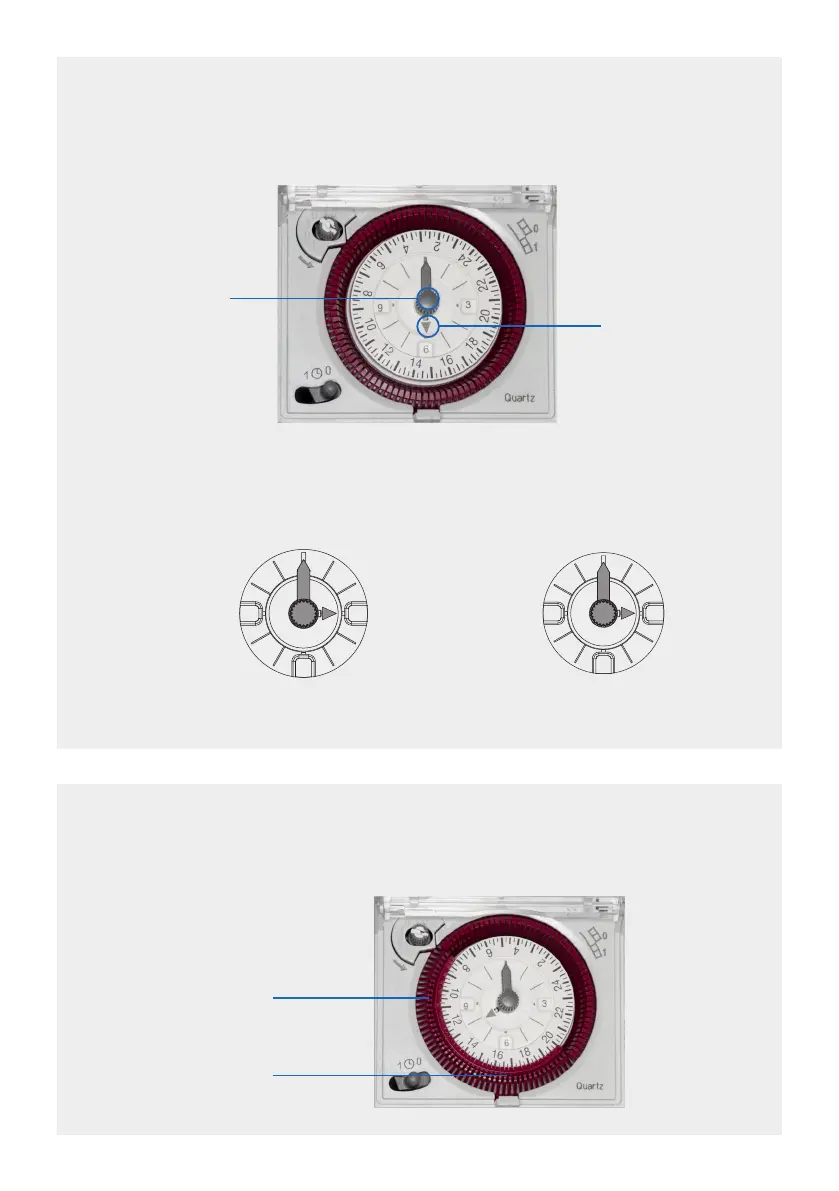
The timer is 24 hour. When the numbers on the inner clock dial show 3,6 & 9 this indicates
AM. When the numbers on the inner clock dial show 15,18 & 21 this indicates PM.
For example:
Turn the grey
centre pin
clockwise to
set the time.
Hour hand
SETTING THE TIMER (CURRENT TIME)
To set the current time on the clock (inner part), turn the minute hand clockwise, via the
centre pin. Totally disregard the segmental timer around the clock.
SETTING THE TIMER (PROGRAM TIMES)
Set your required ON/OFF periods by pushing the segments in towards the centre of
the clock for the ON periods.
3
6
9
Current
time shows
3.00am
Current
time shows
3.00pm
13
15
18
21
These segments turn the
sockets ON or OFF
In this example the lights
would be ON from
8.00AM to 8.00PM
4


 To Next Page