

EasyManua.ls Logo

HERO 8 - User Manual

HERO 8
6 pages
Print Icon
To Next Page IconTo Next Page
Loading...
SPECIFICATION:
The HERO 8 Way Contactor + Heater can control the timing of:
Lighting sockets: 8 x 600W HPS Lighting systems or 4 x 1000W HPS lighting systems.
Not recommended for use with LED lighting due to the in-rush of current on start-up.
Heater sockets: total load of 2500W.
INSTRUCTIONS
8 WAY CONTACTOR + HEATER
Please read the instructions before operating the unit.
Question and Answer IconNeed help?

Do you have a question about the HERO 8 and is the answer not in the manual?

Summary

Safety First

General Safety Precautions

Ensure unit is disconnected, dry, and load limits are respected for safe operation.

Installation

Mounting the Unit

How to mount the unit on a wall using pre-installed brackets and fixings.

Initial Set Up

Timer Switch Positions

Explains '0', '1', and timer positions for controlling lighting and heater sockets.

Understanding the Timer

Timer Functionality

Dual-purpose timer acting as a clock and segmental programmer for socket control.

Setting the Timer

Current Time Adjustment

How to set the current 24-hour time using the minute hand and centre pin.

Programming ON;OFF Periods

Setting ON/OFF periods by pushing segments for desired socket control times.

Operating the Unit

Connecting Lights and Heater

Plugging in HPS systems, balancing electrical load, and respecting specifications.

Turning the Unit On

Activating the timer by ensuring the switch is in the middle position for operation.

Resetting the Circuit Breaker

Procedure for resetting tripped circuit breakers on left and right sides.

Troubleshooting and Warranty

Troubleshooting Common Issues

Verifying faults, checking power, and addressing circuit breaker tripping.

Warranty and Liability

Information on the 2-year warranty, user-serviceable parts, and manufacturer liability.

Summary

Safety First

General Safety Precautions

Ensure unit is disconnected, dry, and load limits are respected for safe operation.

Installation

Mounting the Unit

How to mount the unit on a wall using pre-installed brackets and fixings.

Initial Set Up

Timer Switch Positions

Explains '0', '1', and timer positions for controlling lighting and heater sockets.

Understanding the Timer

Timer Functionality

Dual-purpose timer acting as a clock and segmental programmer for socket control.

Setting the Timer

Current Time Adjustment

How to set the current 24-hour time using the minute hand and centre pin.

Programming ON;OFF Periods

Setting ON/OFF periods by pushing segments for desired socket control times.

Operating the Unit

Connecting Lights and Heater

Plugging in HPS systems, balancing electrical load, and respecting specifications.

Turning the Unit On

Activating the timer by ensuring the switch is in the middle position for operation.

Resetting the Circuit Breaker

Procedure for resetting tripped circuit breakers on left and right sides.

Troubleshooting and Warranty

Troubleshooting Common Issues

Verifying faults, checking power, and addressing circuit breaker tripping.

Warranty and Liability

Information on the 2-year warranty, user-serviceable parts, and manufacturer liability.

Overview

The HERO 8 Way Contactor + Heater is a device designed to control the timing of lighting and heating systems, primarily for horticultural applications. It acts as both a clock and a segmental timer, allowing users to program specific ON/OFF periods for connected appliances.

Function Description:

The primary function of the HERO 8 Way Contactor + Heater is to switch electrical loads for High Intensity Discharge (HID) lighting systems and heaters. It features an 8-way contactor, meaning it can control up to eight individual lighting systems. The integrated heater control allows for a separate set of appliances to be managed. The unit operates based on a 24-hour timer, which can be programmed to automate the switching of these systems.
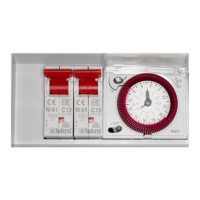
Important Technical Specifications:

  • Lighting Sockets: The unit is capable of controlling:
    • 8 x 600W HPS (High Pressure Sodium) lighting systems.
    • Alternatively, 4 x 1000W HPS lighting systems.
    • Note: It is explicitly stated that the unit is not recommended for use with LED lighting due to the in-rush of current on start-up, which can cause issues.
  • Heater Sockets: The total load for the heater sockets should not exceed 2500W.
  • Power Cords: The unit has two power cords, each designed to carry up to 13A. The left-hand power cord is designated as the 'master' and supplies power to the timer and contactor, meaning it must be plugged in for the unit to function.
  • Electrical Load Balancing: For safety and optimal performance, the total current required by all lighting systems on either side of the unit should not exceed 13A. Any load applied to the unit should be evenly distributed across both sides. For example, if connecting 4 lights, 2 should be plugged into one side and 2 into the opposite side.
  • Circuit Breakers: The unit is equipped with two circuit breakers. The left circuit breaker is connected to the sockets on the left-hand side and the heater sockets. The right circuit breaker is connected to the sockets on the right-hand side. These breakers trip to cut power if the unit is overloaded.
  • Fuse: The main fuse in the plugs should be a 13amp fuse.

Usage Features:

  • Installation: The unit comes with four pre-installed brackets for wall mounting. Users are instructed to fit a fixing through the hole in the bracket and secure it to the mounting surface.
  • Initial Set-Up:
    • Before connecting any lighting or heaters, the timer must be set up, and the unit must be connected to power.
    • Access to the timer is gained by opening its covers.
    • The timer switch has three positions:
      • '0' position: Lighting sockets OFF / Heater sockets ON.
      • '1' position: Lighting sockets ON / Heater sockets OFF.
      • Middle (timer) position (clock symbol): Both Lighting & Heater sockets will switch ON / OFF based on the programmed timer settings.
  • Setting the Current Time (Clock Function):
    • The inner part of the timer acts as the clock.
    • To set the current time, the grey centre pin should be turned clockwise to move the minute hand. The segmental timer around the clock should be disregarded during this step.
    • The timer is a 24-hour clock. Numbers 3, 6, and 9 on the inner dial indicate AM, while 15, 18, and 21 indicate PM.
  • Setting Program Times (Segmental Timer):
    • The outer part of the timer consists of segments.
    • To program 'ON' periods, these segments should be pushed inwards towards the centre of the clock. Segments that are pushed in will activate the connected sockets (ON), while segments that are not pushed in will keep them OFF.
  • Turning the Unit ON:
    • To activate the timer function, the switch must be in the middle (timer) position.
    • Users can verify the unit's operation by temporarily moving the switch to '1' (lights ON) and then '0' (heaters ON) to check power to the respective systems. After verification, the switch should be returned to the middle position.
  • Safety First:
    • Always disconnect the unit from the power supply before set-up or maintenance.
    • Ensure the unit remains in a dry area and is not accessible to unfamiliar individuals.
    • Avoid plugging the unit into extensions or adaptors, as the high current can pose a fire risk.
    • After switching the unit off, wait at least 5 minutes before unplugging to allow connected appliances to safely discharge.

Maintenance Features:

  • Resetting the Circuit Breaker:
    • If a circuit breaker trips (indicated by a loss of power to a bank of 4 sockets or heater sockets), disconnect all lights and/or heaters from the affected bank.
    • Reset the breaker by pushing the switch to the up position.
    • To identify the problematic appliance, reconnect each light individually with the timer switch in position '1'. If the breaker trips again, that light is either overloaded or faulty.
    • For heater issues, turn the timer switch to '0' and reconnect heaters individually. If the breaker trips, the heater is overloading the circuit or has an electrical problem.
    • Once issues are resolved, return the switch to the middle (timer) position.
  • Troubleshooting:
    • If a specific socket fails, test it by plugging in a known working appliance. If it still fails, the unit should be returned to the retailer.
    • If the unit has no power to any sockets or to one side, check if the circuit breakers have tripped and, if necessary, change the main fuse in the plugs.
    • To replace a fuse, remove the plug, prise out the fuse carrier with a small screwdriver, replace with a 13amp fuse, and push it back in.
    • Persistent tripping of circuit breakers indicates that the connected load is too large for the unit.
  • Warranty: The unit carries a 2-year warranty (terms and conditions apply).
  • User Serviceability: There are no user-serviceable parts inside the unit. Tampering with the unit will void the warranty. The manufacturer is not liable for damage caused by the operation of the unit.

HERO 8 Specifications

General IconGeneral
BrandHERO
Model8
CategoryHeater
LanguageEnglish

Videos

How to Insert Battery & SD Card In GoPro Hero 8 Black

How to Charge Battery on GoPro Hero 8 Black

How to Format SD Card on GoPro Hero 8 Black

How to Connect GoPro Hero 8 to Phone (Android)

How to Change Hypersmooth Settings on a GoPro Hero 8

How to Attach Mounts on the GoPro Hero 8