.
4. Hiboy APP Connection
76
5. Charging
6. Riding Basics
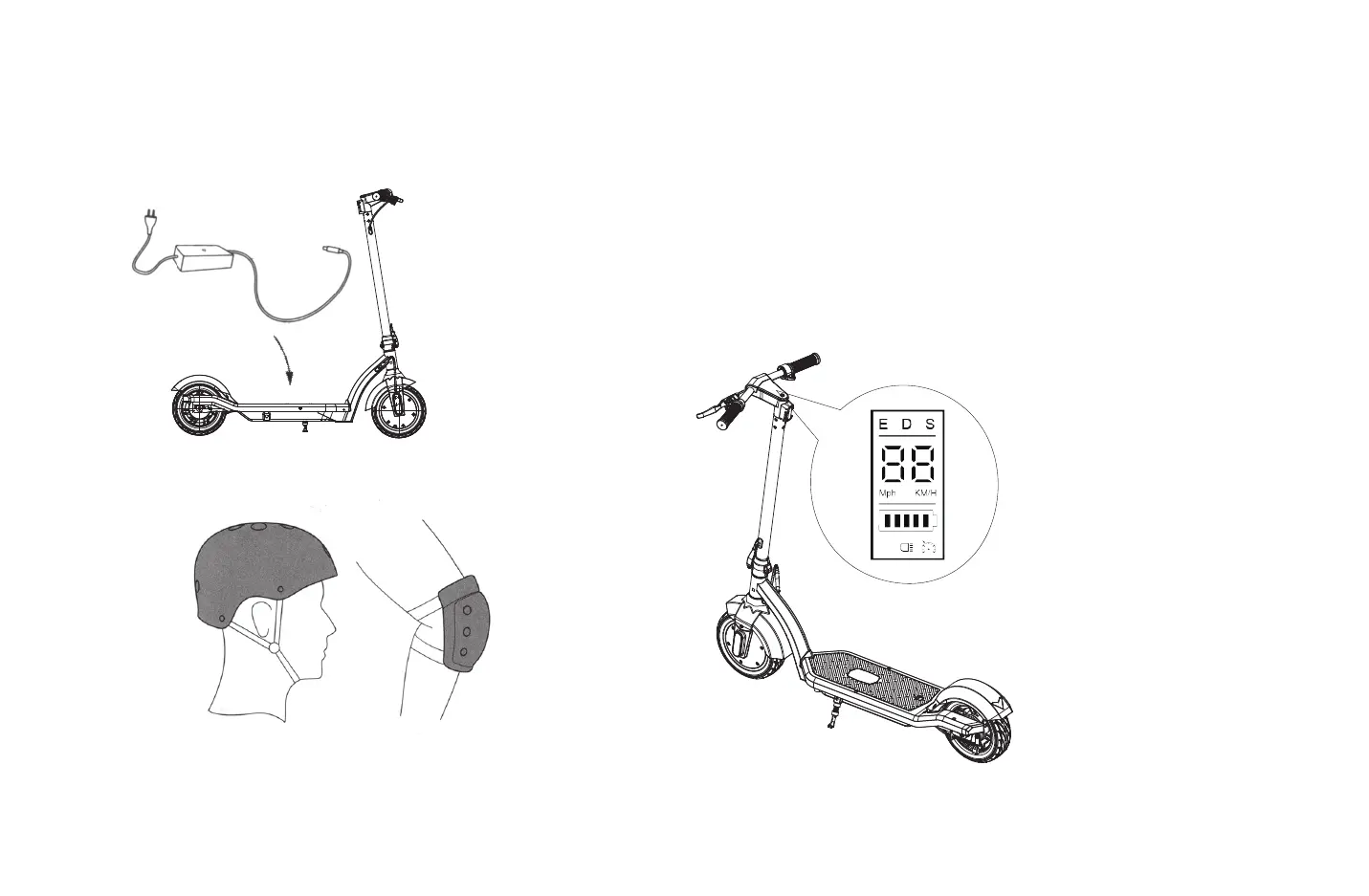
1. Turn the power on,and check the electricity indicator.
Your scooter will be fully charged when the LED light on the charger
Download "Hiboy" form "App store"(iPhone) or
"Google Play"(Android), then connect to your scooter.
changes from red(charging)to green.
After a period of full charge, the charging will cut off automatically.
Even so, we still don't recommend charging your scooter for a long
time more than 24 hours at one time.
Do not connect the charger if the charging port is wet. Cover the
charging port when not use.
Always wear a helmet and safety gear so to
avoid falling and injury during the driving
learning,as shown in the figure.
2. Turn on the Scooter.
3. Select the device to connect.
4. After connecting with the scooter, you can use the App to control the scooter, such as change the Speed
mode, Speed unit, lock / unlock the scooter, turn on / off the lights...etc.
Have fun with Hiboy electric scooter.
1. Scan the QR code to download Hiboy App.
Before using the App, you need to click on register to follow regis-
teration process on the App, if you meet with any problems during
registration, please refers to the “Question and Answer” to find the
answer, you can also contact us for support.


 To Next Page