This document serves as a user manual for the HiFuture Gravity Bluetooth speaker, providing instructions and specifications in multiple languages including English, Czech, Slovak, Hungarian, and German.
Function Description:
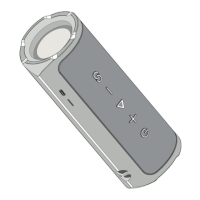
The HiFuture Gravity is a portable Bluetooth speaker designed for wireless audio playback. It features a dual speaker mode/equalizer, allowing users to switch between different sound profiles. The device includes standard music control functions such as volume adjustment, track navigation, and play/pause. It also incorporates an RGB light feature, which can be toggled on or off. The speaker supports Bluetooth connectivity for wireless audio streaming and has a Type-C charging port.
Important Technical Specifications (English):
- Type: Portable Bluetooth speaker
- Amplifier and DSP: ACM8625M
- Preset equalizer: Dual equalizer (general and bass boost)
- Bluetooth version: Bluetooth 5.3
- Support profile: A2DP1.3 / AVRCP1.6 / HFP1.7
- Speaker Frequency Response: 50Hz-20KHz (±6dB)
- Battery type: Li-ion polymer battery 4000mAh
- Battery lifetime: Remains 80% capacity after 300 battery cycles
- Music playback time: 8 hours* (based on HiFuture testing standard at 50% volume on IOS phone with Hotel California at temperature 25 degrees)
- Charge Voltage & Current: DC 5V@2A
- Wireless Range: 10 meters (Free space)
- Dimension (Length x Width x Height): 261.3 × 117.08 × 116.3 mm
- Water resistance: IPX7
- BT Chipset: AC6966B8
- Audio Decode: SBC/CVSD
- Driver type: Dynamic woofer and tweeter
- Speaker diameter: 7.62 cm + 1.9 cm
- Speaker impedance: 4 ohms (±15%)
- Speaker rated power: 30 + 15 W
- Rated power: 45 W
- SPL: 83 dB/1 m/1 W
- SNR: >=80 dB
- THD+N: <=1 % (20 W/1 kHz)
- Standby time: 300 days
- Charging time: 3.5 hours
- Charging port: Type-C
- Weight: 1600 grams
Usage Features:
- Power On/Off: Press and hold the power button for two seconds to turn the speaker on or off.
- Auto OFF: The speaker automatically powers off if there is no connection for 10 minutes.
- Auto Disconnect: If no music is played for 30 minutes after a Bluetooth connection, the speaker will automatically disconnect.
- Bluetooth Connection: Press and hold the power button for two seconds to enter pairing mode. The indicator light will flash blue. Once successfully connected, the blue light will illuminate steadily. The device can be found as "HiFuture Gravity" in Bluetooth settings.
- Music Control:
- Volume Down/Previous Track: Single click for volume down, press and hold for previous track.
- Pause/Play: Single click.
- Volume Up/Next Track: Single click for volume up, press and hold for next track.
- Power Button/RGB Indicator: Single click to toggle RGB light on/off when the speaker is powered on.
- Dual Equalizer: The speaker has two equalizer modes. The indicator for equalizer one is a steadily illuminated blue light, while for equalizer two, it's a blue breathing light. Double-click the equalizer button to switch between the general equalizer (Equalizer one, default) and the bass boost equalizer (Equalizer two).
- Switch Between Two Bluetooth Devices: To switch between two paired Bluetooth devices (Phone A and Phone B), press and hold the equalizer button for two seconds. The speaker will disconnect from the current device and attempt to connect to the other.
- Twin Speakers Mode:
- Power on both speakers.
- On one speaker (Speaker 1), press and hold the equalizer button for two seconds. The indicator will flash blue.
- On the second speaker (Speaker 2), press and hold the equalizer button for two seconds. Its indicator will also flash blue.
- Once paired, both speakers will show a steady blue light, indicating a successful twin speaker connection.
- Restore Factory Settings: To reset the Gravity speaker, ensure it is powered on, then press and hold the equalizer button for approximately 7 seconds. A prompt sound will indicate a successful reset. After resetting, it is recommended to remove "HiFuture Gravity" from your device's Bluetooth settings and re-pair.
Maintenance Features:
- Charging: Connect the Type-C charging cable to the speaker's charging port. The red indicator light will illuminate during charging and stop illuminating when fully charged. A full charge takes approximately 3.5 hours.
- Warranty: A 2-year warranty is provided for new products purchased through the Alza.cz sales network. The warranty does not cover damage from improper use, natural disasters, unauthorized intervention, normal wear and tear, exposure to adverse external influences, or modifications made to the product.
- WEEE Compliance: The product must not be disposed of as normal household waste. It should be returned to the place of purchase or a public collection point for recyclable waste to prevent potential negative environmental and health consequences.

 Need help?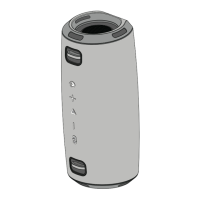

 To Next Page
 General