Need help?
Do you have a question about the Hiking DTS238-7 and is the answer not in the manual?
Details the DTS238-7 WIFI smart energy meter's capabilities and compliance with IEC standards.
Lists key operating parameters like frequency, voltage, accuracy, and communication interfaces.
Covers voltage/current limits, protection values, basic tolerance, self-consumption, and starting current.
Describes anti-creeping circuit logic and the meter's expected average operational lifespan.
Specifies the LCD display format for total active energy in kWh.
Highlights capabilities like measuring active energy, displaying voltage, current, and power factor.
Covers RS485/WIFI communication, APP control for reading and on/off functions.
Details features for overvoltage, undervoltage, overload protection, and timing control via APP.
Explains the ability to reset active energy to zero using the mobile application.
Describes voltage and current sampling, signal transformation, and energy measurement via counters.
Details the energy pulse output for testing with specific pulse width.
Outlines the meter's construction: base, cover, terminal base, and terminal cover with sealing.
Provides a block diagram illustrating the working principles of the meter.
Illustrates wiring for direct input and transformer input types with terminal connections.
Explains the function of LEDs (WIFI, impulse) and buttons (Setting, Down bond).
Covers DIN rail mounting, checking goods, installation environment, and wiring.
Provides a diagram showing the physical dimensions for meter installation.
Details handling requirements during transport and storage conditions.
Specifies the warranty terms for the meter based on user operation.
Defines the frame structure for reading and writing data using Modbus commands.
Lists register addresses for various data items like kWh, voltage, current, and power.
Details display formats for impulse constant, active energy, and phase currents.
Covers display formats for phase voltages, active power, and reactive power.
Lists display formats for total/phase power factors and frequency.
Instructs on downloading WISEN software and initiating meter input for WiFi connection.
Guides through adding the device, selecting Wi-Fi, and entering credentials for connection.
Explains control, reset, timing, and setting functions available via the mobile app.
Describes accessing meter details, history, and understanding parameter definitions.
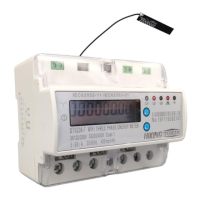
This document describes the DTS238-7, a Din rail, 3-phase WiFi smart energy meter designed for measuring three-phase four-wire AC active energy and various other parameters.
The DTS238-7 meter is a multi-function smart energy meter that measures positive and negative active energy, accumulating negative energy into positive energy. It also displays real-time values for three-phase voltage, current, active power, power factor, and frequency. The meter features a pulse LED to indicate operation and provides a pulse output with optical coupling isolation. It includes an RS485 communication port and WiFi connectivity, allowing for remote reading and control (on/off) via a dedicated APP. The meter is designed for long-term operation without calibration for active energy measurement. It displays data step-by-step using a button and offers overvoltage, undervoltage, and overload protection, with settable values via the APP. Additionally, it has a timing control function, also settable via the APP, and allows for resetting the active energy to zero.
The working principle involves sampling three-phase voltage and current, transforming them into suitable signals, and processing them through an integrated circuit. The meter then outputs a pulse signal proportional to the measured power, driving a step-motor counter or LCD counter for energy measurement. It also provides an energy pulse output for testing with a pulse width of 80±20ms.
General:
Protection Values (default, settable via APP):
Basic Tolerance:
Self-consumption:
Starting current: Under rated voltage, rated frequency, and COS=1, the meter starts and continues to register on application of 0.2% In (if CT is used) or 0.4% Ib.
Anti-creeping: The meter has an anti-creeping logical circuit. When 115%Un is connected and the current circuit is cut, the meter will not create more than one pulse in a stipulated time.
Installation: The meter is designed for installation on a 35mm DIN rail. It should be installed in a waterproof box, either indoors or outdoors, fixed on a strong and flame-resistant wall at a recommended height of about 1.8m, away from corrosive gases. All connections should be made fully in accordance with the connection diagram on the terminal cover, preferably using copper wire, with all screws tightened.
APP Control and Monitoring: The meter can be connected to a 2.4GHz WiFi network and controlled via a mobile APP (WISEN software).
Transportation and Storage:
Warranty: The meter comes with a 12-month warranty from the date of sale. If the meter does not meet its technical specifications due to correct operation according to the user's manual, it will be repaired or replaced free of charge by the manufacturer.
 General
| Brand | Hiking |
|---|---|
| Model | DTS238-7 |
| Category | Measuring Instruments |
| Language | English |

 To Next Page