EasyManua.ls Logo

Hikmicro Gryphon GQ50L - User Manual

Hikmicro Gryphon GQ50L
39 pages
Print Icon
To Next Page IconTo Next Page
Loading...
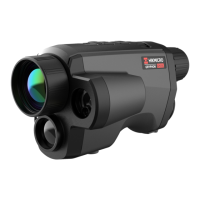
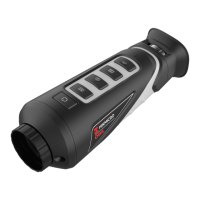
Handheld Thermal Monocular Camera
User Manual
Question and Answer IconNeed help?

Do you have a question about the Hikmicro Gryphon GQ50L and is the answer not in the manual?

Overview

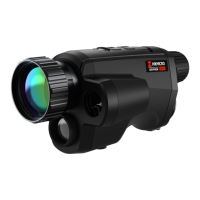
This document describes a handheld thermal monocular camera designed for thermal observation and target searching, utilizing thermal imaging technology to provide clear views in low visibility or dark environments. It is suitable for various outdoor activities such as hunting, searching and rescuing, hiking, and travel.

Function Description:

The device offers several key functionalities:

  • Distance Measurement: It can detect the distance between the target and the device. This function is supported only by certain models.
  • Highest Temperature Tracking: The camera identifies and marks the spot with the highest temperature in the scene.
  • Client Software Connection: Through the HIKMICRO Sight App, connected via hotspot, users can capture snapshots, record videos, and configure device parameters using their phone.
  • Image Correction: The device supports Defective Pixel Correction (DPC) and Flat Field Correction (FFC) to optimize image quality.
  • Image Calibration: It adjusts the thermal view to ensure consistency with the optical view.
  • Palette: Multiple palette modes are available, allowing users to select the most suitable one for different scenes.
  • Fusion: The device can display a fusion of thermal and optical views.

Important Technical Specifications:

  • Wi-Fi Frequency Bands: 2.4 GHz (2.4 GHz to 2.4835 GHz)
  • Nominal Limits of Transmitted Power: < 20 dBm
  • Battery Type: 18650 with protection board.
  • Battery Size: 19 mm × 70 mm.
  • Rated Battery Voltage/Capacity: 3.6 VDC/3.35 Ah (12.06 Wh).
  • Input Voltage for Power Supply: Limited Power Source (5 VDC, 2 A) according to IEC61010-1 standard.
  • Operating Temperature: -30°C to 55°C (-22°F to 131°F).
  • Operating Humidity: 95% or less.
  • Altitude: Can be safely used in regions below 2000 meters above sea level.

Usage Features:

  • Device Connection: The device can be connected to a PC via a Type-C cable for power or to export files. It should be powered on for 10 to 15 seconds before other operations.
  • Battery Installation: Batteries are inserted into a compartment by disassembling the cover (rotating anticlockwise until marks align) and inserting the battery with the positive mark inward. The cover is then rotated clockwise to fix it. For long-term storage, the battery should be fully charged every half year.
  • Power On/Off: Press the Power Key for standby/wake-up. Hold the Power Key to power on/off.
  • Auto Power Off: Users can set an auto power off time via the menu.
  • Menu Navigation: Hold the Menu Key to access the menu. Rotate the wheel to select functions and press the Menu Key to confirm.
  • Focus Adjustment: Adjust the focus ring until the image is clear. Avoid touching the lens surface during focusing.
  • Brightness Adjustment: In menu mode, rotate the wheel to select the brightness icon and press the Menu Key to adjust. Higher brightness values result in brighter images in white hot mode and opposite in black hot mode.
  • Contrast Adjustment: In menu mode, rotate the wheel to select the contrast icon and press the Menu Key to adjust.
  • Scene Mode Selection: Choose between "recognition mode" (recommended for normal scenes) and "jungle mode" (recommended for hunting environments) to improve display effect.
  • Palette Selection: Select from multiple palettes (White Hot, Black Hot, Red Hot, Fusion) to display the scene in different effects.
    • White Hot: Hot parts are light-colored.
    • Black Hot: Hot parts are black-colored.
    • Red Hot: Hot parts are red-colored.
    • Fusion: Image is colored from white, yellow, red, pink to purple, from high to low temperature.
  • Fusion Level Adjustment: When Image Fusion palette is set, adjust the fusion level for better effect based on observation distance.
  • Brand Logo Display: Option to add a brand logo to the live view interface.
  • Digital Zoom: Adjust digital zoom (1x, 2x, 4x, 8x) via the wheel.
  • Defective Pixel Correction (DPC): Corrects non-uniformity of display. Users can manually select and correct defective pixels.
  • Image Calibration (FFC): Corrects non-uniformity of display. Options include Manual FFC, Auto FFC, and External FFC (covering the lens cover).
  • OSD Settings: Display or hide OSD information on the live view interface.
  • Time Synchronization: Synchronize time and date via the menu.
  • Burning Prevention: This function closes a shield to protect the thermal detector from being burned if the grey scale reaches a certain value.
  • Hot Tracking: Detects and marks the highest temperature spot in the scene.
  • Distance Measurement with Laser: Measures distance with a laser. The result is displayed at the upper right of the image.
  • Distance Measurement with Cursor: Allows users to select a target (Deer, Grey Wolf, Brown Bear, Custom) and set its height. Then, align top and bottom cursors with the target's edges to measure distance and height.
  • Capture Picture/Record Video: Press the Capture Key to capture, or hold it to trigger calibration. Simultaneously press Measure Key/Capture Key and Menu Key to start/stop recording.
  • CVBS Output: View device images on a display unit via CVBS interface.
  • Language Settings: Select the device language.
  • Unit Settings: Switch units for fusion level and laser ranging functions.

Maintenance Features:

  • General Maintenance: If the product malfunctions, contact the dealer or service center. Unauthorized repairs are not covered.
  • Cleaning: Wipe the device gently with a clean cloth and a small quantity of ethanol. Clean the lens with a soft, dry cloth or wiping paper to avoid scratching.
  • Device Information: View device information (version, serial number) via the menu.
  • Upgrade Device: Upgrade firmware by connecting the device to a PC, copying upgrade files to the root directory, and rebooting. Ensure the device remains connected during the upgrade.
  • Restore Device: Restore the device to default settings via the menu.

Safety Instructions and Regulatory Information:

  • Laws and Regulations: Use in strict compliance with local electrical safety regulations.
  • Transportation: Transport in original packaging to prevent damage. Do not drop or subject to physical shock. Keep away from magnetic interference.
  • Power Supply: Use a qualified manufacturer's power adapter. Do not connect multiple devices to one adapter.
  • Battery Safety: Replace battery with the same or equivalent type (18650). Dispose of used batteries according to manufacturer instructions. Do not dispose of in fire, crush, or expose to extreme temperatures or low air pressure. Do not swallow. Do not charge other battery types with the supplied charger. Ensure no flammable material is within 2m of the charger.
  • Using Environment: Avoid extremely hot, cold, dusty, corrosive, saline-alkali, or damp environments. Avoid vibratory surfaces. Do not aim the lens at the sun or other bright lights.
  • Emergency: In case of smoke, odor, or noise, immediately turn off power, unplug, and contact the service center.
  • Laser Safety: When using laser equipment, ensure the device lens is not exposed to the laser beam to prevent burnout. Laser radiation can cause eye injuries, skin burns, or ignite flammable substances. Before enabling light supplement, ensure no humans or flammable substances are in front of the laser lens. Keep out of reach of minors.

Regulatory Compliance:

  • FCC Information: Complies with Part 15 of FCC Rules for Class B digital devices.
  • EU Conformity Statement: Marked with "CE," complying with Directives 2014/53/EU (RED), 2014/30/EU (EMCD), 2014/35/EU (LVD), and 2011/65/EU (RoHS).
  • WEEE Directive (2012/19/EU): Products should not be disposed of as unsorted municipal waste. Recycle at designated collection points.
  • Battery Directive (2006/66/EC): Batteries should not be disposed of as unsorted municipal waste.
  • Industry Canada ICES-003 Compliance: This device meets CAN ICES-3 (B)/NMB-3(B) standards.
  • Export Controls: Thermal series products may be subject to export controls. Consult legal/compliance experts for necessary export licenses.

Hikmicro Gryphon GQ50L Specifications

General IconGeneral
BrandHikmicro
ModelGryphon GQ50L
CategoryThermal cameras
LanguageEnglish

Related product manuals