11
TROUBLESHOOTING
Use the inspections in the table below if the tool does not operate normally. If this does not remedy the problem, consult your
dealer or the HiKOKI Authorized Service Center.
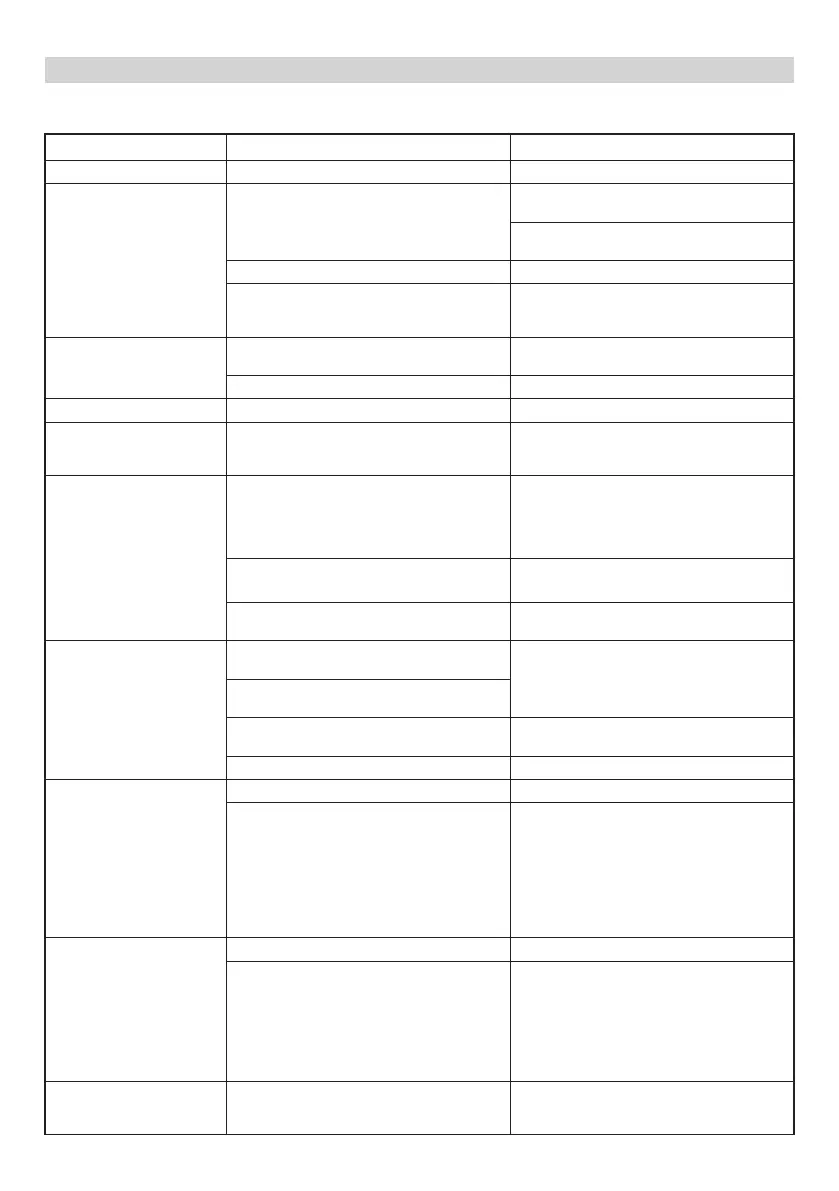
Symptom Possible cause Remedy
Tool doesn’t run No remaining battery power Charge the battery.
Tool suddenly stopped Tool was overburdened Get rid of the problem causing the
overburden.
During operation, lighten the applied
pressure.
Battery or tool overheated Allow the tool and battery to thoroughly cool.
The trigger switch was held down for 5
minutes or more.
This is not a malfunction.
The motor was automatically stopped to
prevent failure of the tool.
Saw blade
-can’t be attached
-fall off
The shape of the attachment portion doesn’t
match
Use the appropriate blade
(See “Selecting accessories”)
The blade’s attachment hole is worn Replace with a new blade.
Switch can’t be pulled Lock-off button is pushed in Release the Lock-off button.
An abnormal high-pitched
noise occurs when the
trigger switch is pulled.
The trigger switch is being pulled only
slightly.
This is not a malfunction.
It does not occur if the trigger switch is
pulled more fully.
Blade wears out too
quickly.
Number of strokes is too fast
Mode is inappropriate
Switch the mode to a lower setting than the
current one.
(Switch to low speed mode when cutting
stainless pipes)
(See “Adjusting operating speed”)
Proper machine oil not used when cutting
metallic materials
Use machine oil (turbine oil, etc.)
Too much applied pressure during operation During operation, lighten the applied
pressure.
Unable to properly cut. Blade is inappropriate for the quality and
thickness of the material to be cut
Use the proper blade
(See “Selecting accessories”)
Blade is too short for the length of the
material to be cut
Mode is inappropriate for the quality and
thickness of the material to be cut
Set the appropriate mode
(See “Adjusting operating speed”)
Blade is worn, degraded or damaged Replace with a new blade.
<UC18YFSL>
The pilot lamp is rapidly
fl ickers red, and battery
charging doesn’t begin.
<UC18YSL3>
The charge indicator lamp
is rapidly fl ickers purple,
and battery charging
doesn’t begin.
The battery is not inserted all the way. Insert the battery fi rmly.
There is foreign matter in the battery
terminal or where the battery is attached.
Remove the foreign matter.
<UC18YFSL>
The pilot lamp blinks red,
and battery charging
doesn’t begin.
<UC18YSL3>
The charge indicator lamp
blinks red, and battery
charging doesn’t begin.
The battery is not inserted all the way. Insert the battery fi rmly.
The battery is overheated. If left alone, the battery will automatically
begin charging if its temperature decreases,
but this may reduce battery life. It is
recommended that the battery be cooled in
a well-ventilated location away from direct
sunlight before charging it.
Battery usage time is short
even though the battery is
fully charged.
The battery’s life is depleted. Replace the battery with a new one.
0000BookCR18DBL.indb110000BookCR18DBL.indb11 2017/12/0510:33:522017/12/0510:33:52


 To Next Page
 Loading...